The best Christmas marketing ideas for small businesses are built around dates: a gift guide on one recurring URL, a last order date in every ad, gift cards and collection after the cut-off, and a Boxing Day and January sale built in advance. In Google Ads, match the tool to the event: seasonality adjustments for one to seven days, Promotion Mode for 3 to 14 day sales, campaign total budgets for new 3 to 90 day campaigns.
TL;DR
Christmas Day 2026 is a Friday, just over five weeks from now. The best Christmas marketing ideas for a small business are built around dates, not slogans: a gift guide on one recurring URL, ads that say your last order date, a switch to gift cards and collection after that date, and a Boxing Day and January plan that is ready before you close.
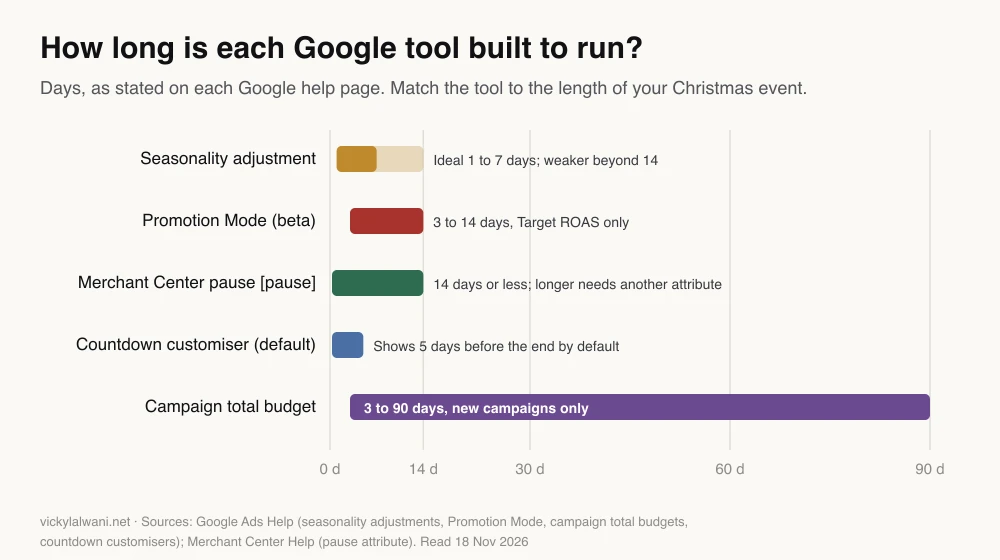
In Google Ads, match the tool to the length of the event. Google says seasonality adjustments suit events of one to seven days, Promotion Mode (beta) suits 3 to 14 day sales on Target ROAS, and campaign total budgets cover 3 to 90 days but only for new campaigns. A daily budget can still spend up to twice its value on a busy day.
Put dates in the ads themselves: a countdown in a responsive search ad stops showing after its end date, Christmas promotion assets can show from 1 November to 15 January, and most ads are reviewed within one working day, so load your post-Christmas ads now, paused.
Short answer: the best Christmas marketing ideas for small businesses are a gift guide, a 12 days series, a clear last order date in every ad and email, gift cards and collection after that date, and a Boxing Day and January sale planned in advance. Start now and work backwards from the last day you can deliver.
It is mid-November. Black Friday is on 27 November, your courier has published its last posting dates, and somewhere in your Google Ads account a headline still says "free delivery in time for Christmas" from last year. Most small business Christmas plans fail in this quiet way: not from a bad idea, but from a date that nobody changed.
This guide is the practical version for the next six weeks. It covers the ideas, the dates, and the Google Ads, Shopping and SEO settings that decide whether the ideas pay off. Every Google feature below was checked against Google Ads Help, Merchant Center Help and Google Search Central on 18 November 2026. If you would rather have someone set it up and watch it through December, that is what my Google Ads management covers, and there is a Christmas marketing support page with a free call.
What are the best Christmas marketing ideas for a small business?
Short answer: pick three or four ideas from the twelve below that fit your margin and your delivery dates, and do them well. A gift guide, a last order reminder and gift cards after the cut-off suit almost everyone; a 12 days series and a Boxing Day sale suit businesses with an email list and stock to clear.
| Idea | Best channel | Effort | Best for |
|---|---|---|---|
| Gift guide by person or budget | SEO, email | Medium | Retail, ecommerce |
| 12 days of Christmas series | Email, social | High | Businesses with a list |
| Last order date reminder | Ads, email, site banner | Low | Anyone who ships |
| Gift cards after the cut-off | Google Ads, email | Low | Retail, services |
| Ready-made gift bundles | Shopping, site | Medium | Retail |
| Click and collect push | Search ads, site | Low | Shops with premises |
| Client thank-you offer | Low | Service businesses | |
| Local partnership or charity link | Social, PR | Medium | Local brands |
| Customer stories | Social | Low | Any business |
| Behind-the-scenes video | Social, YouTube | Low | Makers, small teams |
| Boxing Day or after-Christmas sale | Email, paid search | Medium | Retail with stock |
| New year booking offer | Google Ads, email | Low | Clinics, trades, services |
Ideas that answer "will it arrive in time?" or "what do I buy for them?" earn the clicks in December; ideas that only say "Merry Christmas" rarely do.
This autumn I asked one retail client for two things in a single email: the products they wanted to push for Christmas and their top products by margin. Their Christmas plan is deliberately modest, a small daily budget running through December and a Christmas page built for organic search, because their stock decides what we can advertise. A winning ad is worth nothing on the day that product sells out, so the plan follows the stockroom, not the dashboard.
What are the key dates for Christmas 2026?
Short answer: Black Friday is Friday 27 November, Cyber Monday is 30 November, Christmas Day is Friday 25 December, Boxing Day is Saturday 26 December and New Year's Day is Friday 1 January 2027. The most important date is your own last order date, which comes from your courier and your handling time.
| Date | What happens | What to have ready |
|---|---|---|
| Now to 26 Nov | Gift research starts | Gift guide live, tracking checked |
| 27 to 30 Nov | Black Friday weekend | Sale ads approved days before |
| 1 Dec to your cut-off | Peak gift buying | "Order by" date in ads and emails |
| After your cut-off | Last-minute buyers | Gift cards, collection, digital gifts |
| Fri 25 Dec | Christmas Day | Ad schedule or budget set |
| Sat 26 Dec onwards | Boxing Day and January sales | Sale ads uploaded and paused |
| Fri 1 Jan 2027 | New year plans | Booking offers for services |
Your last order date is the sum of your order cut-off time, your handling time and your courier's transit time. Google Merchant Center uses the same parts for the delivery estimate it shows shoppers, and its help page says that when handling or transit overlaps a public holiday on its list, Google adds an extra day to the estimated delivery date. Check that your Merchant Center settings and the date in your ads say the same thing.
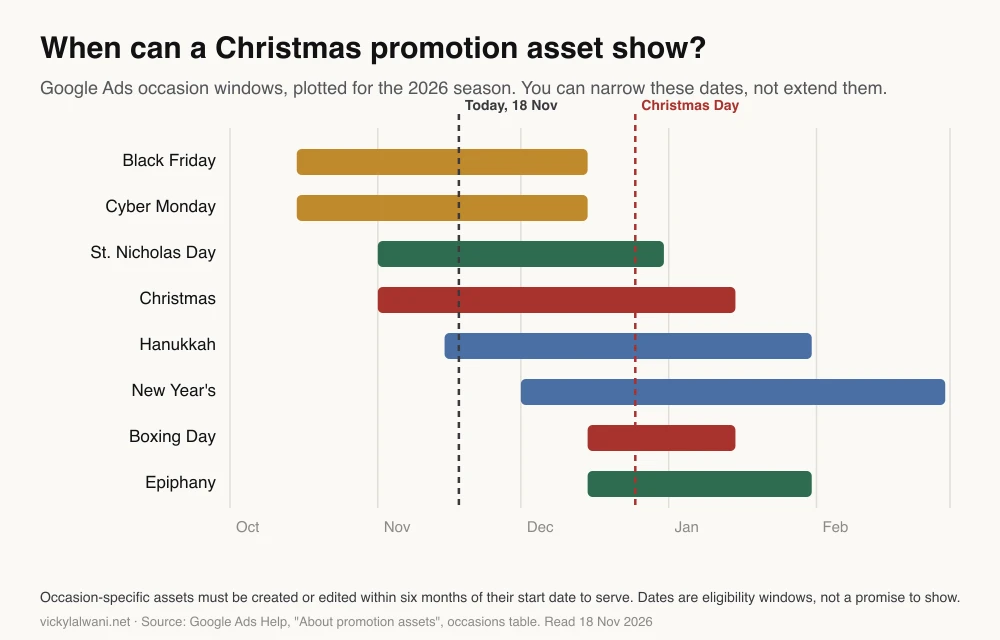
Google Ads also has its own calendar for promotion assets, the extra line under a search ad that names an occasion such as "Christmas". Each occasion has a fixed window in which the asset may show.
How should you set Google Ads budgets for Christmas?
Short answer: raise daily budgets in steps before your busiest days rather than on the day, remember a campaign can spend up to twice its average daily budget on any one day, and use a campaign total budget only for a new campaign with fixed dates of 3 to 90 days. If your campaigns use ad schedules, budget for 30.4 days a month.
Three budget terms matter here. An average daily budget is what you set per day; Google's help says a campaign might spend up to twice that on a given day and no more than 30.4 times it in a month. A campaign total budget is one sum for set dates. Smart Bidding is Google's automated bidding, which sets a bid for each auction to hit a cost per conversion (CPA) or return on ad spend (ROAS) target.
| Tool | What it does | Length | Use it for |
|---|---|---|---|
| Average daily budget | Up to 2x on a day, 30.4x a month | Ongoing | Most campaigns |
| Campaign total budget | One sum, paced to the end date | 3 to 90 days | A new sale campaign |
| Promotion Mode (beta) | Lowers Target ROAS, adds budget, reverts | 3 to 14 days | A short sale |
| Seasonality adjustment | Tells bidding to expect a conversion rate jump | 1 to 7 days ideal | A big, predictable spike |
Campaign total budgets are new this year. Google's help page says the campaign adjusts spending daily to spend the total, has no daily spending limit, will never charge more than the total, and must run at least three days. The catch for Christmas: they are only available for new campaigns, and you cannot switch an existing campaign to one.
Ad schedules changed on 1 June 2026. If you switch whole days off with an ad schedule, the campaign now paces towards 30.4 times the daily budget however many days it runs. Google's own example: a campaign set to run 20 days at 100 a day used to aim for 2,000 in the month; it now paces towards 3,040, and the daily budget should be about 66 to spend 2,000. Google still never runs ads on days you switched off. If you plan to go dark over Christmas with a schedule, recalculate the daily budget for December.
Budget changes are safe to make in a hurry. Google's Smart Bidding page says changes to budgets, targets, creative or targeting never trigger a "Learning" status; new campaigns, new bid strategies and big goal changes do. That is a good reason not to launch brand new campaigns in the week before Christmas.
Should you use a seasonality adjustment or Promotion Mode at Christmas?
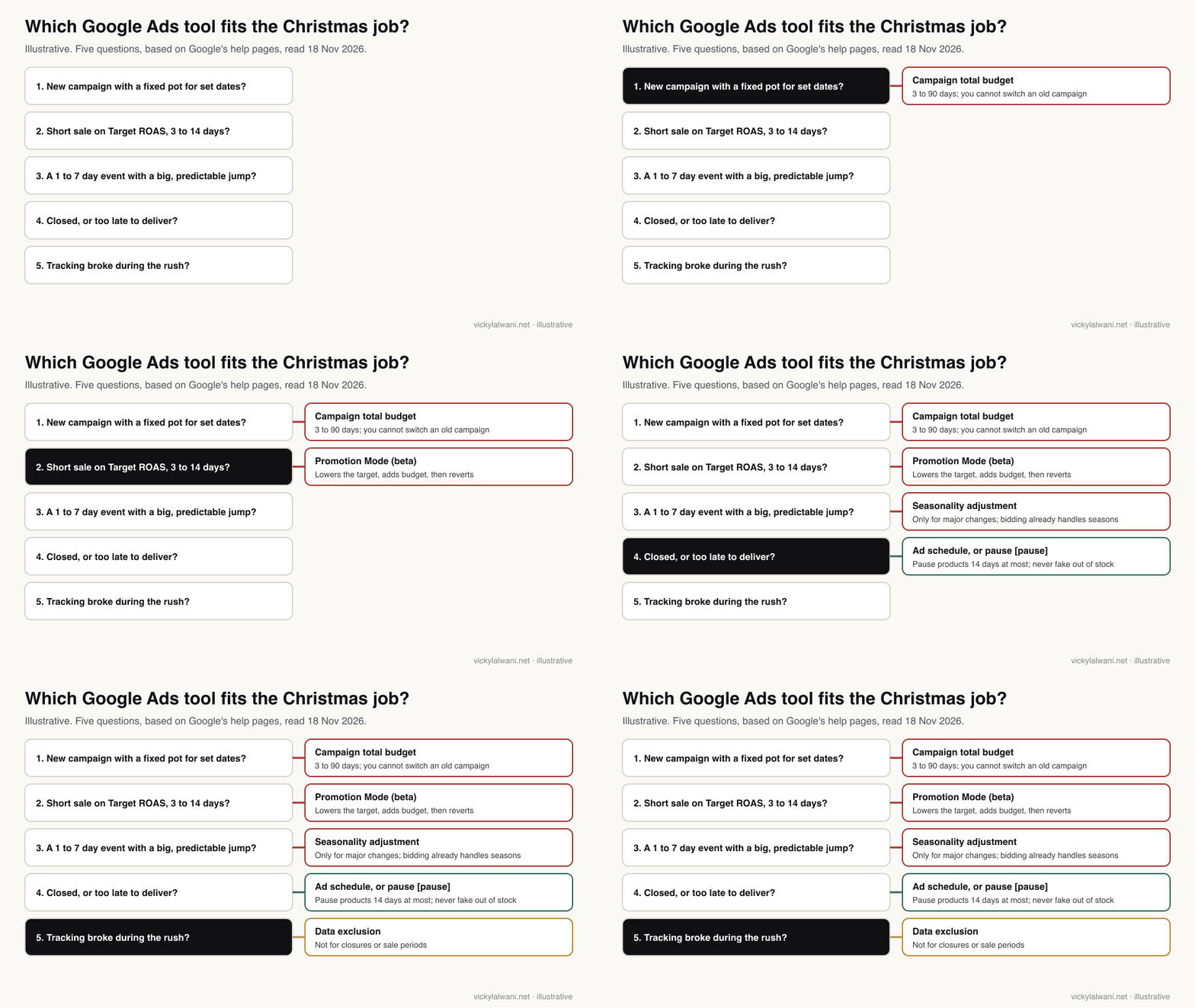
Short answer: usually neither for Christmas itself, because Smart Bidding already expects it. Use a seasonality adjustment only for a short event of one to seven days where you expect a much bigger jump in conversion rate than normal, and Promotion Mode only for a 3 to 14 day sale on a Target ROAS campaign where you will accept a lower return.
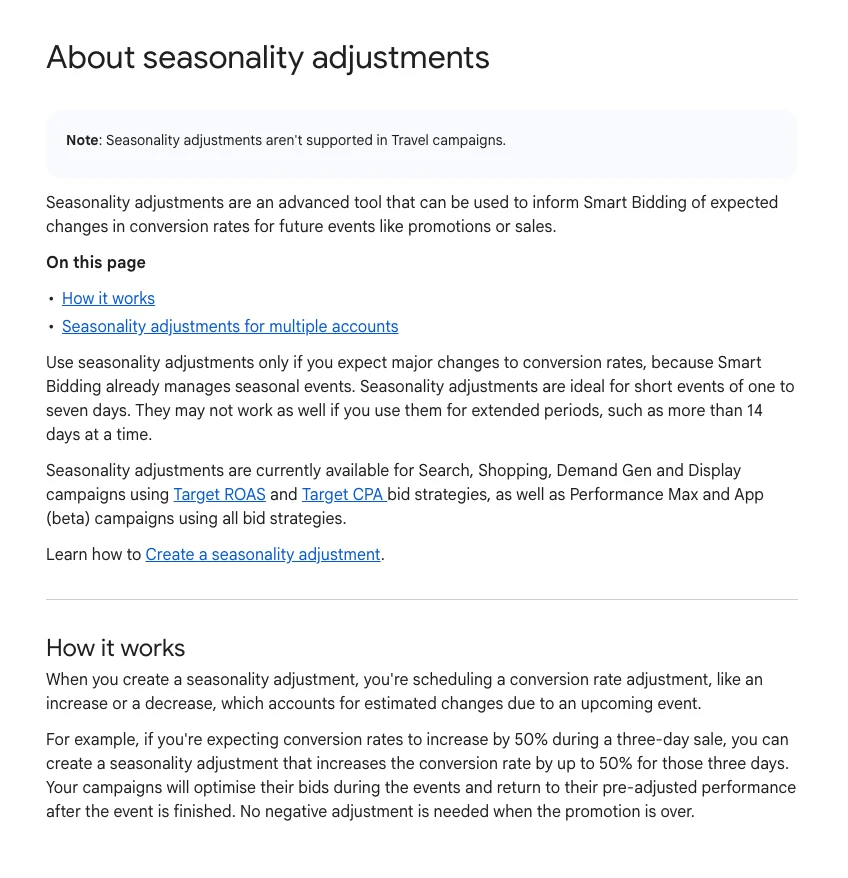
A seasonality adjustment tells Smart Bidding that your conversion rate will change for set dates. Google's page is blunt: use it only if you expect major changes to conversion rates, because Smart Bidding already manages seasonal events. It works best for one to seven days and may not work as well beyond 14. It covers Search, Shopping, Demand Gen and Display on Target CPA or Target ROAS, and Performance Max on all bid strategies. Bidding returns to normal afterwards, so you do not need a negative adjustment when the sale ends.
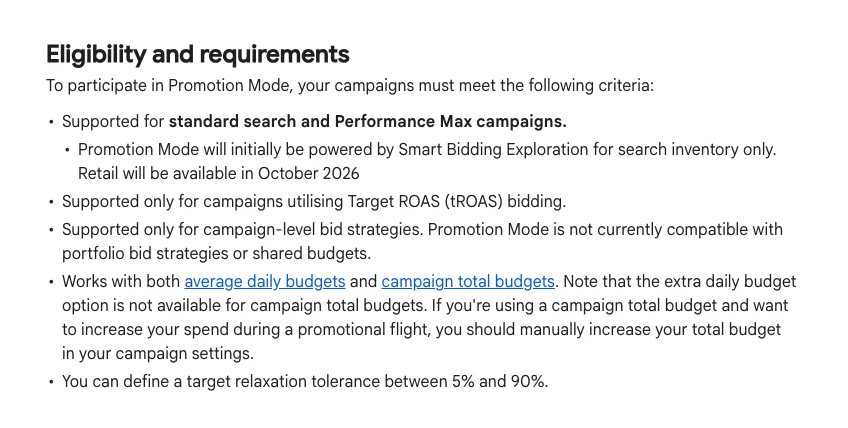
Promotion Mode is newer and still in open beta. For a sale of 3 to 14 days it temporarily lowers your Target ROAS and can add an extra daily budget, then puts both back when the sale ends. The tolerance is 5% to 90%. Google's worked example: a 500% target with a 20% tolerance bids to 400% for five days.
The difference matters. With a seasonality adjustment, bidding still aims for your original target; with Promotion Mode, it aims for the lowered one. Promotion Mode only works on Search and Performance Max campaigns using a campaign-level Target ROAS, not with portfolio strategies or shared budgets, and Google asks for new campaigns to be built at least 48 hours ahead so the ads are approved. While a promotion is active you cannot edit the baseline target or budget outside the Promotion Mode panel.
One setting is often misused at Christmas. Data exclusions tell Smart Bidding to ignore days when conversion tracking was broken. Google says they are only for conversion tracking issues and not for irregular periods such as promotions. If your shop is simply closed, there are no clicks to exclude; a data exclusion is for a broken tag, not a holiday.
How do you put last order and delivery dates in your ads?
Short answer: write the date into the headline ("Order by 18 Dec for Christmas"), add a countdown customiser that stops the headline after the cut-off, add a Christmas promotion asset, and make sure Merchant Center has the same cut-off and handling time. Submit any new ads several days early because most are reviewed within one working day, not instantly.
A countdown customiser is a code in a responsive search ad that counts down to a date: days, then hours, then minutes. Google's help page explains that ads with countdown customisers automatically stop showing after their end date, and by default the countdown starts five days before the end. Two details catch people out. COUNTDOWN uses the searcher's time zone and GLOBAL_COUNTDOWN uses your account's, so pick the second for a real courier cut-off. And keep at least three headlines without a countdown so the ad still serves.
A promotion asset adds an offer line under your ad. Choose the Christmas occasion and Google shows it within that window; you can narrow the dates but not extend them. Editing a promotion asset does not reset its statistics, and an occasion asset that has not been created or edited within six months of its start date stops serving. Re-save last year's Christmas asset rather than assuming it still runs.
Check one new default before Black Friday. Google's page on account-level automated assets describes automated promotions, which source deals and offers from your website and other sources for Search and Performance Max campaigns that use location assets. Trade press reports it was switched on by default from 12 October 2026 (PPC Land). If an old sale banner is still on your site, it can end up in your ads, so look under Assets, account-level automated assets.
| Phase | Example headline | Asset or setting |
|---|---|---|
| Gift research | Gifts for Keen Gardeners | Sitelinks to gift guide |
| Black Friday | 20% Off Gift Sets, Ends Monday | Promotion asset, end date |
| Before cut-off | Order by 18 Dec for Christmas | Countdown, account time zone |
| After cut-off | Gift Cards Sent in Minutes | Digital gift ad group |
| Boxing Day on | Winter Sale Now On | Boxing Day promotion asset |
All dates and offers in the table are examples. Replace them with your own.
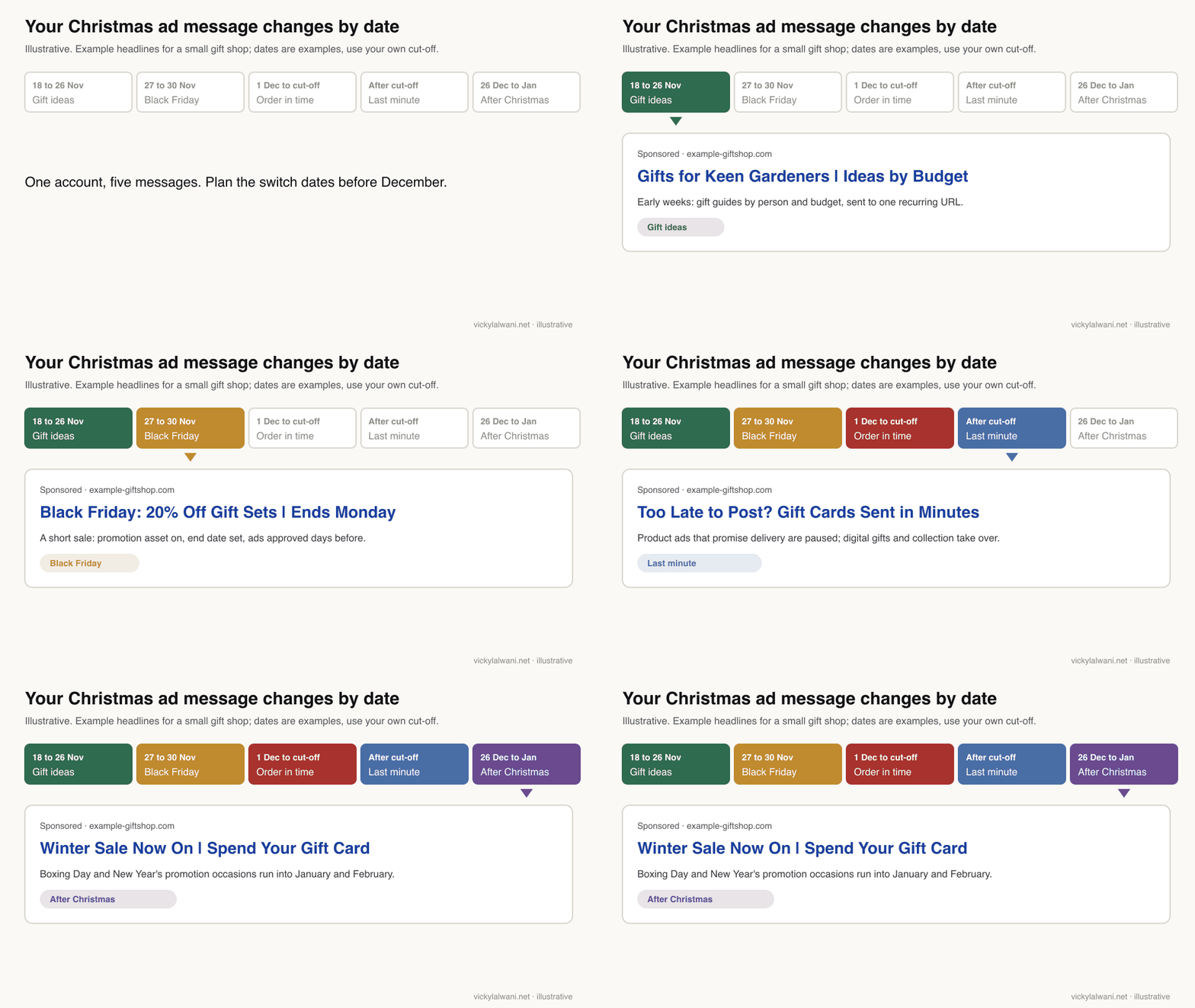
Load the next phase early. Google says most ads are reviewed within one working day, some take longer, and you should submit several days in advance if you need an ad live by a date. Paused ads are reviewed just like active ones, so build your gift card and Boxing Day ads this week and leave them paused. Merchant Center promotions follow a similar rule: Google reviews them on submission and again at the start time, typically within 12 hours of the start, but up to 24.
If you use AI to draft the variants, give it your real dates and let it do the typing, not the facts. This is the prompt I would start from:
You are writing Google Ads responsive search ad headlines (max 30 characters each) for a Christmas campaign.
Business: [what you sell, who buys it]
Last order date for Christmas delivery: [date and time, time zone]
After that date we can still offer: [gift cards / click and collect / digital products / none]
Offers: [exact offer and end date, or "no discount"]
Rules:
- Never promise delivery by Christmas after the last order date.
- Do not invent prices, discounts, stock levels or reviews.
- Write 5 headlines for each phase: gift ideas, order by date, after cut-off, Boxing Day sale.
- Mark any headline that needs a countdown customiser.
- Flag anything you are unsure about instead of guessing.
Check every line before it goes live. In my four-tool marketing test, each AI tool added at least one claim nobody had supplied, and at Christmas a wrong delivery promise becomes a refund.
What should you do with Shopping ads after the last delivery date?
Short answer: stop promising delivery, not necessarily stop advertising. Pause product ads that cannot arrive in time with Merchant Center's pause attribute (for 14 days or less), keep ads running for gift cards, collection and in-store stock, and never mark products as out of stock just to hide them.
Merchant Center has a dedicated attribute for this. Setting pause to "ads" temporarily stops a product showing in ads, including Shopping, display and local inventory ads, and lets you bring it back quickly. Google's rules: pause for 14 days or less, use excluded destination for anything longer, and do not set availability to out of stock to pause a product. Do not delete products either; Google warns that adding an offer back after deletion takes a significant amount of time.
What stays on depends on what you can still sell. A shop with premises can push collection and local inventory. A business with digital gift cards can run a small search campaign for "last minute gift" searches that are clearly not asking for delivery. A service business has an advantage here: a voucher or a January booking can be sold on Christmas Eve.
Your returns window matters more than usual this month. Google Search Central documents a seasonal override for return policies, so a longer holiday returns window can be stated in structured data with a start and end date. If you extend returns for gifts, say so in the feed, on the page and in the ads.
How do you refresh Performance Max for Christmas?
Short answer: swap Christmas images, headlines and descriptions into your existing asset groups, or add one Christmas asset group, rather than building a new campaign. Google says creative changes never trigger a Learning status, but new or edited assets still go through review, so make the changes this week and plan the swap back for January.
Performance Max is Google's campaign type that runs one budget across Google's channels, including Search, Shopping and YouTube. Its ads are built from asset groups: sets of headlines, images and videos tied to a theme. Google's best practice is to build each asset group around a single theme and give it as many text, image and video assets as you can.
| Job | When | Why |
|---|---|---|
| Add Christmas images and headlines | This week | Creative edits keep history |
| Add or re-save promotion assets | Before 27 Nov | Occasion assets must be fresh |
| Check automated promotions | Before 27 Nov | Old site offers can appear |
| Remove "in time for Christmas" text | Your cut-off day | The promise expires |
| Swap in sale or January assets | 24 Dec, paused earlier | Review takes time |
| Remove Christmas assets | Early January | Stale creative wastes spend |
The reason to edit rather than rebuild is in Google's own words: modifying your creative never removes your historical data or triggers a "Learning" status. A new campaign, by contrast, is a new strategy and has to learn during the busiest weeks. Practitioners on Reddit make the same point about Black Friday: add sale assets and themes to the Performance Max campaign you already have before splitting out a new one.
Two limits are worth knowing. Promotion Mode can be switched on for Performance Max, but Google says its exploration only applies to the search part of the campaign. And if a Performance Max campaign and a Search campaign both target the same products, keep the Christmas message the same in both, because the shopper will not know which campaign showed the ad.
How do you do SEO for a Christmas gift guide?
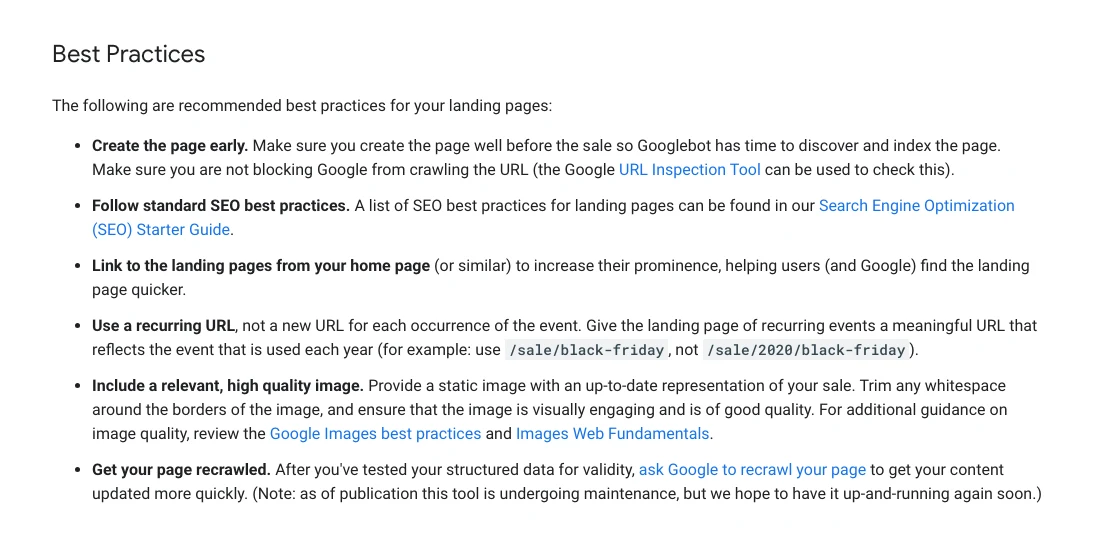
Short answer: publish the gift guide on one recurring URL you reuse every year, link it from your home page, ask Google to recrawl it after each update, and write it like a real recommendation with your own photos and reasons. A new page may not rank much this December, but the same URL builds value year after year.
Google Search Central's advice for seasonal sale pages is short and still the best guide. Create the page early, link it from the home page, and use a recurring URL, not a new URL for each occurrence of the event: for example /gifts/christmas, not /gifts/2026/christmas. Then ask Google to recrawl the page after you update it, using the URL Inspection tool in Search Console.
A gift guide is a set of recommendations, so Google's guidance on writing high quality reviews applies: when you call something the best for a purpose, say why, with first-hand evidence such as your own photos. Twenty products with one copied line each are unlikely to beat ten products you have handled and can explain.
| Gift guide job | Why |
|---|---|
| One URL kept every year | Links and history carry over |
| Link from the home page | Google and shoppers find it |
| Sections by person and budget | Matches how people search |
| Your own photos and reasons | Google's reviews guidance |
| Last order date near the top | Answers the first question |
| Sale end dates in product markup | Expired prices may hide listings |
| Recrawl after each update | Faster refresh in results |
If your product pages carry merchant listing structured data, check the sale dates. Search Central says a listing may not display if priceValidUntil indicates a past date, so a Black Friday price with an end date of 30 November needs updating on 1 December. Shipping costs and delivery times can also be marked up, at product level or once for the whole store.
For the full plan behind this, my SEO consulting covers gift guide and category page structure, and the Black Friday marketing strategy guide covers the sale weekend in detail.
What should your post-Christmas sales plan look like?
Short answer: have the Boxing Day and January campaign built, approved and paused before you close for Christmas, run it from 26 December with a Boxing Day or New Year's promotion asset, and aim it at three groups: gift card holders, people who got cash, and past customers. Service businesses should sell January bookings from mid-December.
The post-Christmas period is predictable, which makes it easy to prepare. Google's promotion asset windows already cover it: Boxing Day from 15 December to 15 January and New Year's from 1 December to 28 February. Because ads take time to review, build these campaigns now and switch them on from your phone on the day.
| When | Audience | Message |
|---|---|---|
| 26 to 31 Dec | Sale shoppers | Boxing Day sale, clear end date |
| 26 Dec to mid-Jan | Gift card holders | Spend your gift card |
| Late Dec | Returners and exchangers | Easy exchanges, new range |
| 1 to 31 Jan | Past customers | New year offer by email |
| Mid-Dec to Jan | Service buyers | Book your January slot |
If you pause over the holiday, decide how. Lowering budgets keeps your account active; switching whole days off with an ad schedule means the new pacing rule applies to the rest of the month. Practitioners in the PPC subreddits report that service accounts which pause for a week or two usually recover within a few weeks of restarting, and that the riskier accounts are small ones with few conversions. Treat that as practitioner opinion, not a Google rule.
Plan the January wind-down too. Remove "Christmas" from headlines, end the promotion assets, restore any budgets you raised, and check that Smart Bidding targets you lowered for a sale are back where you want them. Promotion Mode reverts by itself; manual changes do not.
What does a 12 days of Christmas campaign look like?
Short answer: twelve emails or posts on consecutive days, mostly useful content with two or three real offers, ending on your last order date and a gift card message. Not every day needs a discount, which protects your margin.
This is an illustrative plan for a small gift shop whose last order date falls in mid-December:
| Day | Content | Offer? |
|---|---|---|
| 1 to 3 | Gift guides for three types of person | No |
| 4 | A bundle with a strong margin | Bundle price |
| 5 and 6 | Customer story, behind the scenes | No |
| 7 | Free delivery for one day | If the numbers work |
| 8 and 9 | Gift wrap tip, top sellers | No |
| 10 | Your last order date | No |
| 11 | Last chance for delivery | No |
| 12 | Gift cards for late shoppers | Gift cards |
Which email and social ideas work at Christmas?
Short answer: email works best because you already have permission to contact the people on your list; keep each email to one message. On social, mix gift ideas, behind-the-scenes moments, customer stories and clear opening hours and delivery dates.
- Email: one message per send, either a gift idea, a date or an offer. Put the last order date in the subject line on the last two sends before your cut-off.
- Social: show the product being made, packed or used. Post your holiday opening hours and the last order date as a pinned post.
- Paid social: test gift angles early, then retarget people who visited. Plan fresh creative for December, because people see the same ads often. The Meta ad creative process guide covers the brief, and Meta Ads management covers the running.
- For agencies and consultants: a year in review without client names, twelve quick tips, your holiday hours, and a January review offer for businesses planning their year.
What people say on X and Reddit
Short answer: Google's own accounts spent 2026 adding budget controls built for short sales, while practitioners report that December costs rise, that seasonality adjustments are overused, and that service businesses often slow down from mid-December and restart in January.
| Who | What they said | Take it as | Link |
|---|---|---|---|
| Google's Ads Liaison (official) | Campaign total budgets open to all for Search, Performance Max and Shopping, built for 3 to 90 day pushes (15 Jan 2026) | Official | X post |
| Google's Ads Liaison (official) | Ad schedule pacing change: ads still run only in scheduled hours; size daily budgets to the monthly spend you want (19 Feb 2026) | Official | X post |
| Google's Ads Liaison (official) | Channel prioritisation and budget allocation controls rolling out as options (14 Oct 2026) | Official | X post |
| Search Engine Roundtable's editor | Google publishes a full help page for Promotion Mode (4 Nov 2026) | News | X post |
| A PPC news curator | Automated promotion assets launch in Google Ads (2 Sep 2026) | News | X post |
| A PPC agency owner | Warns automated promotions are on by default and can pull site, feed or profile deals into ads (23 Sep 2026) | Opinion | X post |
| r/PPC | A toy store's return fell from November to December; replies blame peak auction prices and suggest splitting gift keywords (12 Jan 2026) | First-hand | Thread |
| r/ecommerce | A store that switched Shopping off in Black Friday week the year before kept it on in 2025 and reports strong growth (2 Dec 2025) | First-hand | Thread |
| r/PPC | Scaling into Black Friday: raise budgets in steps the week before; one manager prefers a seasonality adjustment (24 Nov 2025) | Opinion | Thread |
| r/PPC | Target CPA through Black Friday hurt return; replies: a CPA target ignores order value (2 Dec 2025) | First-hand | Thread |
| r/googleads | A home services manager pulls back around 15 to 20 December and restarts after New Year (3 Dec 2025) | First-hand | Thread |
| r/PPC | Black Friday Search next to Performance Max: try adding sale assets to the existing campaign first (20 Nov 2025) | Opinion | Thread |
| r/SEO | Holiday sale pages: keep one seasonal URL, update it yearly, publish two to four weeks ahead (3 Nov 2025) | Opinion | Thread |
One caution from this research: some Reddit replies suggest using data exclusions to mark paused days, which is not what Google says they are for.
Videos worth watching
Short answer: Google Ads' own channel published two holiday episodes this year, one on retail campaigns and budgets and one on getting Merchant Center data ready. Watch both before changing anything in December.
Made by Google Ads (official channel), 16 September 2026. It promotes only Google's own campaign types. Covers holiday budgets, Performance Max and a Q4 checklist.
Made by Google Ads (official channel), 19 August 2026. It promotes only Google's own tools. Covers shipping cut-offs, return policies and promotions in Merchant Center.
| Video | Channel | Date | What it covers |
|---|---|---|---|
| How to prepare your Google Ads retail campaigns for holiday shopping | Google Ads | 16 Sep 2026 | Holiday budgets, Performance Max, Q4 checklist |
| How to get your product data holiday ready on Google Merchant Center | Google Ads | 19 Aug 2026 | Shipping cut-offs, returns, promotions |
| Community Q&A: The bidding & budgets special | Google Ads | 22 Jul 2026 | Promotion Mode vs seasonality adjustments |
| How to Stop Google Ads Overspend Without Seasonal Bid Adjustments | A PPC agency founder's channel | 3 Nov 2026 | Why repeated adjustments backfire |
| How to Turn Off Automated Promotions in Google Ads (2026) | A small PPC agency channel | 20 Oct 2026 | Where the setting lives |
| Holiday SEO for Ecommerce: What to Fix in November | A small SEO agency channel | 7 Nov 2026 | Prices, stock, shipping info first |
Where this advice is weak
Short answer: Google's help pages describe how tools work, not what they will do for your account; Promotion Mode is a beta; and the practitioner views come from forums, not controlled tests.
- Promotion Mode is in open beta and its retail support was due in October 2026, so screens and rules may change during December.
- The automated promotions start date comes from trade press, not from a Google help page.
- Courier cut-off dates differ by carrier, service and destination. I have not listed any; use your own carrier's published dates.
- The budget and recovery observations from Reddit are individual reports. Your account's history is a better guide than anyone's average.
- A new gift guide published this late may not rank well this December. The SEO advice is mostly an investment in next year.
- I have not tested every setting here on a live account this season; where I describe my own work, it is the process, not a result.
Want a second pair of eyes on your Christmas account?
The useful work this month is unglamorous: dates in the right places, budgets that match your stock, and ads for after the cut-off loaded before you need them. On client accounts I audit first, put every finding in a sheet with a manual check column, and make no changes until the client approves them. If you want that done for your Christmas and January campaigns, see Google Ads management or the Christmas marketing support page; rates are on the pricing page.
Keep reading: Black Friday marketing strategy, how to find wasted Google Ads spend, the weekly PPC audit checklist and the conversion tracking audit.
Sources
| Source | What it supports | Date |
|---|---|---|
| Google Ads Help: promotion assets | Occasion windows, six-month rule, automated promotions | Read 18 Nov 2026 |
| Google Ads Help: seasonality adjustments | One to seven days; campaign types | Read 18 Nov 2026 |
| Google Ads Help: Promotion Mode | 3 to 14 days, Target ROAS, open beta | Read 18 Nov 2026 |
| Google Ads Help: campaign total budgets | 3 to 90 days, new campaigns only | Read 18 Nov 2026 |
| Google Ads Help: ad schedule pacing | 30.4x pacing from 1 June 2026 | Read 18 Nov 2026 |
| Google Ads Help: overdelivery | Up to 2x a day, 30.4x a month | Read 18 Nov 2026 |
| Google Ads Help: Smart Bidding learning | Budget and creative edits keep history | Read 18 Nov 2026 |
| Google Ads Help: data exclusions | Only for tracking issues | Read 18 Nov 2026 |
| Google Ads Help: countdowns | Stops after end date; time zones | Read 18 Nov 2026 |
| Google Ads Help: automated assets | Automated promotions | Read 18 Nov 2026 |
| Google Ads Help: ad review | One working day; paused ads reviewed | Read 18 Nov 2026 |
| Google Ads Help: Performance Max | One theme per asset group | Read 18 Nov 2026 |
| Merchant Center Help: delivery time | Cut-off, handling, holiday extra day | Read 18 Nov 2026 |
| Merchant Center Help: pause | 14 days or less; not out of stock | Read 18 Nov 2026 |
| Merchant Center Help: promotion review | 12 to 24 hours from start | Read 18 Nov 2026 |
| Search Central blog: sale pages | Recurring URL, link, recrawl | 26 Oct 2020 |
| Search Central: high quality reviews | First-hand evidence for "best" | Updated 10 Dec 2025 |
| Search Central: merchant listings | Past priceValidUntil may hide | Updated 8 Sep 2026 |
| Search Central: return policy | Seasonal override | Updated 8 Sep 2026 |
| Search Central: shipping policy | Store-wide shipping markup | Updated 8 Sep 2026 |
| PPC Land | Automated promotions default date | 2026 |
| X, Reddit and YouTube | Practitioner and official views, linked above | Nov 2025 to Nov 2026 |
FAQ
What are good Christmas marketing ideas for small businesses?
A gift guide, a last order date in every ad and email, gift cards and collection after that date, a 12 days of Christmas email series and a Boxing Day or January sale are the strongest starting points. Pick three or four that fit your margin and delivery dates rather than trying all of them.
Is it too late to start Christmas marketing in mid-November?
No. Email and Google Ads can reach people who are ready to buy this week, and most new ads are reviewed within one working day. Start with your last order date, your gift guide and your post-Christmas ads, then add the rest if time allows.
Should I run Google Ads at Christmas?
Yes, if your conversion tracking works and you can deliver what the ad promises. Raise budgets in steps before busy days, remember a campaign can spend up to twice its average daily budget on one day, and change the ad message when your last delivery date passes.
Should I use a seasonality adjustment for Christmas?
Usually not for Christmas itself, because Google says Smart Bidding already manages seasonal events. Google recommends seasonality adjustments only for major expected changes in conversion rate over short events of one to seven days, such as a flash sale much deeper than usual.
How do I add a last order date to my Google Ads?
Write the date into a headline and add a countdown customiser with your account time zone, so the headline stops showing after the cut-off. Keep at least three headlines without a countdown, and add a Christmas promotion asset, which Google can show from 1 November to 15 January.
What should I do with Shopping ads after the last delivery date?
Stop promising delivery, not necessarily stop advertising. Use the Merchant Center pause attribute set to ads for products that cannot arrive in time, for 14 days or less, and keep ads running for gift cards, collection and local stock. Google says not to set products to out of stock just to pause them.
What is Promotion Mode in Google Ads?
Promotion Mode is an open beta setting for Search and Performance Max campaigns on Target ROAS. For a sale of 3 to 14 days it temporarily lowers the target by a tolerance of 5% to 90% and can add an extra daily budget, then returns both to their previous settings when the sale ends.
How do I update Performance Max for Christmas without resetting it?
Edit the existing asset groups or add one Christmas asset group instead of launching a new campaign. Google says modifying creative never removes historical data or triggers a Learning status, although new or edited assets still go through policy review, so make the changes early.
Should my Christmas gift guide have a new URL every year?
No. Google Search Central recommends a recurring URL for recurring events, such as /gifts/christmas rather than one with the year in it. Link the page from your home page, update it each year and ask Google to recrawl it after each update.
What should I plan for after Christmas?
Build your Boxing Day and January campaigns now and leave them paused, because ads need review time. Use the Boxing Day or New Year's promotion occasion, aim at gift card holders and past customers, and remove Christmas wording and restore any raised budgets in early January.