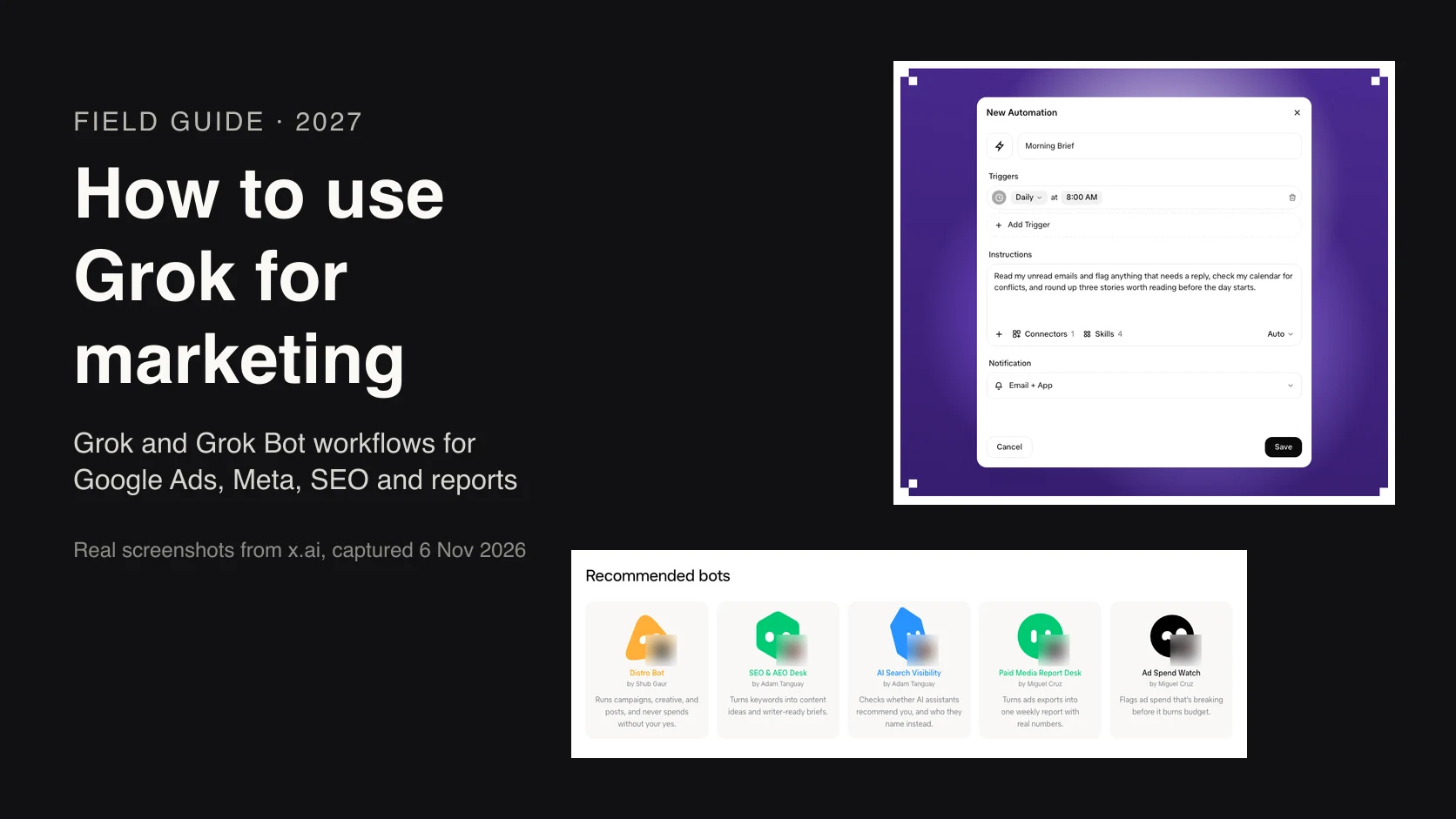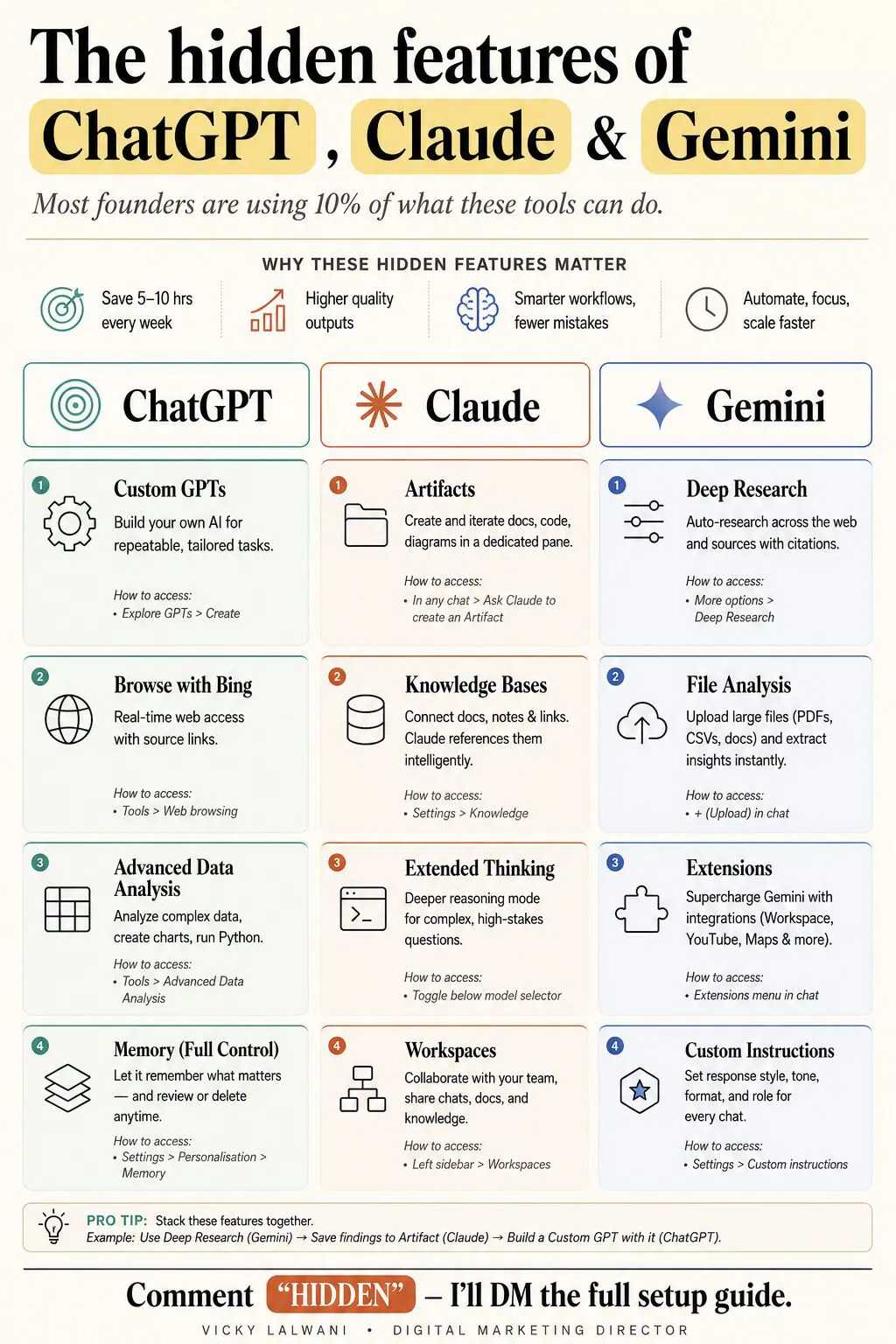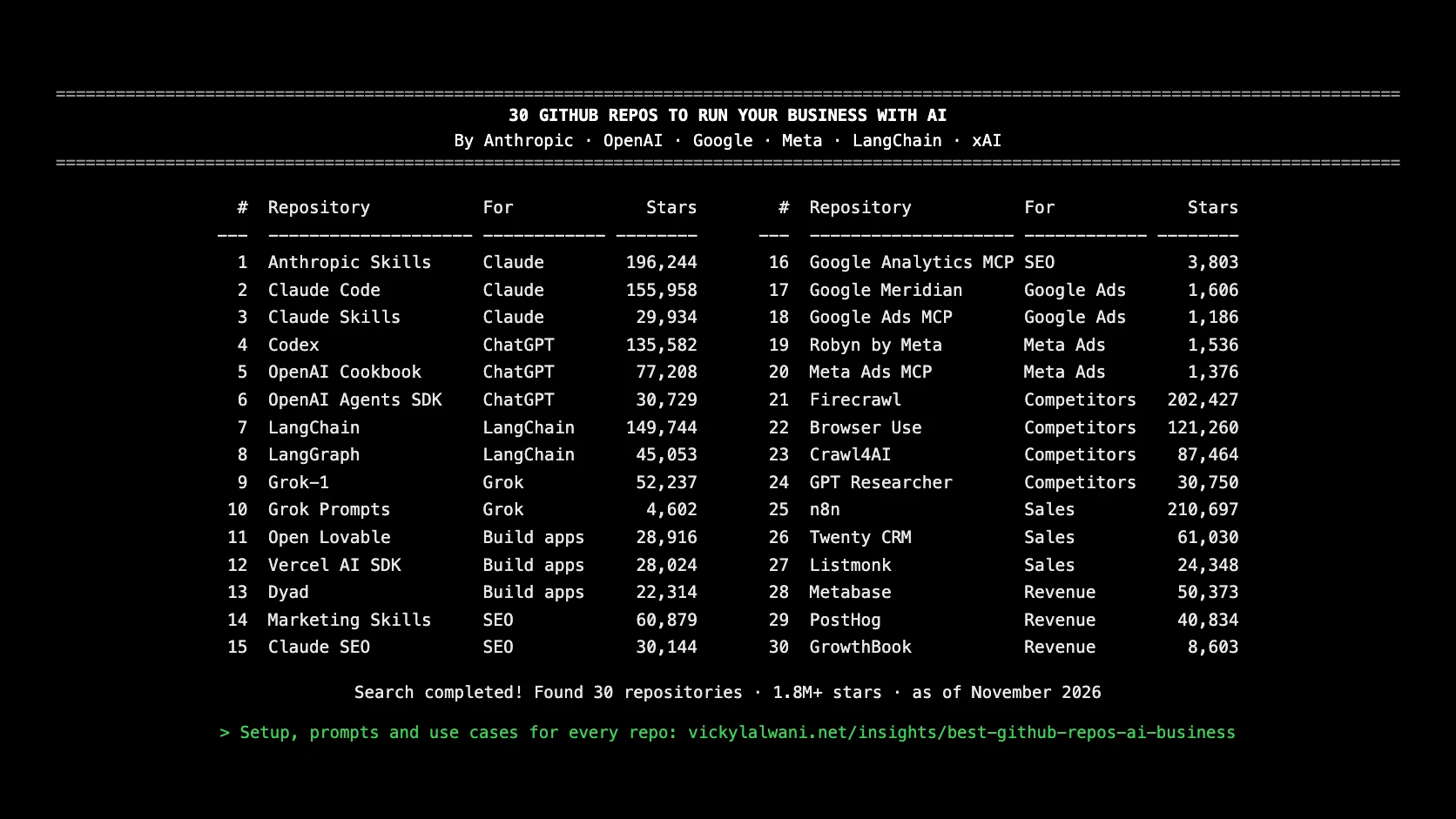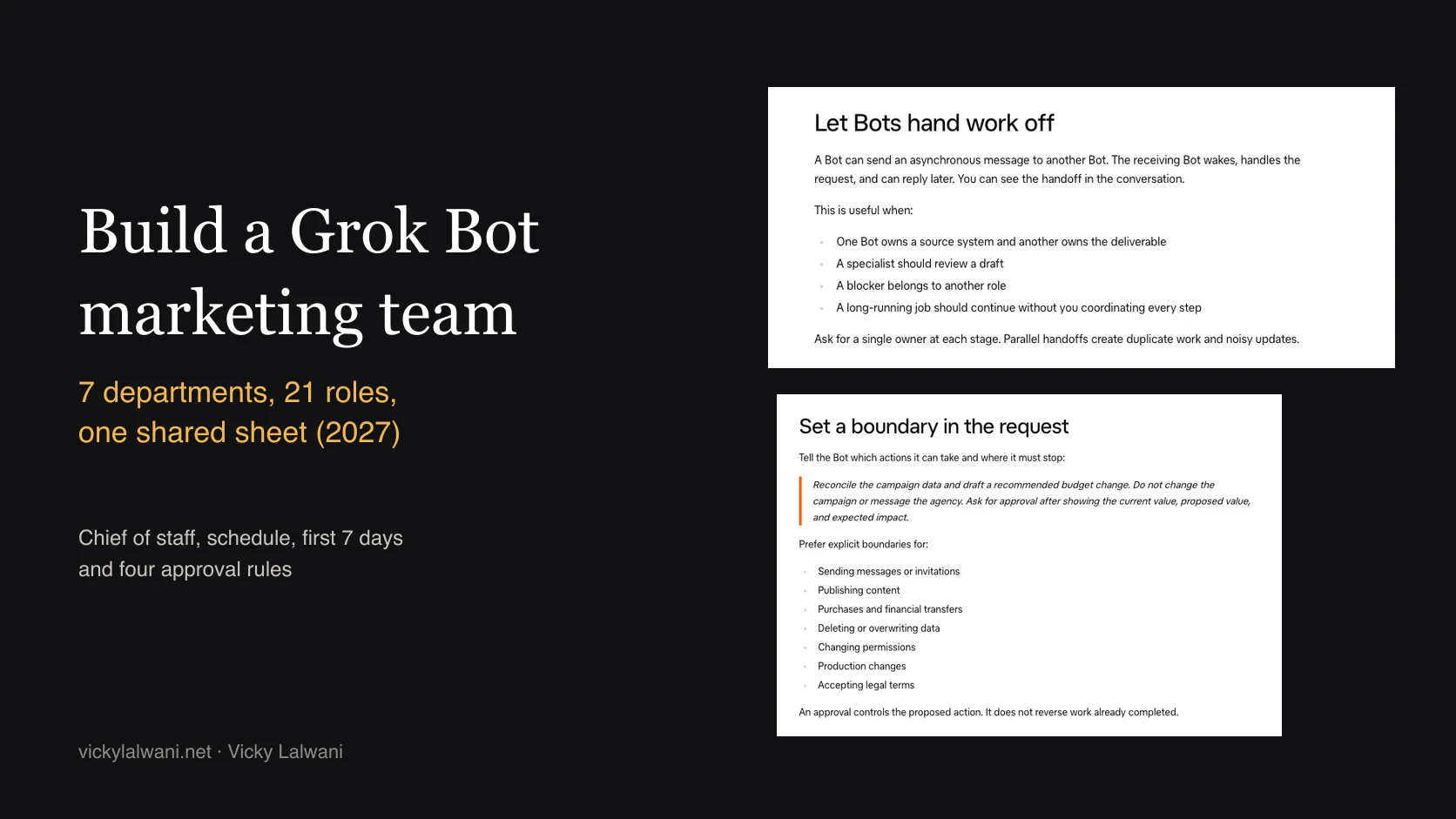
A Grok Bot marketing team is a set of Grok Bots, one per marketing job, coordinated by one chief-of-staff Bot and joined by a shared Google Sheet. Each role reads the Brief tab, claims its rows on the Tasks tab, writes drafts to its own tab and marks them for review; the chief of staff checks the drafts and writes an 8 AM brief; a person approves anything that spends money, goes to a person, changes something live or makes a promise. Grok Bot is included on the Premium ($30 a month), Super and Ultra plans of The X Subscription and draws on a shared weekly usage pool, so start with 3 to 5 roles, read-only access and a schedule you can afford.
TL;DR
- What it is: one Grok Bot per marketing job, a chief-of-staff Bot on top, and a shared Google Sheet where Bots hand work to each other. Built from my free guide.
- The sheet does the coordinating: a Brief tab, a Tasks tab where each row is one job with a Worker and a Status, one tab per department, and Ready for approval.
- Start small: 3 to 5 roles, not 21. The paid media team at SpaceXSI, the company behind Grok, says start with reporting.
- The four rules: no Bot spends money, sends to a person, changes anything live or makes a promise. You do those.
- Cost: Grok Bot comes with Premium at $30 a month, Super and Ultra. Usage is a shared weekly pool, so schedule carefully.
- Honest part: Bots make mistakes. Keep them read-only until their drafts hold up for two weeks.
Jump to: What it is · Before you build · The sheet · Claim and hand off · Role instructions · Chief of staff · Five roles · Schedule · Access and approvals · Quality checks · Cost · First 7 days · Measure it · Where it breaks · Videos · X and Reddit · Sources
What is a Grok Bot marketing team?
Short answer: A Grok Bot marketing team is a set of Grok Bots, each with one marketing job, coordinated by a chief-of-staff Bot and joined by one shared Google Sheet. Bots research, draft and check on a schedule. You approve what spends, sends, goes live or promises anything.
Picture a Monday. Search terms from the weekend are already tagged, a conversion that dropped to zero on Saturday is flagged, and last Tuesday's five Search Console fixes are still waiting as copy you can paste. None of it went live. It sits in a sheet with a status next to it.
That is the whole idea. Grok Bot is SpaceXSI's AI teammate product: each Bot has a name, a job, its own memory and access to a cloud computer, so it keeps working when your laptop is closed. One Bot is an assistant. Twenty-one Bots with clear jobs and one shared record is a team.
This article is the build blueprint: the sheet, the instructions, the schedule, the gates and the costs. If you are new to Grok itself, start with how to use Grok for marketing. If you want the skills layer that sits next to Grok Bot, read Claude Fable and Grok Bot: 21 marketing skills. This one does not repeat either. If you would rather have the team built for you, that is my AI marketing agent setup, read-only from day one. For team structure beyond Grok Bot, see AI agent marketing team.
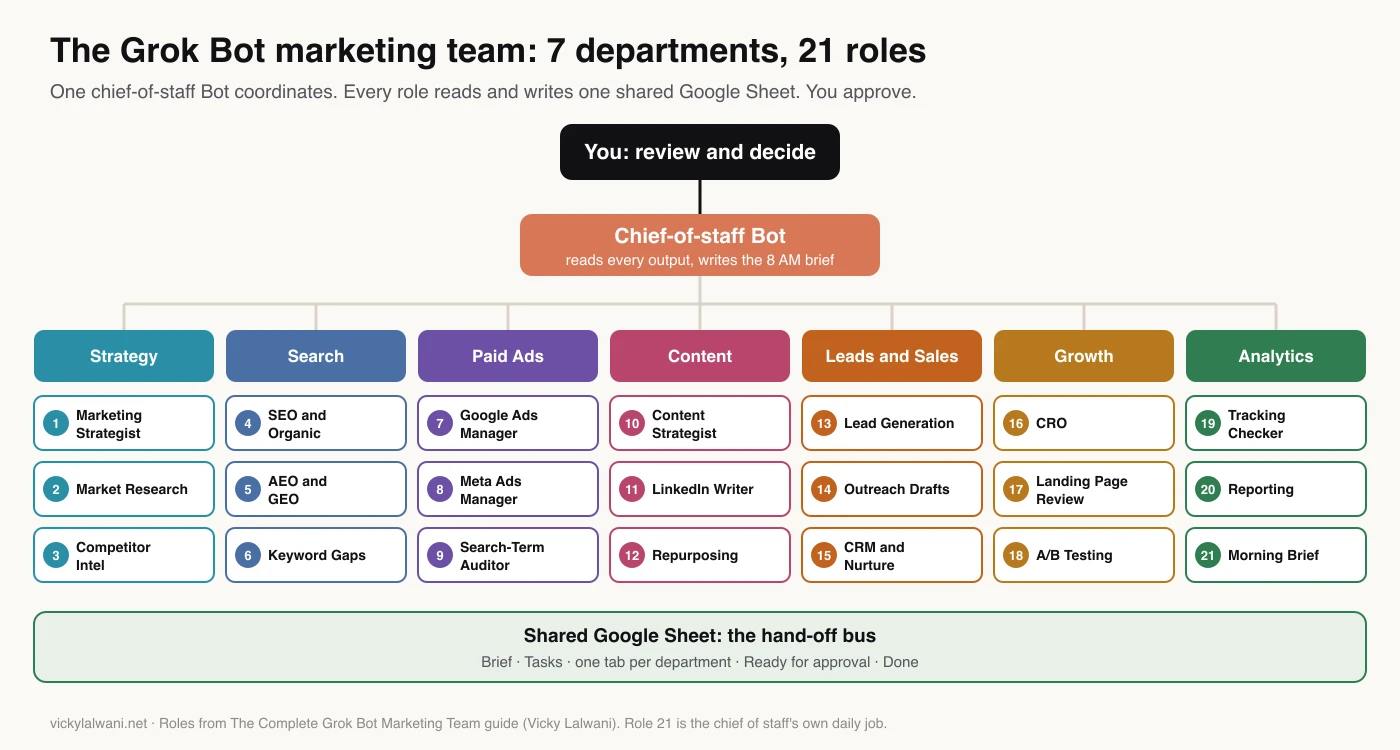
| Department | Roles | Ties to |
|---|---|---|
| Strategy | Strategist, Market Research, Competitor Intel | Planning |
| Search | SEO, AEO and GEO, Keyword Gaps | SEO |
| Paid Ads | Google Ads, Meta Ads, Search-Term Auditor | PPC |
| Content | Strategist, LinkedIn Writer, Repurposing | SEO, social |
| Leads and Sales | Lead Gen, Outreach drafts, CRM | Pipeline |
| Growth | CRO, Landing Page Review, A/B Testing | Conversion rate |
| Analytics | Tracking, Reporting, Morning Brief | Trust in numbers |
How to read the evidence here. Product facts come from SpaceXSI's docs, read on 22 November 2026, and are linked where they appear. The sheet, the instructions and the schedule are my method; example rows and timings are illustrative, and I publish no time-saved figure because I have not measured one I can share.
What you need before you build it
Short answer: You need a plan that includes Grok Bot (Premium or higher on The X Subscription, or an eligible legacy plan), a Google account the Bots can use, one Google Sheet, a written brief about your business, and read-only access to the accounts the Bots will read. Plan one evening for the sheet and the brief before you create a single Bot.
- A plan with Grok Bot. Premium, Super and Ultra on The X Subscription include it; Plus and Free do not. Some legacy Cursor and SuperGrok plans include it too.
- Not the same as Team Bots. SpaceXSI's Team Bots, launched in public beta on Teams and Enterprise plans, let colleagues share one Bot. This blueprint is several Bots with one job each, on your own seat.
- Connected Google apps. With the Sheets connection, a Bot can read and edit cells in spreadsheets the connected account can edit. A file shared as Viewer stays view-only. SpaceXSI announced the native Sheets, Docs and Slides connections on 22 September 2026.
- A brief. What you sell, who buys, where, goals, budgets, competitors, tone, the conversions that matter and links to every account. Every Bot reads it first, every run.
- Read-only logins. Google Ads, Google Analytics 4 (GA4), Search Console and Meta at the lowest level that still shows the data. More on this below.
- A way in for what Bots cannot reach. Bots work on their own cloud computer, not yours. In my own setup Grok Bot can reach the sheet but not my computer, so a small Google Apps Script web app works as a bridge: a local app reads and writes the same sheet. The sheet stays the one meeting point.
Expect a few blocks only you can clear. When I first handed work to Grok Bot, it hit a terms screen only I could accept and had no ad account access until I granted it. SpaceXSI says Bots should hand you sign-ins, CAPTCHAs and similar human steps rather than get around them.
How to structure the shared Google Sheet
Short answer: Use one Google Sheet with a Brief tab, a Roles tab, a Tasks tab, one output tab per department, raw tabs for exports, a Ready for approval tab and a Done tab. Tasks is where every hand-off happens: every job is a row with an ID, Role, Worker, Status, Depends on and Gate.
Why a sheet and not Bot-to-Bot chat? Grok Bot does support hand-offs: one Bot can message another, which wakes and replies later. SpaceXSI's own advice is to ask for a single owner at each stage, because parallel hand-offs create duplicate work. A row with one Worker is a single owner you can see, sort and audit.
There is a cost reason too. Every Bot reply counts toward your usage, including messages between Bots. A sheet does not make the work free, but it keeps hand-offs short and written down.
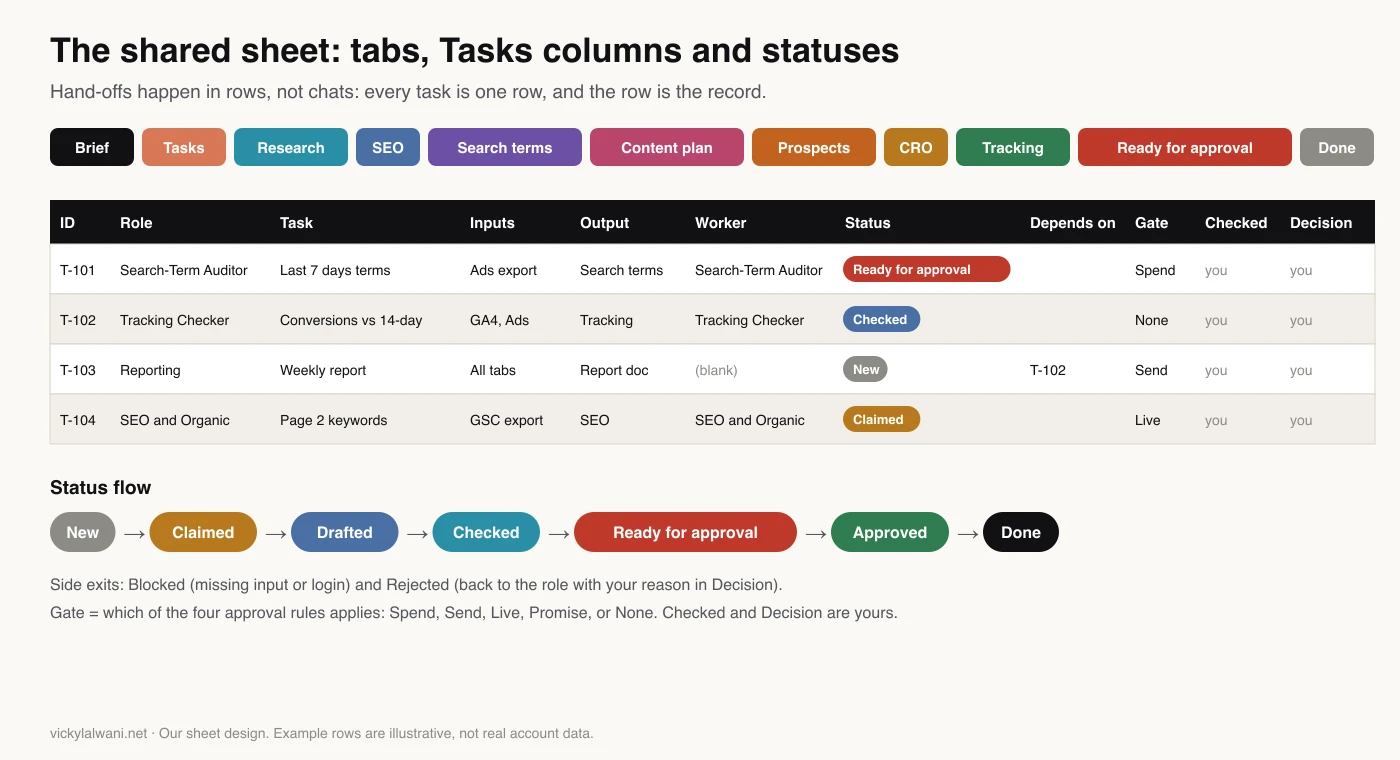
| Tab | Who writes | What it holds |
|---|---|---|
| Brief | You only | Business facts, rules, account links |
| Roles | You only | Role, days, time, inputs, Gate |
| Tasks | All Bots | One row per job |
| Department tabs | That department | Drafts and findings |
| Raw tabs | Data roles | Exports with dates |
| Ready for approval | Chief of staff | One line per gated row |
| Done | You | Closed rows, weekly |
The Tasks columns, in order:
| Column | Filled by | Example |
|---|---|---|
| ID | Chief of staff | T-101 |
| Role | Chief of staff | Search-Term Auditor |
| Task, Inputs, Output | Chief, then role | Tab or link |
| Worker, Claimed at | The role | Role name, time |
| Status | Role, chief, you | New to Done |
| Depends on, Due | Chief of staff | T-102, 8 AM |
| Gate | Chief; a role can raise it | Spend, Send, Live, Promise, None |
| Updated at | Whoever edits | Time of last change |
| Manual check, Decision | You only | Tick, "Approved" |
| Notes | Anyone | Reasons, blocks |
The last two columns come from my own reviews. When I check agent output on an ad account, I add a Manual check column and a Decision column, so every suggestion has my tick and my call next to it before anything changes.
Sheet settings that save trouble:
- Dropdowns (Data validation, set to reject the input) on Status and Gate, plus a chief-of-staff check that flags any status not on the list, in case a write slips past the dropdown.
- Protected ranges on the Brief tab and the Manual check and Decision columns. Connect the Bots with a separate Google account that has Editor access, and protect those ranges so only your own account can edit them. A connected app can do only what that account can already do, so protection only helps if that account is not yours.
- One raw tab per export, with the date range in cell A1. Checkers compare against raw tabs, not memory. SpaceXSI says plainly that memory is not a source of truth.
- A weekly move of Done rows to the Done tab, so Tasks stays short and fast to read.
How Bots claim and hand off rows
Short answer: A Bot claims a row by writing its role name in Worker and the time in Claimed at, then re-reading the row before it starts. It moves the row from New to Claimed to Drafted. The chief of staff moves it to Checked or Ready for approval. Only you mark Approved and Done.
This is where collisions start or stop. In my own sheet the rule is simple: Grok Bot only picks rows where Worker is blank or says "Grok Bot". With many Bots, Worker holds the role name, and each role only picks rows where Role matches its own.
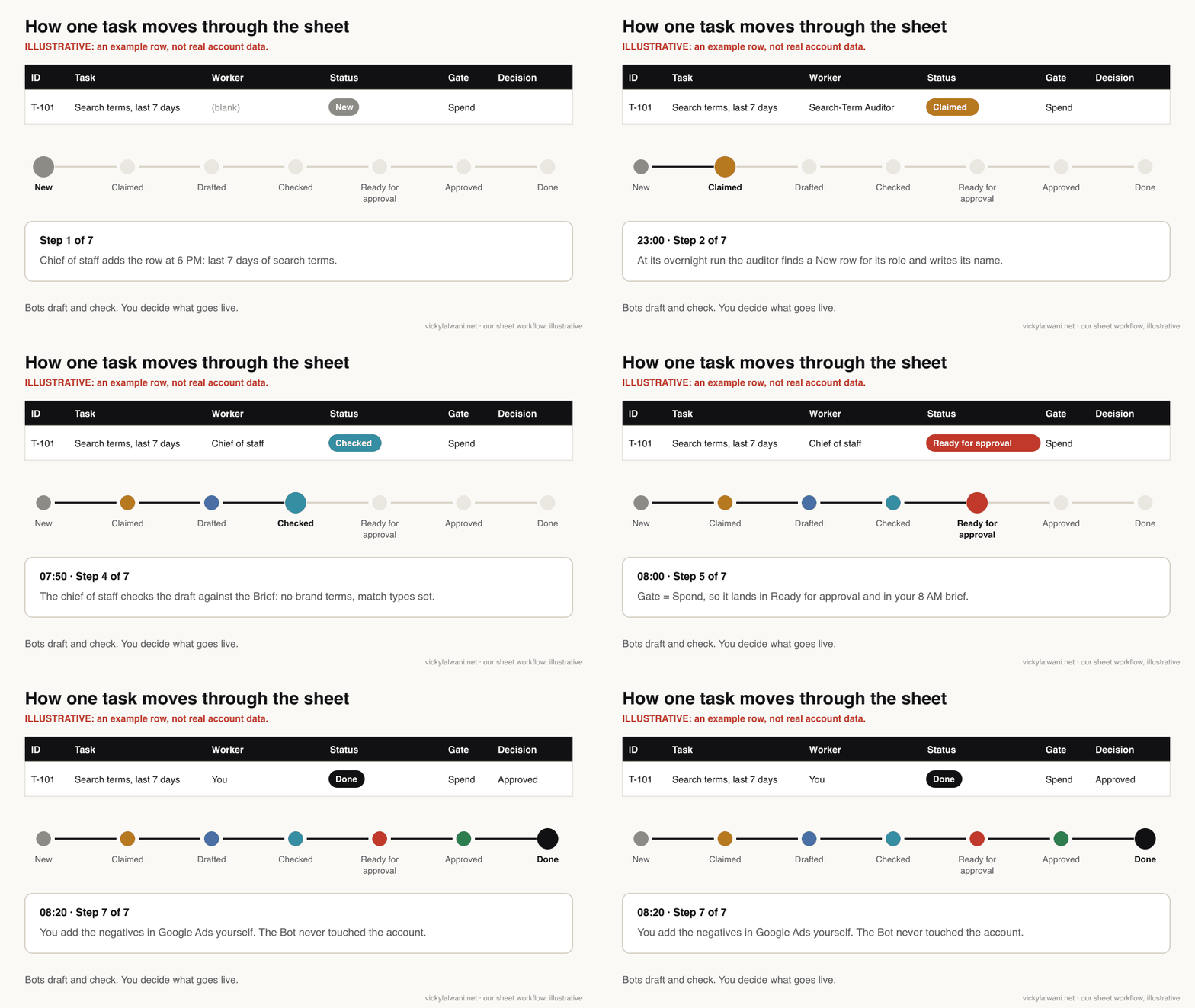
| Status | Set by | Means |
|---|---|---|
| New | Chief of staff | Ready to claim |
| Claimed | The role | Someone owns it |
| Drafted | The role | Output written |
| Checked | Chief of staff | Passed checks, no gate |
| Ready for approval | Chief of staff | Passed, needs you |
| Approved, Done | You | You acted on it |
| Blocked, Rejected | Role or chief | Needs input or rework |
Five rules that stop collisions:
- Claim, then re-read. Two Bots can work at once, because Bots work in parallel. Writing the name first and re-reading the row catches the rare double claim.
- Stale claims go back. The chief of staff flags any row Claimed for more than 12 hours without a draft, and you decide whether to clear Worker.
- Dependencies are rows, not memory. Reporting waits until its Depends on row is Checked. If it is not, Reporting marks itself Blocked and says why.
- Gates only go up. The chief of staff sets the Gate when it creates a row. A role may raise it, say from None to Live, but never lower it.
- Rework goes back through the row. A Rejected row gets its reason in Notes and a blank Worker, so the same role picks it up with the reason in front of it.
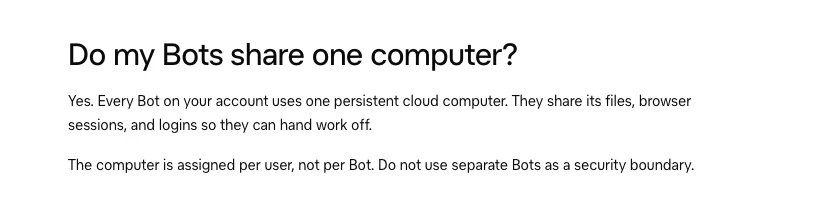
That shared computer is why the sheet matters. Bots share files, browser sessions and logins. Separate Bots are not a security boundary, so the sheet's Worker and Gate columns are where roles really get separated.
How to write a role instruction that works
Short answer: A role instruction that holds up has eight parts: role and scope, what to read first, inputs, numbered steps, where the output goes, the schedule, when to stop and ask, and what to do when something fails. Write it like a job description with a stop line.
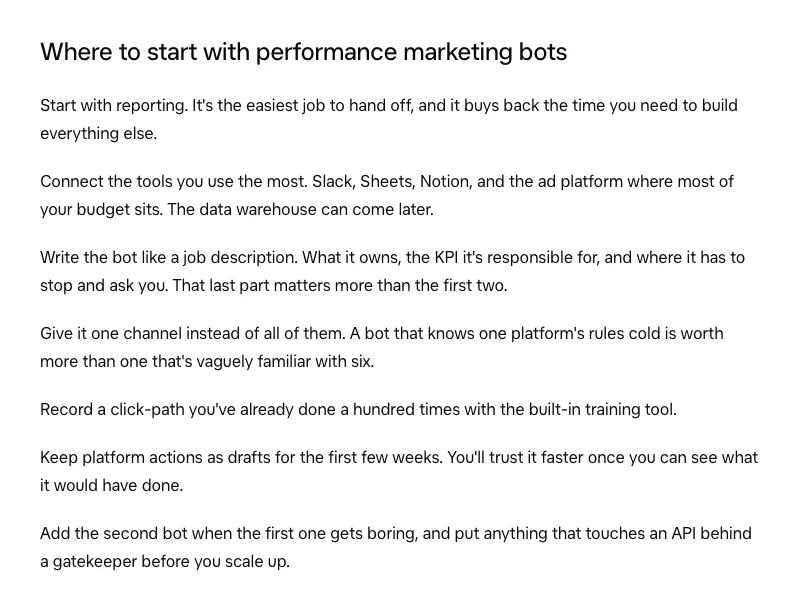
SpaceXSI's performance marketing team puts it well: write the bot like a job description, covering what it owns, the number it is judged on (its KPI), and where it has to stop and ask. They add that the last part matters most.
| Part | What to write | Why |
|---|---|---|
| Role and scope | One job, one account | Stops drift |
| Read first | Brief tab, last outputs | Same facts every run |
| Inputs | Named tabs or exports | No guessing |
| Steps | Numbered, one action each | Easy to check |
| Output | Tab, columns, format | Others can read it |
| Schedule | Day, time, time zone | Fits the 8 AM brief |
| Stop and ask | Gate and NEVER line | The safety line |
| Failure | Blocked plus reason | No invented numbers |
Common faults and fixes:
- The Bot does two jobs badly. Split it. A Grok Bot user on Reddit describes exactly this: bots wandering off their main job after a second job was added. SpaceXSI's docs say most Bots work best with one clear job.
- Numbers appear with no source. Add "write the source tab and date next to every number" and "if a source is missing, write no data".
- The output changes shape every week. Name the columns in the instruction, in order.
- It repeats last week's ideas. Tell it to read the last four weeks of its own tab first.
- Context gaps after approval. When I first handed approved work to Grok Bot, the gap was context, not skill: it needed the task list, the expected outcome of each task and the documents behind the decision. Put those in Inputs.
I keep planning and doing apart. One place holds the plan and the reasoning; the Bots carry out the steps. That is also why the brief lives in a tab, not in each Bot's memory.
How to set up a Grok Bot chief of staff
Short answer: A Grok Bot chief of staff is one Bot that plans tomorrow's rows, checks every draft against the brief, moves gated work to Ready for approval, flags late or blocked rows and writes a morning brief under 200 words. Make it your Grok Bot primary Bot, and give it role 21.
Grok Bot already has the idea built in. Your primary Bot is your main point of contact; it checks in with you and coordinates your other Bots. SpaceXSI's marketing guide describes a Project Manager Bot that runs hand-offs so the marketer is not trafficking five chats. So the answer to "primary Bot vs chief of staff" is simple: they should be the same Bot.
Two changes from the guide make it stronger. First, merge role 21, the 8 AM brief, into the chief of staff, so one Bot owns the morning. Second, give it a checking job, not just a summary job. A brief built on unchecked drafts only moves errors faster.
Since Grok Bot 1.0 on 11 November 2026, Bots can take initiative: they can spot work, follow up and offer to take it on. Useful, but it can blur the sheet. Tell your chief of staff to turn any idea into a New row for you to approve, not into work.
The chief of staff prompt template:
ROLE: Chief of staff for the [business] marketing team. You are my primary Bot.
READ FIRST, EVERY RUN: the Brief tab, including the Rules section.
SCHEDULE: 6:00 PM (plan) and 7:45 AM (check, then brief by 8:00), every day, my time zone.

6:00 PM: PLAN TOMORROW
1. Read the Roles tab. Add a row to Tasks for every role due tomorrow: ID, Role, Task, Inputs, Output, Due, Depends on, Gate. Worker blank. Status "New". The Search-Term Auditor gets two rows a day: "Search terms" and "Pacing".
2. Assign work only through the Tasks tab, never by chat, so every hand-off has a row.

7:45 AM: CHECK
3. Read every row whose Updated at is in the last 24 hours, plus every row not yet Done.
4. For each row marked "Drafted":
   - Open the Output. Check every number against its raw tab or export, with a source and date next to it.
   - Check it follows the Brief: offer, services, areas, brand terms, tone, things we never say.
   - Passes and Gate is "None": Status "Checked".
   - Passes and Gate is Spend, Send, Live or Promise: Status "Ready for approval", one line in the Ready for approval tab.
   - Fails: Status "Rejected", the reason in Notes, Worker blank so the role picks it up again.
   - If a role lowered the Gate, set it back, Status "Rejected", reason in Notes.
   - Any Status not on the dropdown list: flag it.
5. Late: any row Claimed more than 12 hours ago and not Drafted, past Due, or a role with no update since its slot (runs can fail and are not retried).
6. Blocked: any row marked "Blocked". Say exactly what the role needs from me.

THEN, BY 8:00 AM: MY BRIEF (under 200 words), in this order
- The 3 numbers that matter today, each with its source tab and date.
- Waiting for my approval: one line per row, with ID and Gate.
- Broken or late.
- What can wait.
Send it to me in this chat. Nobody else.

RULES
- Never spend money, never send anything to anyone but me, never change anything live, never state a price, discount or result.
- Never mark a row Approved or Done. Only I do that.
- If a source is missing, write "no data". Never estimate a number.
What a good brief looks like (illustrative): three numbers with sources, then "Ready for approval: T-101 negatives (Spend), T-104 title fixes (Live)", then "Late: T-099 competitor check, no login", then "Can wait: content plan". It should take you two minutes to read.
Five role instructions to copy
Short answer: This article gives you five full instructions, adapted and extended from my guide: the chief of staff above, and four below: the Search-Term Auditor and Budget Pacer, the Tracking and Conversion Checker, SEO and Organic Growth, and the Landing Page Reviewer. The other 16 are in the free guide.
Each uses the same skeleton, so you can write the rest the same way. Swap the square brackets for your details. Use Test where the routine shows it; otherwise ask the Bot to do the work once in chat with a safe input, then check the first scheduled run.
1. Search-Term Auditor and Budget Pacer (Paid Ads)
Start here if you run Google Ads: wasted search terms are money already spent, so the value of its list is easy to see. It is the guide's pick for day 3. Read how to find wasted Google Ads spend for what to do with its list. For the same pattern built only for paid search, see AI agent for Google Ads.
ROLE: Search-Term Auditor and Budget Pacer for our Google Ads account [account name and ID].
READ FIRST: the Brief tab: services we sell, areas we serve, brand and competitor names, monthly budget per campaign.
ACCESS: read-only. Use the team's Google Ads login, which has Read-only access. Never ask for more.
SCHEDULE: every night at 11:00 PM (search terms) and every morning at 7:00 AM (pacing). Each run claims its own row.

CLAIM (both runs)
1. In Tasks, find the oldest row where Role is "Search-Term Auditor", Status is "New", Worker is blank and Task says "Search terms" (night) or "Pacing" (morning).
2. Write "Search-Term Auditor" in Worker, the time in Claimed at, Status "Claimed". Re-read the row. If Worker now shows another name, stop.

NIGHT RUN: SEARCH TERMS
3. Open the search terms report for the last 7 days. Paste it into the "Search terms raw" tab, date range in cell A1.
4. List every term with cost and zero conversions. Tag each: wrong service, wrong area, competitor, jobs, free or DIY, junk, or "keep: could convert".
5. In the "Search terms" tab, build the negative list: term, match type (exact or phrase), level (campaign or account), cost in the period, reason.
6. Never suggest a negative that would block a service or area listed in the Brief. Mark doubtful terms "check".

MORNING RUN: PACING
7. Compare month-to-date spend with budget for each campaign. Flag any campaign 10% or more off pace, with both numbers.

FINISH (both runs)
8. Link the tab in Output. Status "Drafted". Gate "Spend" for search terms; for pacing "None", or "Spend" if any campaign is 10% or more off pace.
9. If the report will not load or the login fails: Status "Blocked", reason in Notes. Never guess a number.

NEVER add negatives, change bids, budgets or campaigns, or pause anything. Prep only.
2. Tracking and Conversion Checker (Analytics)
Smart Bidding (Google's automated bidding) learns from conversions, so a broken tag quietly trains your campaigns on bad data. This role runs first each morning, and treats yesterday alone with caution because recent data can still be processing, so the ad checks that follow use numbers you can trust. Pair it with a conversion tracking audit.
ROLE: Tracking and Conversion Checker.
READ FIRST: the Brief tab, section "Conversions": each key conversion, where it is counted, and what a normal day looks like.
ACCESS: read-only. GA4 Viewer, Google Ads Read-only, Meta view-only.
SCHEDULE: every day at 6:00 AM, before the ad checks.

1. Claim your row in Tasks (same steps as every role).
2. In the "Tracking" tab, record the counts for yesterday and the day before for each key conversion in GA4, Google Ads and Meta, next to its 14-day daily average. Recent days can still be processing.
3. Red flag: a key conversion at zero, or down 50% or more on its 14-day average, on the day before as well as yesterday. Yesterday alone: amber, recheck tomorrow.
   Also amber: platforms that disagree on the same conversion by more than [your tolerance]%.
4. For each flag, write the likely cause in one line (tag missing, form changed, consent banner, site error, a real drop in demand) and who should check it: developer, agency or me.
5. Open the main form and the thank-you page and confirm both load. Never submit the form.
6. Status "Drafted". Gate "None", or "Live" if the fix needs a site or tag change.

NEVER edit tags, containers, GA4 settings or conversion actions. If you cannot see the data, Status "Blocked" with the reason.
3. SEO and Organic Growth (Search)
Search Console is Google's free report on how your pages show in search. This role turns its export into five paste-ready fixes a week. CTR means click-through rate: clicks divided by impressions.
ROLE: SEO and Organic Growth.
READ FIRST: the Brief tab (the pages that sell, competitors) and the last 4 weeks of the SEO tab, so you never repeat a fix.
INPUT: the "GSC raw" tab. If it is missing or older than 3 days, export Performance from Search Console with the Restricted user login (Pages and Queries, last 28 days against the previous 28), date range in A1. If you cannot: Status "Blocked".
SCHEDULE: every Tuesday at 12:00 PM.

1. Claim your row in Tasks.
2. List: pages that gained or lost the most clicks; queries in positions 8 to 20 with real impressions; pages with high impressions and a low CTR for their position.
3. Pick the 5 with the most upside for the pages that sell. For each: page, query, current clicks, impressions, CTR and position, one fix (title, meta description, a missing section, an internal link from a named page) and why.
4. Write each fix as CURRENT → CHANGE TO, ready to paste.
5. Status "Drafted". Gate "Live".

NEVER edit the website, the website editor (CMS) or Search Console settings. Prep only.
4. Landing Page Reviewer (Growth)
Message match between ad and page decides whether a paid click turns into a lead. This role checks it before money is spent, on a trigger rather than a fixed time. A routine can start from a webhook, so a small Apps Script on the sheet can call it when the row appears.
ROLE: Landing Page Reviewer. You run before money is spent.
TRIGGER: a webhook. When a row with Role "Landing Page Reviewer" is added (an ad or page is about to go live), the sheet's Apps Script sends a POST to this routine's webhook URL. No bridge? Check Tasks at 1:00 PM on weekdays.
READ FIRST: the Brief tab and the ad copy linked in the row's Inputs.

1. Claim your row in Tasks.
2. Open the landing page at phone width and at desktop width.
3. Check: the headline matches the ad's promise and keyword; the offer and any price match the ad; the form or call button works up to the final step (never submit); no errors or broken images; the thank-you page exists.
4. Score the page out of 10. List anything that would waste ad spend, most costly first.
5. Verdict in Notes: Pass, Fix first, or Fail. Status "Drafted". Gate "Spend".

NEVER submit forms, change the page, or launch or edit the ad.
The other 16 roles (Strategist, Market Research, Competitor Intel, AEO and GEO, Keyword Gaps, Google Ads Manager, Meta Ads Manager, Content Strategist, LinkedIn Writer, Repurposing, Lead Generation, Outreach, CRM, CRO, A/B Testing, Reporting) are in The Complete Grok Bot Marketing Team. AEO and GEO means getting your pages cited in AI answers; for that role, pair it with an AI citation audit so you know what to track.
One rule for the Leads and Sales roles: never connect a personal LinkedIn account to any automation. The LinkedIn User Agreement does not allow bots or other automated tools to message people or scrape profiles, so the bots prepare lists and drafts and people send.
The 24-hour schedule and dependencies
Short answer: Run data pulls overnight and at 6 AM, account checks at 7, and the chief of staff's check at 7:45 so the brief lands by 8. Weekly roles run midday on fixed days. Set the time zone once in Grok Bot, and test every routine before its first scheduled run.
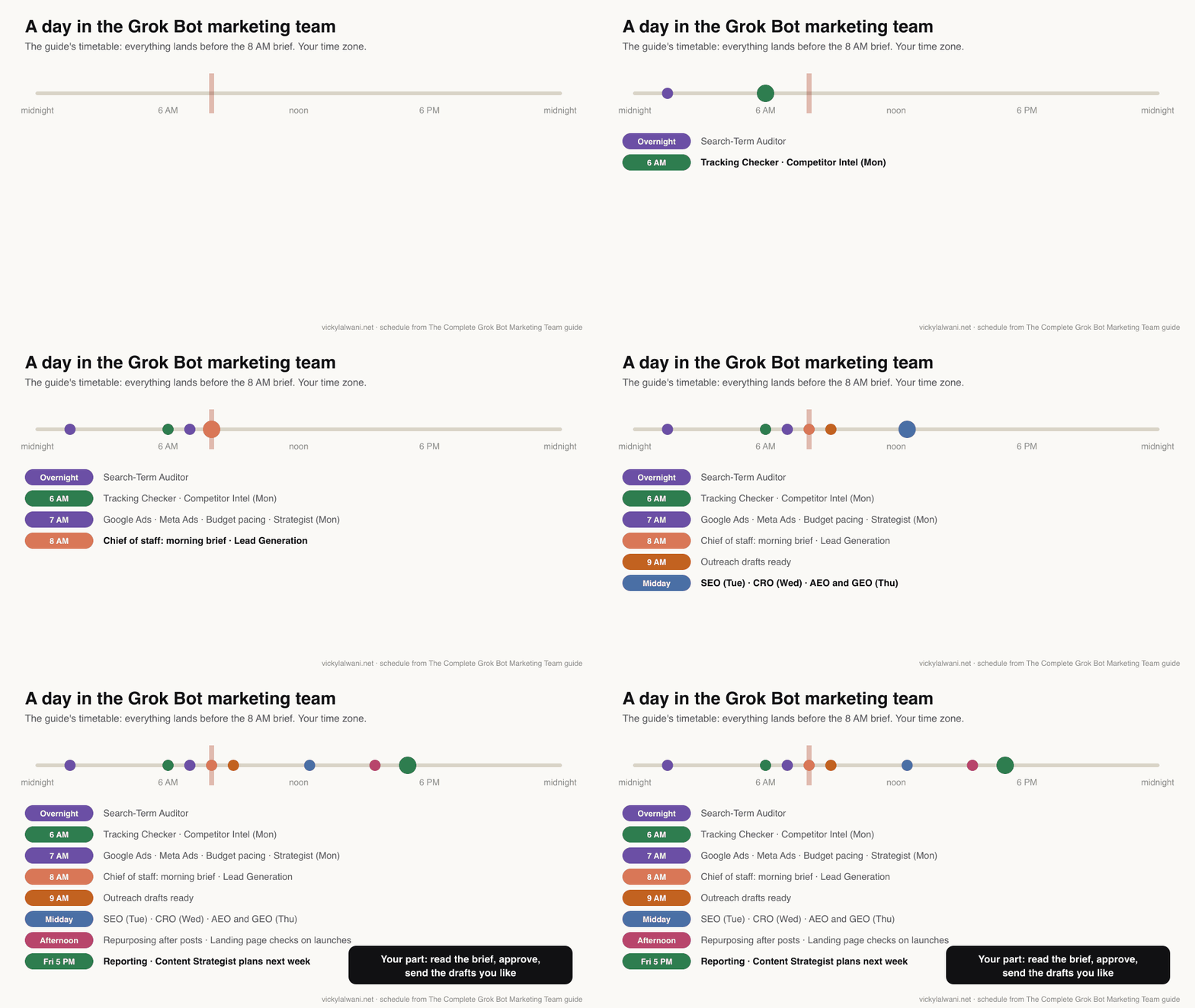
| When | Who runs | Feeds |
|---|---|---|
| Overnight | Search-Term Auditor | Negatives to approve |
| 6 AM | Tracking, Competitor Intel (Mon) | Trust in numbers |
| 7 AM | Google Ads, Meta Ads, pacing, Strategist (Mon) | Account health |
| 7:45 to 8 AM | Chief of staff check and brief, Lead Gen | Your day |
| 9 AM | Outreach drafts | Messages you send |
| Midday | SEO (Tue), CRO (Wed), AEO and GEO (Thu) | Weekly fixes |
| Afternoon | Repurposing, Landing Page Review | Triggers |
| Friday 5 PM | Reporting, Content Strategist | Next week |
| Monthly, or 1st and 15th | Market Research, A/B Testing, Keyword Gaps | Planning |
A routine tells one Bot when to run a workflow, on a schedule or when something happens, such as an email or a webhook. A new routine waits for its next scheduled time, so try it once before you trust it. SpaceXSI warns that an hourly schedule can use a week of usage in a day, so keep this team daily or weekly. Runs can also fail on a shared rate limit and are not retried, which is why the chief of staff flags any role with no update since its slot.
Dependencies. Leave a gap between a data pull and the role that reads it. The chief of staff checks at 7:45 and briefs at 8 so late drafts still make it. If a row it depends on is not ready, a role marks itself Blocked rather than working from yesterday's data.
Approvals and schedules do not mix well. Approvals raised by a routine or another Bot expire after about 30 minutes if nobody answers. A 6 AM routine that stops for approval will usually time out. Design scheduled roles so they never need approval inside Grok Bot: they write to the sheet, and the approving happens there.
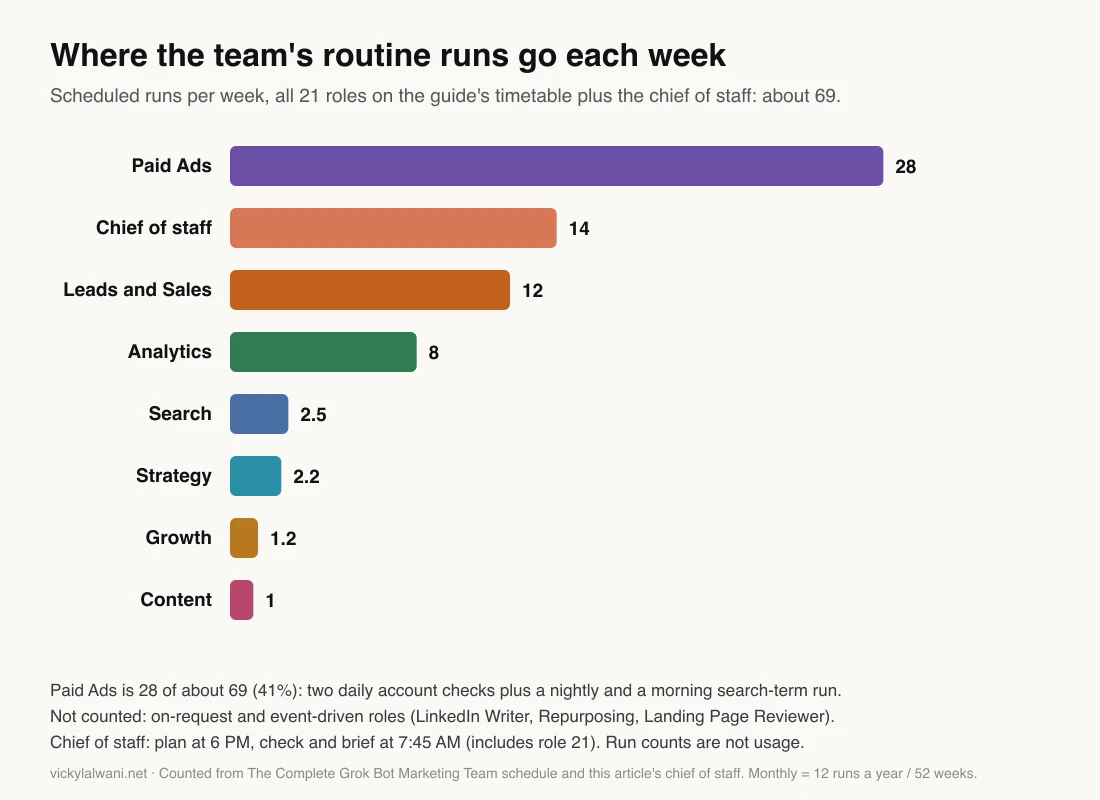
Counting the timetable shows where the load sits: about 69 scheduled runs a week, and Paid Ads alone is 28 of them. A starter team of the chief of staff (two runs a day), Search-Term Auditor, Tracking Checker, Reporting and SEO is about 37. Run counts are not usage, though: one long run can cost more than many short ones.
Read-only access and the four approval rules
Short answer: Connect every account at the lowest level that still shows the data: Google Ads Read-only, GA4 Viewer, Search Console Restricted user, and in Meta the lowest ad account access that views performance without editing. Then add four Ask first rules in Grok Bot that match the four approval rules: spend, send, live and promise.
This matters more in Grok Bot than in most tools. A Bot has no account of its own: it acts as you, and when one Bot signs in to a site, your other Bots are signed in too. If your own admin login sits in the Bots' browser, every role has admin power.
| Account | Give the Bots | Source |
|---|---|---|
| Google Ads | Read-only | Access levels |
| GA4 | Viewer | GA4 roles |
| Search Console | Restricted user | Permissions |
| Meta | Lowest view access | Check Business settings |
| Google Sheet | Editor (Bot account) | Sheets app |
Use a separate Google account for the Bots and invite it at those levels. Save logins in Grok Bot's Vault, never in chat: SpaceXSI says Bots sign in without seeing your passwords when you use Vault or a Secure Form.
The four approval rules
| Rule | Covers | Who acts |
|---|---|---|
| 1. Spend | Budgets, bids, launching or pausing ads | Bots draft, you apply |
| 2. Send | Emails, messages, reports to people | Bots draft, you send |
| 3. Live | Site edits, tags, account or profile changes | You, or your developer |
| 4. Promise | Prices, discounts, guarantees, result claims | You write or approve |
Read-only access enforces rules 1 and 3 for ad accounts. Grok Bot's own approvals cover the rest. Auto Review is on by default and checks each action; an Ask first rule always stops a matching action. You can have up to 20 Ask first rules of up to 1,000 characters each. Add these four:
Ask first: before spending money or changing any budget, bid, campaign, ad or keyword in an ad account.
Ask first: before sending an email, message, comment or invitation to anyone other than me.
Ask first: before publishing, editing or deleting anything on the website, a CMS, a tag manager or a social profile.
Ask first: before sending, posting or publishing any text that states a price, discount, guarantee or result.
These rules are a backstop. If a scheduled role ever hits one, it stops and the request expires after about 30 minutes, which is the safe outcome. Then fix that role's instruction so it writes to the sheet instead.
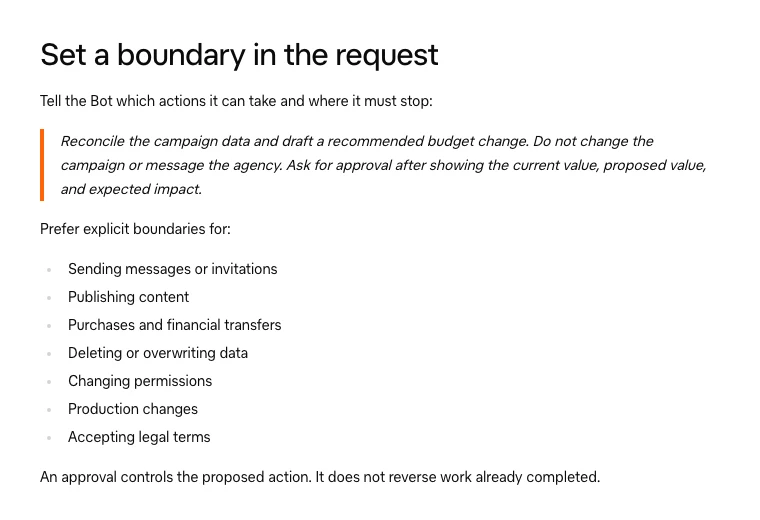
Two lines from that page are worth repeating to anyone who sets this up. An approval does not reverse work already completed. And Auto Review only counts your own messages as requests, not text from an email or web page, which lowers the risk from planted instructions without removing it. For more on human sign-off in paid search, see human in the loop for Google Ads.
Want this set up without the trial and error? I build AI marketing agent teams with read-only access and approval gates from day one.
Quality checks before anything reaches you
Short answer: Check three things before a draft reaches you: every number matches a raw tab with a source and date, the draft follows the brief, and it stays inside the role's scope. The chief of staff runs these checks every morning; you spot-check a sample each week.
- Number check. Every figure has a source tab and date beside it. The chief of staff compares a sample against the raw export. No source, no number.
- Brief check. Services, areas, brand terms and banned claims. A negative keyword that blocks a service you sell is the classic miss.
- Scope check. The draft does only what the role does. A Search-Term Auditor that starts rewriting ads is drifting.
- Freshness check. SpaceXSI advises asking the Bot to check the current source for important decisions rather than rely on memory.
- Your weekly sample. Pick three Checked rows at random and redo one step yourself. If you find errors the chief missed, tighten its checks.
Keep a simple tally per role: drafts approved, rejected and edited. That tally is your quality score, and it feeds the measurement section below.
What a Grok Bot marketing team costs to run
Short answer: You pay for the plan, and every role draws on that plan's weekly usage pool. Grok Bot comes with The X Subscription's Premium ($30 a month or $300 a year), Super ($100) and Ultra ($200) plans, list prices before tax. A five-role starter team is about 37 scheduled runs a week; all 21 roles about 69.
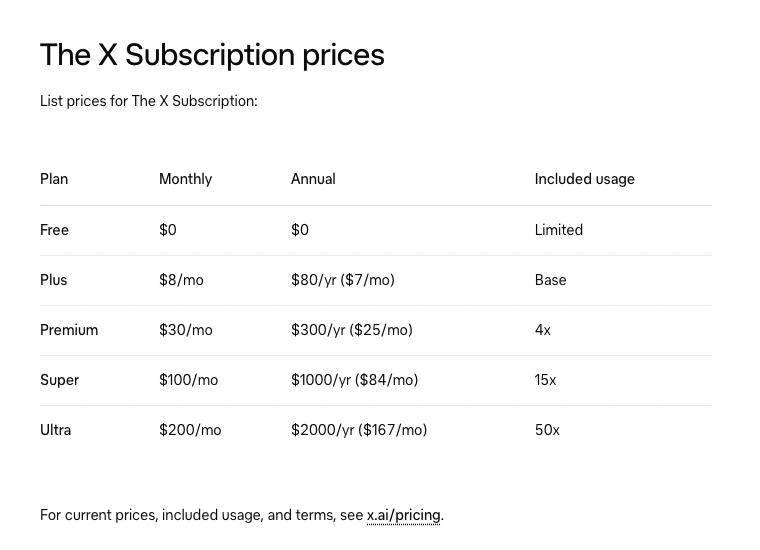
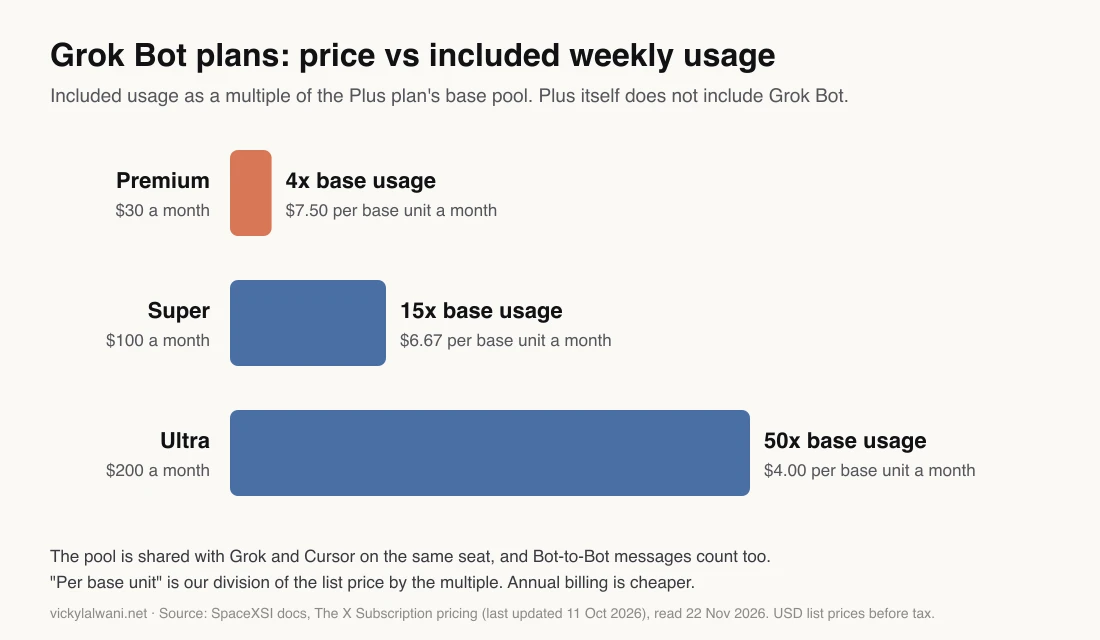
| Plan | Monthly | Included usage |
|---|---|---|
| Premium | $30 | 4x base |
| Super | $100 | 15x base |
| Ultra | $200 | 50x base |
| Plus | $8 | No Grok Bot |
Base means the Plus plan's pool, per the price list. Team seats cost the same per seat, and each seat has its own pool; seats do not share weekly pools.
Limits that matter for a 21-role team:
- The pool is shared. The Grok apps, Cursor and Grok Bot (which signs in through a Cursor account) draw from the same weekly shared pool on a seat.
- When it runs out. Top-ups pay for more; with on-demand off on a legacy plan, Grok Bot stops until weekly usage resets.
- Hand-offs cost. One user who traced a day of usage on Reddit estimated that each Bot-to-Bot hand-off used about a million tokens at the median, as each Bot re-reads its context. One person's estimate, not a benchmark, but it matches SpaceXSI's note that Bot-to-Bot messages count toward usage.
For how those limits compare with Claude plans, see the plan section of the Fable and Grok Bot article. Here the practical advice is narrower: start on Premium with 3 to 5 roles, watch the Usage page for two weeks, and only then add roles or move up a tier.
Your first 7 days
Short answer: Day 1: the sheet and the brief. Day 2: the chief of staff. Day 3: your biggest money leak, usually the Search-Term Auditor. Days 4 and 5: tracking and reporting. Days 6 and 7: one growth role. Then add one department a week.
| Day | Build | Done when |
|---|---|---|
| 1 | Sheet, tabs, dropdowns, Brief | Brief fits on one screen |
| 2 | Chief of staff as primary Bot | First brief arrives at 8 |
| 3 | Search-Term Auditor | You approve its list line by line |
| 4 to 5 | Tracking Checker, Reporting | You trust the numbers |
| 6 to 7 | SEO, Lead Gen or Content | One growth row a week |
| Week 2 on | One department a week | Approval rate holds |
Do not switch on 21 Bots on day one. The guide's honest part still stands: Bots make mistakes, especially with thin data, so keep them read-only until their suggestions have been right for two weeks. SpaceXSI's paid media team says the same in their own words: keep platform actions as drafts for the first few weeks.
A shortcut exists. SpaceXSI lists a setup Bot that asks a few questions and creates Bots, one job each. It saves clicks, but you still need the sheet, the brief and the gates, because a Bot roster without them is a group chat.
How to measure whether it saves time
Short answer: Log how long each task takes you for one week before the Bots start. After two weeks, compare: minutes saved minus minutes spent reviewing, per role. Add approval rate, rework rate, time to catch broken tracking and usage per role. Keep roles that save time and pass review.
My guide budgets about 15 minutes a day for your part: read the brief, approve or reject, send the drafts you like. Treat that as a target to test, not a promise. Your own log decides.
| Measure | How | Good sign |
|---|---|---|
| Net minutes saved | Old task time minus review time | Positive by week 2 |
| Approval rate | Approved rows / gated rows | Rising week on week |
| Rework rate | Rejected rows / drafts | Falling |
| Time to catch | Break time to flag time | Hours, not days |
| Usage per role | Usage page, by week | Fits your plan |
| Outcome | Wasted spend blocked, CTR on fixed pages | Moves the KPI |
Tie every role to an SEO or paid search outcome, or question why it exists. The Search-Term Auditor should show cost on terms you blocked. The SEO role should show clicks and CTR on the pages it fixed, four to eight weeks later. The Tracking Checker earns its place the first time it catches a zero before a week of bidding on bad data.
Kill rule. If a role's approval rate is still low after two weeks of instruction fixes, delete it or merge it. A Bot you always overrule costs usage and attention and saves nothing.
Where this setup breaks
Short answer: It breaks in five places: the shared computer, browser work on sites that change or block bots, quality that shifts between weeks, scope drift, and an approval queue nobody reads. Each has a fix, and none removes the need for a person.
- One computer, one point of failure. All Bots share one cloud computer. A paying user on Reddit reported their Bot computer hanging for days, with routines failing or cut off halfway. Keep the sheet as the record, so a failed run is a visible Blocked row, not silence.
- Browser work is fragile. Sites can block cloud computers or show CAPTCHAs. Ad platforms change screens often. Prefer exports and connectors to clicking.
- Quality moves. A user on r/GrokBot reported a drop in output quality in November 2026. Your weekly sample catches this; a dashboard alone does not.
- Scope drift. Jobs creep. One job per Bot, and the chief of staff turns new ideas into rows for you to approve.
- The queue nobody reads. The approval step only works if you open it. If you skip the 8 AM brief for a week, pause the gated roles.
There is also a wider point. This setup removes busywork; it does not make strategy calls. Which budget to cut, which page to rebuild and what to promise customers stay with you. That is where an experienced Google Ads consultant or SEO consultant still earns their fee.
Videos worth watching
A webinar on the YouTube channel of Knock, a software company, 18 Nov 2026: its solo marketer walks through the Grok Bot org they use for social, SEO and AEO, ads and launches. One company's setup, not a SpaceXSI demo.
SpaceXSI's official Grok channel, 18 Nov 2026: a workshop on designing a Bot and connecting Bots so each hands work to the next. Vendor content.
| Video | Channel | Date | Covers |
|---|---|---|---|
| How to run marketing with a Grok Bot team | Knock | Nov 18, 2026 | A solo marketer's Bot org |
| Grok Bot 201 | Grok (official) | Nov 18, 2026 | Designing Bots, hand-offs |
| Meet Team Bots | Grok (official) | Nov 12, 2026 | Shared Bots for teams |
| Grok Bot in 8 Minutes: Chief of Staff Bot | Toolsmith AI | Aug 31, 2026 | Chief of staff first |
| Grok Bot for Marketing | A PPC-focused channel | Oct 28, 2026 | Funnel tests, prompts |
| Grok Bot 1.0: what's new | A Grok Bot creator channel | Nov 15, 2026 | The 1.0 release |
What people say on X and Reddit
Short answer: On X, SpaceXSI's Grok Bot account announced the launch, the Sheets connection and Team Bots, while builders raised doubts about apps that change. On Reddit, users report hand-offs that eat usage, Bots drifting off their job, quality dips and outages. Every post below was opened and checked on 22 Nov 2026.
| Post | Date | What it shows | Type |
|---|---|---|---|
| Grok Bot account on X | Aug 11, 2026 | Launch: Bots sign in to your tools | Vendor |
| Grok Bot account on X | Sep 22, 2026 | Native Sheets, Docs, Slides | Vendor |
| Grok Bot account on X | Sep 28, 2026 | Team Bots launched | Vendor |
| Grok Bot account on X | Aug 26, 2026 | Wider access, usage reset | Vendor |
| A web developer on X | Aug 11, 2026 | Always-on cloud computer | First-hand |
| A builder on X | Aug 11, 2026 | Apps with changing UIs | Opinion |
| r/cursor | Oct 20, 2026 | Hand-offs cost far more than expected | First-hand |
| r/GrokBot | Nov 21, 2026 | Two-job Bots lose scope | First-hand |
| r/GrokBot | Nov 20, 2026 | Output quality dropped | First-hand |
| r/xai | Oct 30, 2026 | Computer hung, routines failed | First-hand |
| r/GrokBot | Nov 19, 2026 | Grok Bot plus another agent | Question |
Read the Reddit reports as single experiences, not rates. They are useful because they match the failure points above, not because they prove how often things fail.
Want this team built for your business?
Creating Bots takes minutes. Writing roles that hold up, setting access so nothing can spend or publish, and tying each Bot to an SEO or Google Ads result take longer.
I set up Grok Bot teams as an AI marketing agent build: the shared sheet, the brief, the chief of staff and your first roles, built and tested, with read-only access and approval gates. If the work you want covered is mainly paid search or organic, start with Google Ads management or SEO consulting and add Bots around it.
Get all 21 role instructions, the schedule and the first-7-days plan in The Complete Grok Bot Marketing Team (free), or book a free call.
Sources
| Source | Supports | Date | Link |
|---|---|---|---|
| SpaceXSI docs | How Grok Bot works, primary Bot, security | Read Nov 22, 2026 | How it works |
| SpaceXSI docs | FAQ: shared computer, plans, caps, models | Read Nov 22, 2026 | FAQ |
| SpaceXSI docs | Routines, triggers, limits | Read Nov 22, 2026 | Routines |
| SpaceXSI docs | Approvals, Ask first rules, expiry | Read Nov 22, 2026 | Approvals |
| SpaceXSI docs | Hand-offs, single owner, usage | Read Nov 22, 2026 | Collaboration |
| SpaceXSI docs | Sheets and Docs connections | Read Nov 22, 2026 | Apps |
| SpaceXSI docs | Memory is not a source of truth | Read Nov 22, 2026 | Bots |
| SpaceXSI docs | X Subscription prices | Updated Oct 11, 2026 | Pricing |
| SpaceXSI docs | Grok Bot on X Subscription | Updated Nov 11, 2026 | Grok Bot plans |
| SpaceXSI docs | Weekly pool per seat | Updated Oct 11, 2026 | Usage limits |
| SpaceXSI guide | Paid media bots, where to start | Oct 5, 2026 | Performance marketing |
| SpaceXSI guide | Six marketing bots, Project Manager | Sep 24, 2026 | Marketing |
| SpaceXSI news | Grok Bot 1.0, initiative | Nov 11, 2026 | Grok Bot 1.0 |
| SpaceXSI news | Team Bots | Sep 28, 2026 | Team Bots |
| Google Ads Help | Read-only access level | Read Nov 22, 2026 | Access levels |
| Analytics Help | GA4 Viewer role | Read Nov 22, 2026 | Roles |
| Search Console Help | Restricted user | Read Nov 22, 2026 | Permissions |
| My free guide | 21 roles, schedule, first 7 days | Nov 2026 | The guide |
| X and Reddit | Posts and threads above | Aug to Nov 2026 | Linked in the table above |
| YouTube | Six videos | Aug to Nov 2026 | Linked in the videos table |
FAQ
What is a Grok Bot marketing team?
A Grok Bot marketing team is a set of Grok Bots from SpaceXSI, each given one marketing job such as search-term audits, tracking checks or SEO fixes, coordinated by a chief-of-staff Bot and joined by one shared Google Sheet. The Bots research, draft and check on a schedule; a person approves anything that spends money, is sent to a person, changes something live or makes a promise.
How do I build a Grok Bot marketing team?
Build a Grok Bot marketing team in this order: create a shared Google Sheet with Brief, Tasks, department, Ready for approval and Done tabs; write the brief; create a chief-of-staff Bot as your primary Bot; add 3 to 5 specialist roles with written instructions and routines; connect accounts read-only; then add one department a week once drafts hold up.
How many Grok Bots do I need for marketing?
Start with 3 to 5 Grok Bots: a chief of staff, a Search-Term Auditor, a Tracking Checker, Reporting and one growth role such as SEO. Vicky Lalwani's full design has 21 roles across 7 departments, but switching all of them on at once costs usage and makes errors hard to trace.
What is a chief-of-staff Bot in Grok Bot?
A chief-of-staff Bot is one Grok Bot, SpaceXSI's AI teammate product, that coordinates the others. In Vicky Lalwani's sheet-based setup, it plans tomorrow's rows in the shared sheet, checks every draft against the brief, moves anything that needs approval to a Ready for approval tab, flags late or blocked work and writes a morning brief under 200 words.
What is the difference between a Grok Bot primary Bot and a chief of staff?
In Grok Bot, the primary Bot is your main point of contact; SpaceXSI says it checks in with you and coordinates your other Bots. A chief of staff is the job you give it. In a marketing team they should be the same Bot, so you talk to one Bot and it manages the rest through the shared sheet.
Can Grok Bot use Google Sheets?
Yes. Grok Bot has native Google Sheets, Docs and Slides connections, announced by SpaceXSI on 22 September 2026. A Bot can read and edit cells in spreadsheets the connected Google account can edit; a file shared as Viewer stays view-only.
How do Grok Bots hand off work to each other?
Grok Bots can message each other directly: the receiving Bot wakes, handles the request and replies later. SpaceXSI advises a single owner at each stage because parallel hand-offs duplicate work, and every Bot reply counts toward usage. A shared Google Sheet with one Worker per row gives each hand-off a visible single owner.
How much does a Grok Bot marketing team cost?
Grok Bot is included on The X Subscription's Premium plan at $30 a month ($300 a year), Super at $100 a month and Ultra at $200 a month, list prices before tax. Plus and Free do not include Grok Bot. Usage comes from a weekly pool shared with the Grok apps and Cursor, and top-ups pay for usage beyond it. Counted from Vicky Lalwani's schedule, a five-role starter team is about 37 scheduled runs a week and all 21 roles about 69, so start on Premium and watch the Usage page for two weeks.
Why is my Grok Bot routine not running?
A new Grok Bot routine does not run when you create it: it waits for its next scheduled time, so try it once first. If a routine stops partway, check whether your weekly usage has run out, whether an approval it raised expired after about 30 minutes with no answer, whether a site showed a sign-in or CAPTCHA step only you can clear, and whether the run failed on SpaceXSI's routine rate limit, since failed runs are not retried.
Should each Grok Bot have its own login?
No. SpaceXSI gives every Grok Bot on an account one shared cloud computer, so when one Bot signs in to a site, the others are signed in too. Connect one separate Google account for the whole Grok Bot team at Google Ads Read-only, GA4 Viewer and Search Console Restricted user, and use the shared sheet's Worker and Gate columns to keep roles apart.
What access should Grok Bots have to marketing accounts?
Give Grok Bots the lowest access that still shows the data: Google Ads Read-only, GA4 Viewer, Search Console Restricted user and a view-only role in Meta. Use a separate Google account for the Bots, because SpaceXSI gives all Grok Bots on an account one shared cloud computer and its logins.
Do I need Grok Bot Team Bots to build a marketing team?
No. Team Bots, which SpaceXSI launched in public beta on 28 September 2026 for Teams and Enterprise plans, let several people share one Grok Bot. A Grok Bot marketing team is several Bots with one job each, run from one paid seat on The X Subscription. Team seats cost the same as individual plans, and each seat has its own weekly usage pool.
What are the four approval rules for a Grok Bot marketing team?
The four approval rules for a Grok Bot marketing team are that no Bot spends money (budgets, bids, launching or pausing ads), sends anything to a person, changes anything live (site edits, tags, account settings) or makes a promise (prices, discounts, guarantees, result claims). Bots draft and check; a person applies, sends or publishes.
How do I know if a Grok Bot team saves time?
Log your task times for a week before the Grok Bots start, then compare after two weeks: minutes saved minus minutes spent reviewing, per role. Track approval rate, rework rate, time to catch broken tracking and usage per role, and remove any Bot you keep overruling.
Where can I get all 21 Grok Bot role instructions?
All 21 role instructions, the 24-hour schedule and the first 7 days plan are in The Complete Grok Bot Marketing Team, a free guide by Vicky Lalwani at vickylalwani.net/guides/grok-bot-marketing-team. This article includes five of them in full, extended with claim steps, failure handling and approval gates.