A paid media audit checks every ad platform against one result: qualified leads or sales in your CRM. Start with tracking on each platform, then check default settings that spend quietly (Google search partners and AI Max, Meta placements, LinkedIn Audience Network), Meta creative fatigue and overlap where two platforms claim the same customer. Move budget only on CRM cost per qualified lead. A saved Claude skill repeats the checks monthly; a person approves every change.
TL;DR
A paid media audit checks every ad platform you pay for against one question: which spend produced qualified leads or sales, measured in your CRM rather than in each platform's own report. Start with tracking, because every other finding depends on it. Then check the default settings that spend money quietly, creative fatigue, overlap between platforms and, last, where the budget should move.
This guide covers Google, Meta and LinkedIn together. If you only run Google Ads, use the step-by-step Google Ads wasted spend check instead.
You run Google Ads for search, Meta for Facebook and Instagram, and LinkedIn for a B2B audience. Each dashboard says it is working. Add up the leads they claim and you get more than your sales team has ever seen. That gap is where a paid media audit starts, and it is why I treat it as a different job from a single-platform review. If you want someone to run it on your accounts, see my PPC and Google Ads management and Meta ads services.
Jump to: Definition · Where waste hides · Comparing channels · Tracking · Default settings · Creative fatigue · Overlap · Moving budget · Claude skills · X and Reddit · Videos · Weak spots · Sources
What is a paid media audit, and how is it different from a Google Ads audit?
Short answer: a paid media audit reviews all your ad platforms together and judges them on the same business outcome. A Google Ads audit goes deep on one platform: search terms, keywords, bids and settings. You need both, but they answer different questions.
The cross-channel audit asks where the next pound or dollar should go. The single-platform audit asks how to stop leaks inside one account. Mixing them is how audits go wrong: a deep search terms review tells you nothing about whether Meta is double-counting the same buyers.
| Paid media audit (this guide) | Google Ads audit | |
|---|---|---|
| Scope | Google, Meta, LinkedIn and any other paid channel | One Google Ads account |
| Main question | Which channel earns qualified leads? | Which searches and settings waste money? |
| Source of truth | CRM and sales data | Search terms report and conversions |
| How often | Monthly, plus before budget changes | Weekly checks, monthly deep review |
| Where to start | Tracking on every platform | Search terms and negatives |
| Read next | This page | Find wasted Google Ads spend |
Where does wasted spend hide on each channel?
Short answer: on Google it hides in search terms and default settings, on Meta in fatigued creative and broad placements, and on LinkedIn in network and audience expansion. On every platform it hides in tracking that counts the wrong thing.
Wasted spend is rarely one big mistake. It is many small leaks, and each platform leaks in its own way. The table is the map I use before opening any account.
| Channel | Where waste usually hides | First check |
|---|---|---|
| Google Ads | Irrelevant searches, search partners, Display, broad automation | Search terms with spend and no leads |
| Performance Max | Searches and placements you would never buy | Channel performance report |
| Meta | Fatigued ads, duplicate boosted posts, weak lead forms | Frequency and cost per result trend |
| Audience Network, audience expansion, small audiences | Placement and audience settings | |
| All of them | Conversions that are not real leads | Platform leads against CRM leads |
For the Google side in depth, including Performance Max, the Google Ads guide has ten steps. For Meta alone, the Meta ads audit goes further into the account structure.
Why you cannot compare cost per lead across channels
Short answer: because each platform counts differently and the leads are not the same quality. In 2026 benchmarks, a search lead averaged $66.69 and a Facebook lead ad lead $27.39. A cheaper lead is only cheaper if it turns into a customer at the same rate.
WordStream by LocaliQ publishes yearly benchmarks from its customers' campaigns. Its 2026 search figures put the average cost per lead at $66.69. Its 2026 Facebook figures put leads-objective campaigns at $27.39. These are US dollar averages across many accounts, not targets for yours.
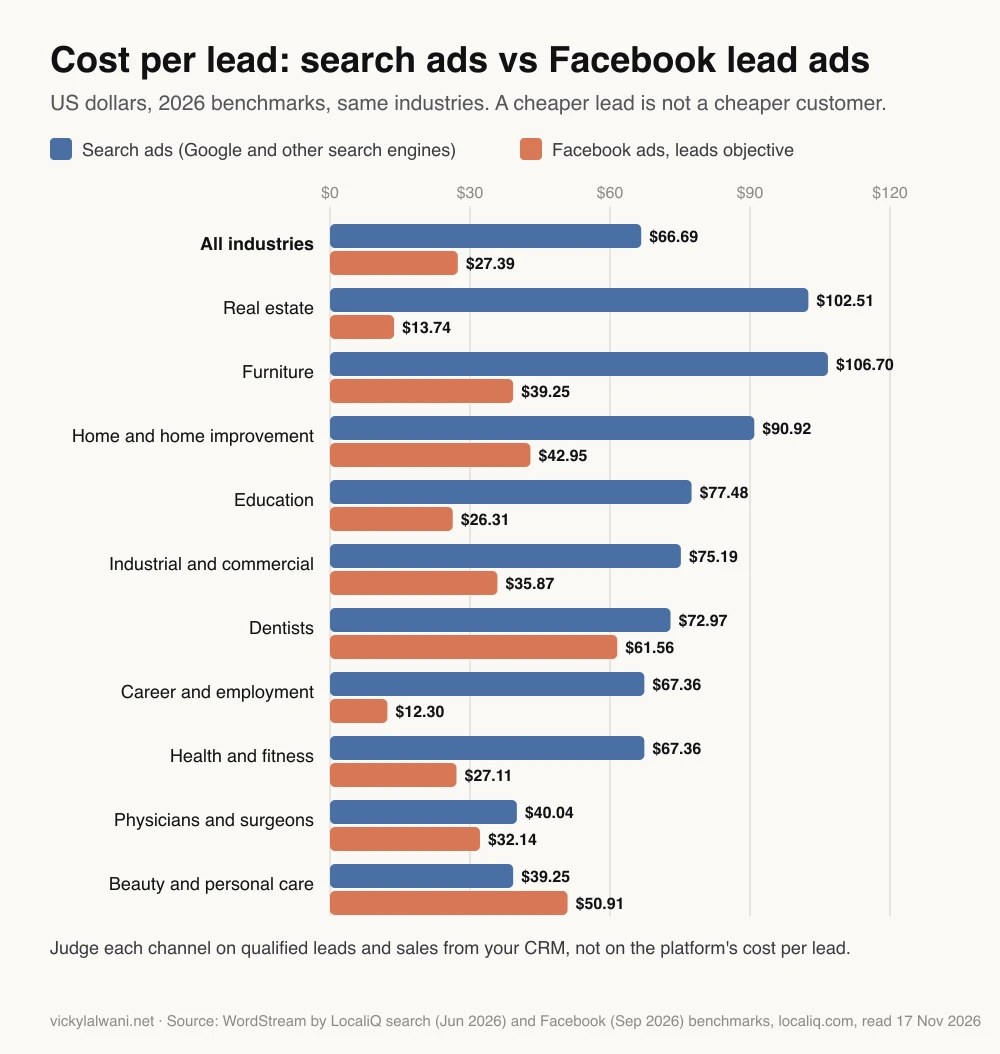
Two things make the comparison unfair. First, the person behind a search lead was looking for you; the person behind a Meta lead form may have tapped a pre-filled form while scrolling. Second, each platform credits itself by its own rules.
Meta's default, according to its results glossary, counts conversions up to 7 days after a click, 1 day after a view and 1 day after an engagement. Google Ads counts by its own model. The same buyer can be claimed by both. My guide to Meta attribution changes covers the 2026 rules in detail.
So the fair comparison is cost per qualified lead or cost per sale, taken from your CRM, for each channel. If you cannot produce that number yet, fixing that is the first finding of the audit.
Step 1: Can you trust the conversions on every platform?
Short answer: only if each platform counts real leads once. Check that bidding uses the right primary conversions in Google, that Meta browser and server events are deduplicated, and that the lead totals roughly match your CRM.
Every other step depends on this one. If a platform counts a button click as a lead, its automated bidding will find more button clickers, and every cost per lead in your audit is wrong. On accounts I take over, I keep campaigns in draft until every form and call button is measured, and I reconcile tracked conversions against the leads in the CRM.
| Platform | What to check | Why it wastes money |
|---|---|---|
| Google Ads | Primary conversion actions | Bidding chases whatever is primary |
| Google Ads | Enhanced conversions for leads | Sends qualified leads back to bidding |
| Meta | Pixel and server event deduplication | Duplicates inflate results |
| Meta | Attribution setting | Changes what counts as a result |
| Insight Tag and conversion actions | Counts that do not match leads | |
| All | Platform leads against CRM leads | Shows the gap to explain |
One date matters for Google. Its help page says that from 15 June 2026, offline conversion import and enhanced conversions for leads uploads moved from the Google Ads API to the Data Manager API. If you send qualified leads back to Google through a custom connection, check the uploads are still arriving.
For a full checklist, see the conversion tracking audit, or my analytics and tracking service if you want it done for you.
Step 2: Which default settings spend money you did not plan?
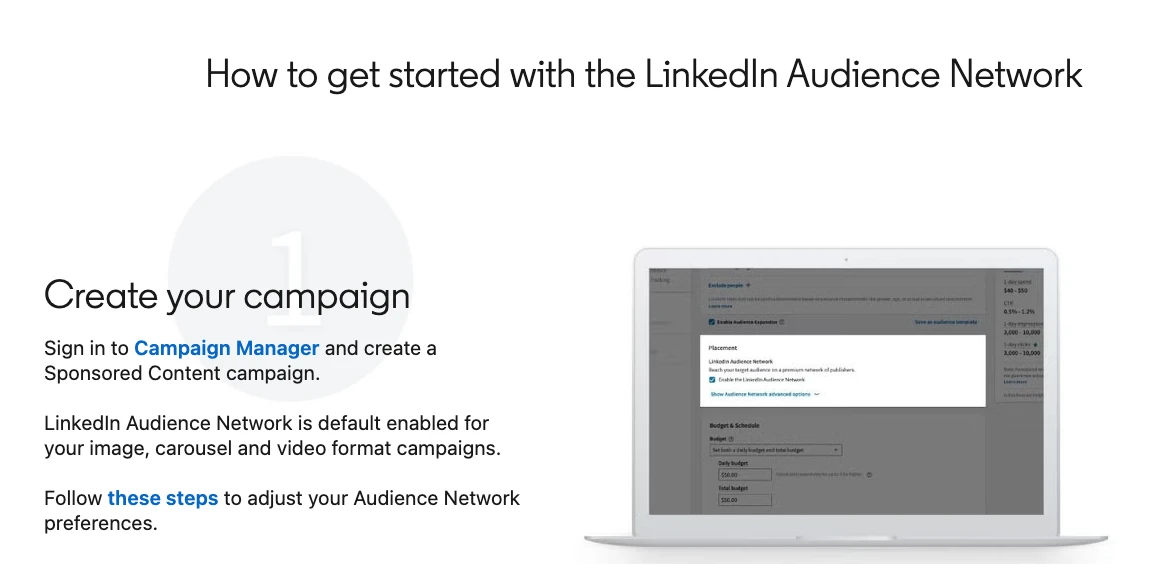
Short answer: several. Google includes search partners by default and switches AI Max on in new Search campaigns. Meta now manages placements for Sales, Leads and App promotion campaigns. LinkedIn enables its Audience Network by default for image, carousel and video campaigns.
None of these is wrong on its own. Each one sends some budget beyond the place you thought you were buying. The audit question is whether that extra reach brings qualified leads at a cost you accept.
| Setting | Default | What to check |
|---|---|---|
| Google search partners | Included | Leads by network segment |
| Google AI Max | On in new Search campaigns | New search terms and landing pages |
| Google Display Expansion | Moves to channel priority, Feb 2027 | Display spend and leads |
| Auto-applied recommendations | Check if switched on | What was applied, in History |
| Google location option | Presence or interest | Clicks from outside your area |
| Meta placements | Managed for Sales, Leads, App | Account controls and value rules |
| LinkedIn Audience Network | On for image, carousel, video | On and off network results |
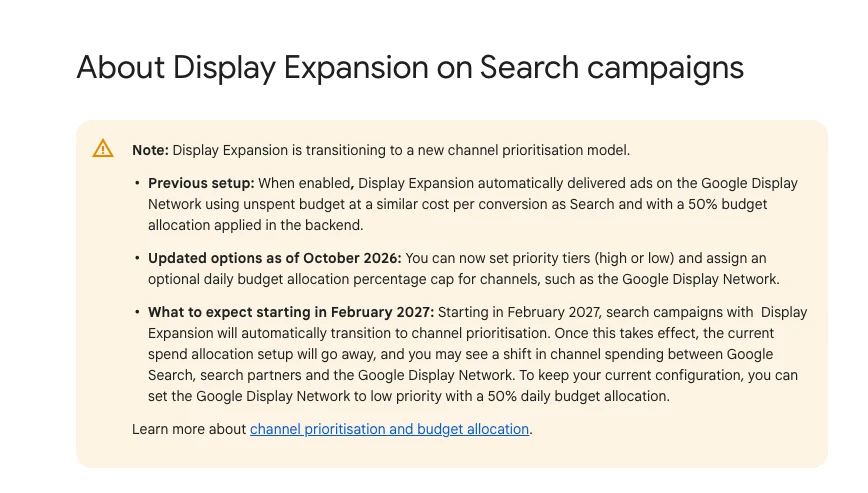
Google's channel prioritisation controls, rolling out since October 2026, let you set Search, search partners and Display to high or low priority, with an optional daily budget cap per channel. For Performance Max, the channel performance report shows where spend went. The Google Ads guide covers Performance Max search terms and negatives step by step.
Meta changed the rules this autumn. Its help page, What's new in placement settings, says that for Leads, App promotion and Sales campaigns you no longer choose placements manually at the ad set level, and that the change is rolling out gradually. The remaining levers are per-placement creative, placement value rules that raise or lower bids, and account-level exclusions by objective.
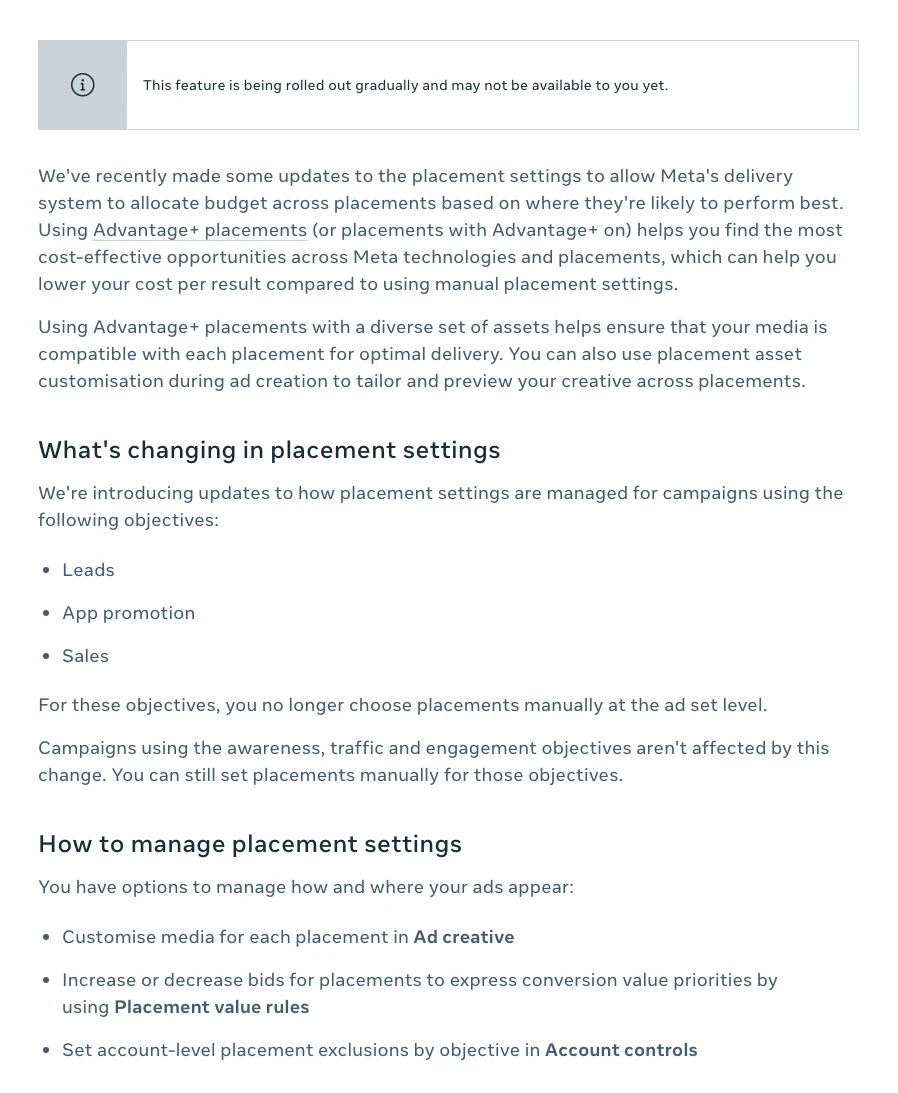
Value rules do not switch a placement off. Trade press reports that bid cuts are capped at 90% (PPC Land, August 2026), so only account controls act as a hard stop. Before this, Meta had already let Sales and Leads campaigns spend up to 5% of budget on each excluded placement; trade press reported the box arrived ticked in Ads Manager (PPC Land, October 2025).
Step 3: Is creative fatigue raising your costs?
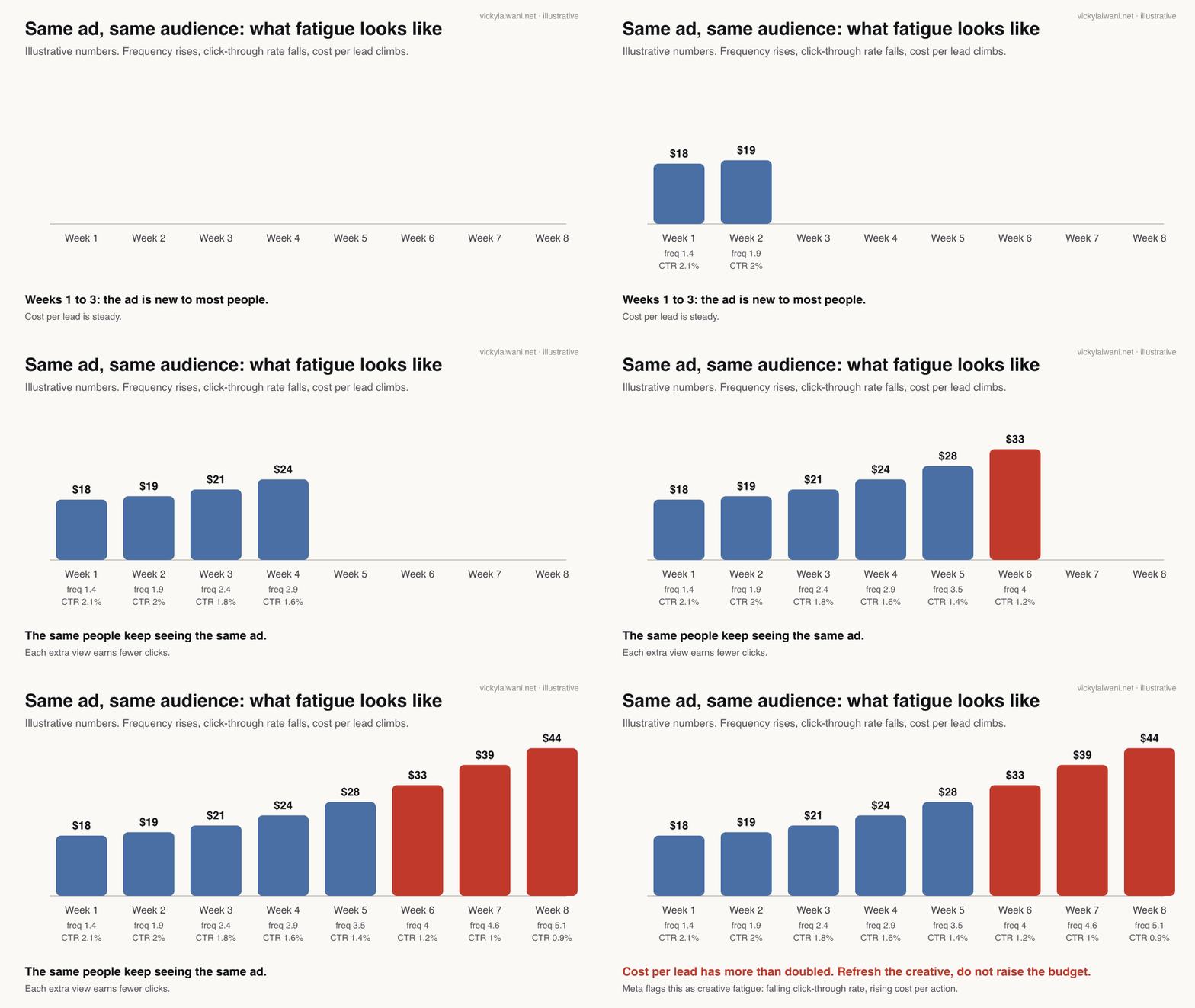
Short answer: it is when frequency keeps rising while click-through rate falls and cost per result climbs, with the audience and budget unchanged. Meta describes fatigue in exactly those terms. The fix is new creative, not more budget.
Meta's developer documentation for its creative fatigue alert says fatigue rises as an audience sees the same creative repeatedly, and usually shows up as a falling click-through rate and a rising cost per action. The alert grades it low, medium or high.
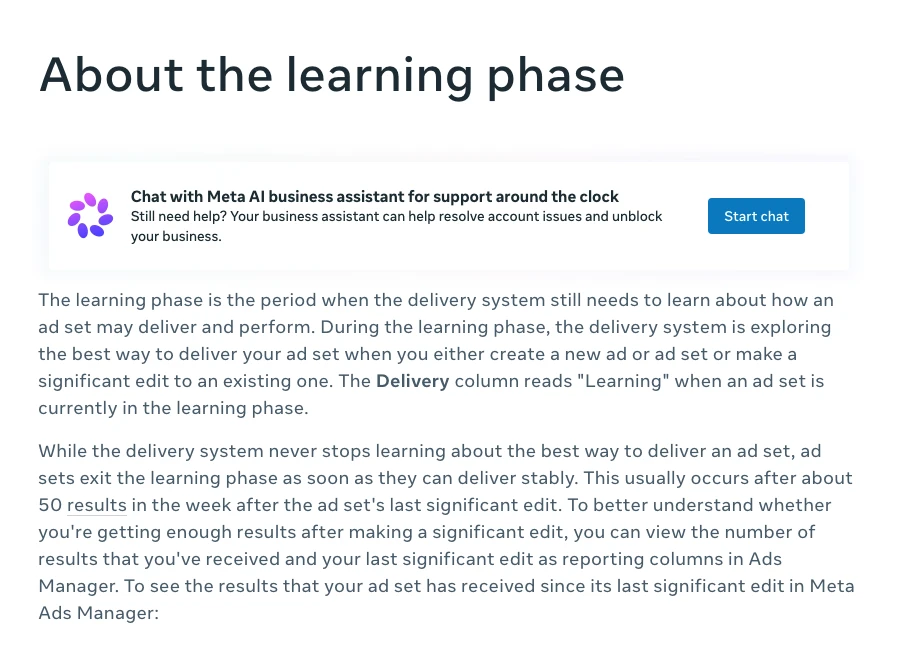
Do not mistake the learning phase for fatigue. Meta's learning phase page says ad sets usually exit learning after about 50 results in the week after the last significant edit, and that edits can send them back. An audit that pauses and relaunches ads every week keeps the account learning and paying for it.
Two habits from Meta accounts I have taken over. First, ask how the business advertised before. Boosted posts often run the same offer several times as separate posts, competing with each other. Second, read the offer off every live creative. Old ads can keep advertising a discount that has since changed.
Step 4: Are two platforms paying for the same customer?
Short answer: often, yes. Brand searches, retargeting audiences and people who see ads on both Google and Meta get claimed by more than one platform. Add the platforms' leads together and compare the total with the CRM.
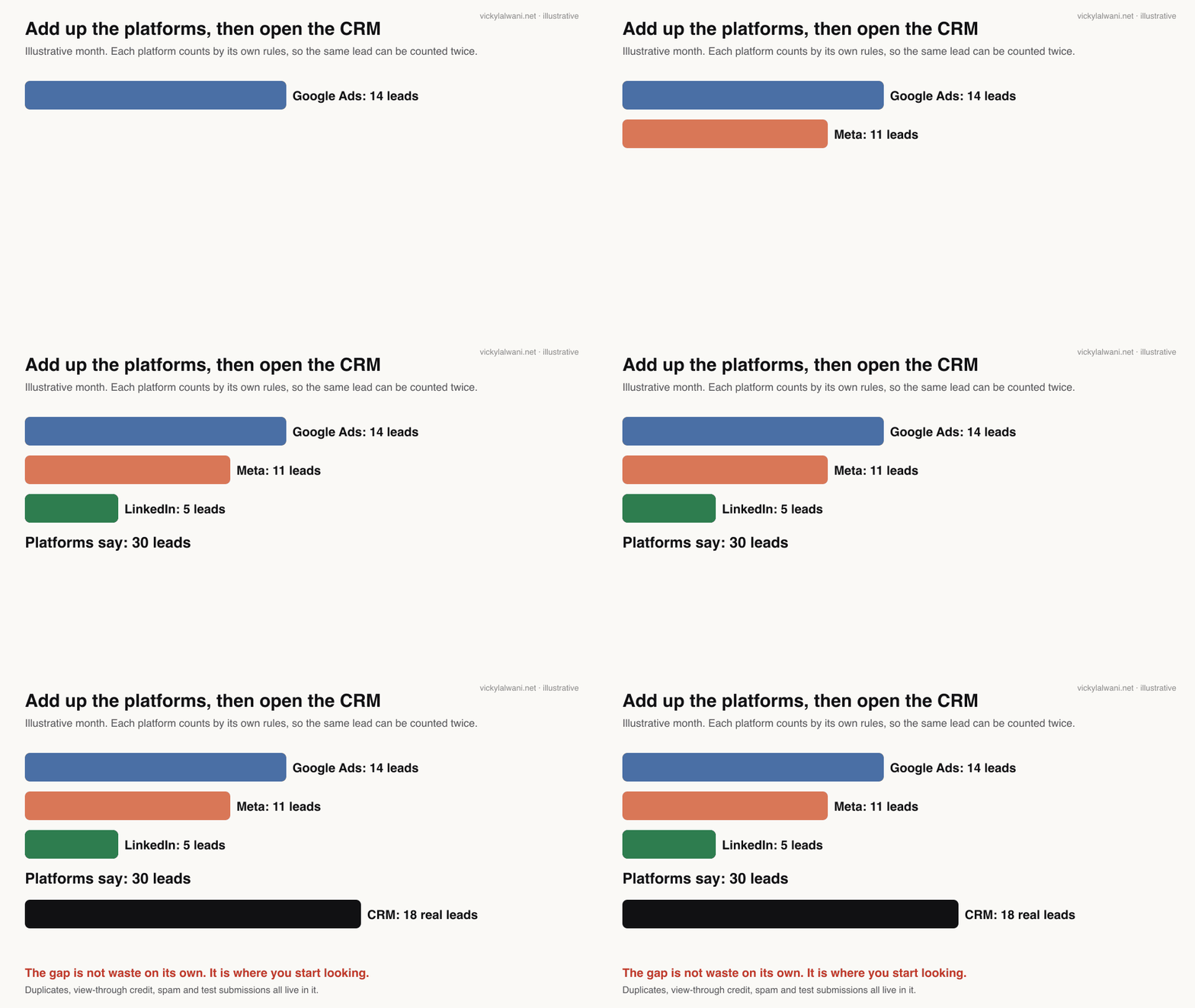
The gap is not waste by itself. It holds duplicates, view-through credit, spam and test submissions. The audit job is to sort it. Three overlaps to check first:
- Brand search. Are you paying for searches of your own name that would have reached you anyway? Look at brand campaigns and at brand terms inside Performance Max.
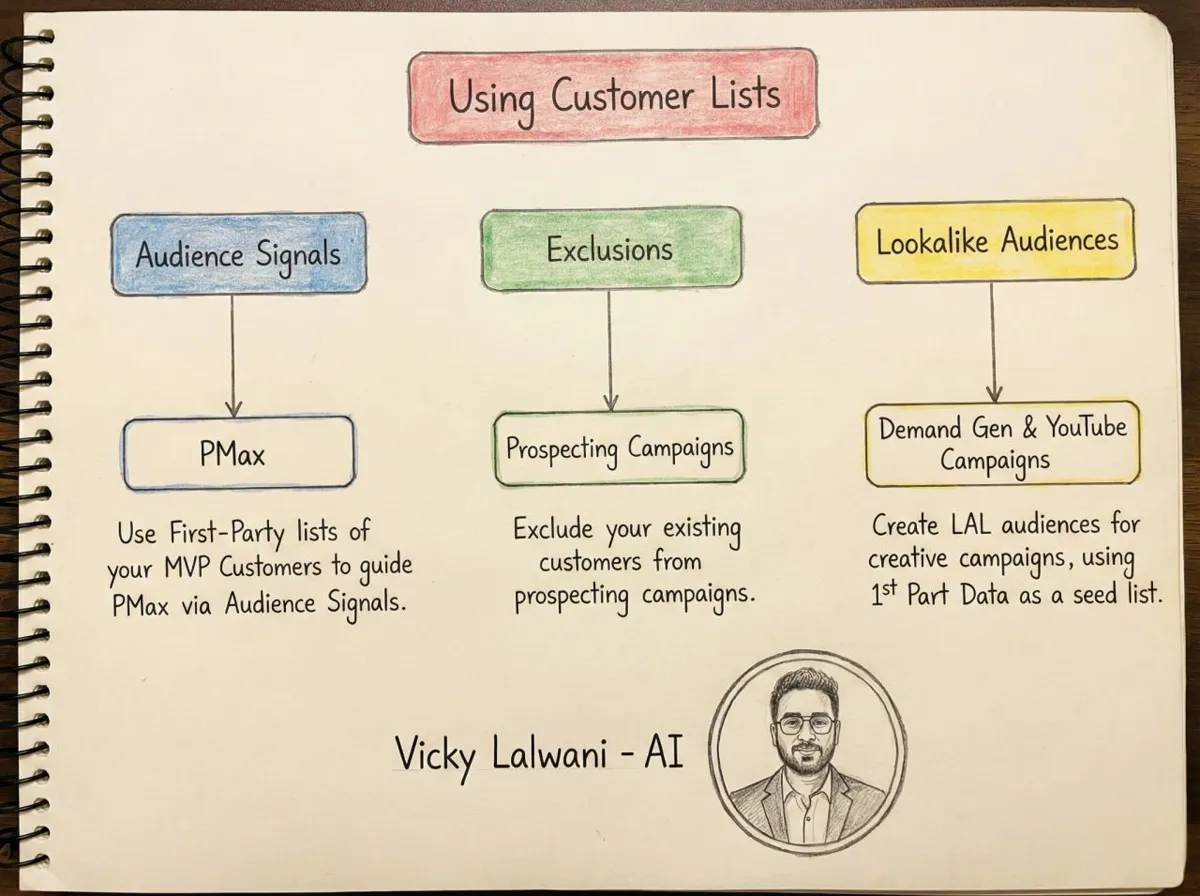
- Retargeting. Are Google and Meta both chasing the same recent visitors? Check audience sizes and frequency on each.
- Prospecting that turns into search. Someone sees a Meta ad, then searches your name and clicks a Google ad. Both platforms may count the lead.
For a reporting view that puts the channels side by side, see my Google Ads and Meta cross-channel report.
Step 5: Where should the budget move?
Short answer: towards the channel with the lowest cost per qualified lead or sale in your CRM, in steps, with a date to judge the move. Never move money on platform-reported cost per lead alone.
When I test a new channel on an account, I run it side by side with the current one and set the date to judge it before launch. That stops a weak channel living on because nobody chose to end it.
| Finding | Action | Who approves |
|---|---|---|
| Tracking counts the wrong thing | Fix before judging spend | Owner and analyst |
| Setting sends spend you did not plan | Lower priority or exclude | Account manager |
| Fatigued creative | New creative, same budget | Creative lead |
| Overlap on brand or retargeting | Cap or remove on one platform | Owner |
| Channel costs more per sale | Move budget in steps | Owner, with a review date |
Expect each platform to need time after a change. Meta ad sets relearn after significant edits, and Google warns that budget-limited campaigns using target bids now move towards the target you set, so check targets when budgets shift (see the August 2026 bidding change).
How Claude skills make the audit repeatable
Short answer: a skill is a saved folder of instructions that Claude loads when your request matches it, so the same audit steps run the same way every month. It gives you consistency, not judgement: a person still approves every change.
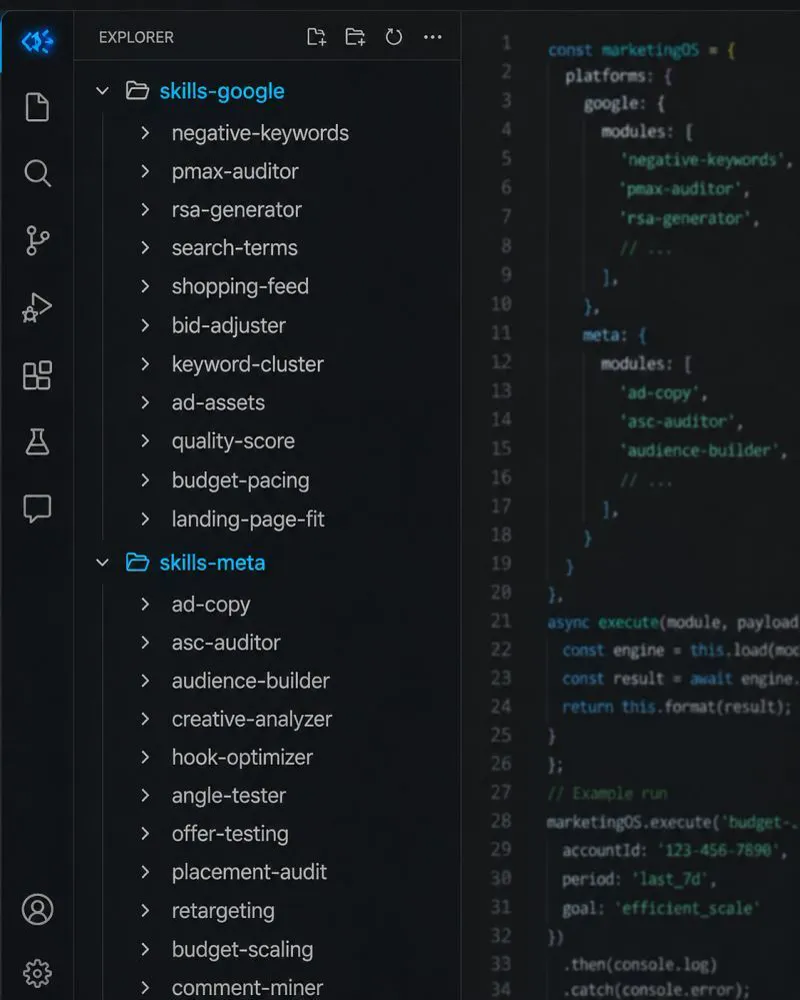
Anthropic's Agent Skills documentation describes a skill as a folder with a SKILL.md file. Its frontmatter needs a name (up to 64 characters, lowercase letters, numbers and hyphens) and a description (up to 1,024 characters) that says what the skill does and when to use it. Claude reads only the name and description until a request matches, then loads the instructions.
Custom skills work in Claude Code, through the API and in the Claude apps with code execution switched on; Claude's help centre lists the plans. Skills do not sync between the apps, Claude Code and the API, so keep one master copy. Anthropic's security advice is plain: use skills only from sources you trust, and audit any you did not write.
"What are skills?", Claude's official channel, February 2026. A short product explainer; it sells nothing beyond Claude itself.
These are the skill files I would write for a cross-channel audit. They are different from the Google-only set in the Google guide, which goes deeper on search terms and negatives.
| Skill | What it does | Platform |
|---|---|---|
| Tracking reconciler | Platform leads against CRM leads | All |
| Primary conversion checker | Flags clicks counted as leads | Google, LinkedIn |
| Event deduplication check | Pixel and server event overlap | Meta |
| Default settings sweep | Partners, AI Max, placements | All |
| Creative fatigue scorer | Frequency, CTR and cost trend | Meta |
| Offer checker | Reads offers off live ads | Meta, Google |
| Overlap finder | Brand and retargeting claimed twice | All |
| Audience size check | Small or expanded audiences | LinkedIn, Meta |
| Budget shift memo | Cost per qualified lead by channel | All |
| Owner summary | Five lines in plain words | All |
Here is a starting SKILL.md for the monthly audit. Copy it into a folder named paid-media-waste-audit and edit the inputs to match your exports.
---
name: paid-media-waste-audit
description: Monthly wasted-spend audit across Google Ads, Meta and LinkedIn exports. Use when the user asks for a paid media audit, a cross-channel waste review or "where is our ad money going".
---

# Paid media waste audit

## Inputs (ask for anything missing, never guess)
- Last 30 and previous 30 days, per platform: spend, results, cost per result, by campaign
- CRM export for the same dates: lead source, campaign if known, status (qualified, won, junk)
- The business's target cost per qualified lead and any protected campaigns

## Steps
1. Tracking: list each platform's primary conversion actions. Flag any that count button clicks, page views or duplicates as leads.
2. Reconcile: compare platform-reported leads with CRM leads by source. Show the gap per platform. Do not call the gap waste; list likely causes.
3. Settings: check search partners, Display, AI Max and auto-applied recommendations in Google; placement settings and account controls in Meta; Audience Network and audience expansion in LinkedIn.
4. Fatigue: flag Meta ads where frequency rose and click-through rate fell for two weeks in a row.
5. Overlap: list brand searches and retargeting audiences that more than one platform claims.
6. Budget: rank campaigns by cost per qualified lead from the CRM, not by platform cost per result.

## Output
One table per platform: finding, evidence (numbers and dates), proposed action, risk if wrong, owner.
Then a five-line summary for the business owner. Change nothing. Every action needs human approval.
For live data, Google publishes an open-source Google Ads MCP server (MCP is an open standard for connecting tools to AI assistants such as Claude). Its README lists a search tool that reads the account with GAQL, Google's query language for ads data, for reading the account, plus a few write tools for assets and labels that need a propose-and-confirm step; it notes how to run it strictly read-only. I connect accounts read-only for audits and keep changes in the platform, by hand, after approval.
Where AI goes wrong on audits is predictable. An agent-built Google Ads plan, for example, can carry search volumes far too low if nobody checks them against Keyword Planner. AI-assisted plans can also carry an old discount forward from earlier context. Both are why every finding needs evidence, and every change needs a person.
What people say on X and Reddit
Short answer: practitioners agree on one rule, never add the platforms' conversions together, and disagree on which channel wins. Each post and thread below was opened and checked on 17 November 2026; Reddit is credited by community only.
| Where | Date | What it says | Type |
|---|---|---|---|
| Google Ads liaison, X | 14 Oct 2026 | Channel priority and budget caps arrive | Official |
| A Meta tracking specialist, X | 3 Dec 2025 | Codeless events behind poor deduplication | First-hand |
| A PPC agency, X | 4 Nov 2026 | Claude plus Google Ads wasted-spend prompts | Vendor |
| Anthropic, X | 16 Oct 2025 | Tips for building Agent Skills | Official |
| r/PPC | Sep 2026 | Meta and Google claim 67; GA4 sees 45 | First-hand |
| r/PPC | Jun 2026 | Platforms, GA4 and CRM never agree | Opinion |
| r/PPC | Nov 2026 | Meta beat Google on cost per purchase | First-hand |
| r/FacebookAds | Aug 2026 | Winning creatives die faster | First-hand |
On X: the controls and the plumbing.
- Google's ads liaison account announced channel prioritisation and budget allocation as optional controls over where Search and Performance Max budgets go. That is the Google lever for the default-settings step.
- A Meta tracking specialist traced many poor event coverage and deduplication scores to events added with Meta's codeless setup tool. Check what else is sending events before trusting Meta's results.
- A PPC agency shared a free Claude and Google Ads setup with prompts for wasted spend, brand cannibalisation and auto-apply checks. It is a lead magnet, but the checks match this guide.
- Anthropic's account pointed developers to its engineering post on Agent Skills, described as folders of instructions, scripts and resources.
On Reddit: the counting problem comes first.
- In one r/PPC thread, an advertiser who inherited accounts saw Meta claim 22 purchases and Google 45, while GA4 showed 6 and 39. The most upvoted reply: never sum platform numbers. Another pointed out that Google kept most of its claim in GA4 and Meta kept little, which points to a tracking fault, not just attribution.
- Another r/PPC post argued that Google Ads, Meta, GA4 and the CRM count different things on purpose, so chasing a perfect match wastes time. Commenters agreed on the substance and called the post basic.
- A B2C subscription app ran Google and Meta side by side and found Meta cheaper per purchase. Replies challenged the maths and suspected that brand search was flattering Google's best campaign. A good example of why you compare like with like.
- On r/FacebookAds, advertisers said winning creatives fade faster than before. The pushback: fatigue gets blamed for problems that are really audience size or a weak offer, and one rule of thumb was to act on cost per result sitting high for several days, not on one bad day.
Videos worth watching
Short answer: start with Meta's two-minute explainer on creative fatigue and Claude's own skills explainer, then the practitioner videos on Meta's placement change. Each was checked on 17 November 2026.
"Solving creative fatigue with strategies to refresh your ads", Meta for Business, February 2026. Official and short; it points to Meta's free Blueprint courses.
| Video | Channel | Date | What it covers |
|---|---|---|---|
| Solving creative fatigue | Meta for Business | Feb 2026 | Creative variety to slow fatigue |
| Advantage+ sales campaigns | Meta for Business | Feb 2026 | Excluding existing customers |
| What are skills? | Claude | Feb 2026 | What a skill is |
| Claude Agent Skills Explained | Anthropic | Nov 2025 | How skills load |
| Meta removed manual placements | A Meta ads educator | Oct 2026 | Value rules, account controls |
| Meta is removing ad placements | A Meta ads coach | Sep 2026 | What to do instead; sells a course |
Where this advice is weak
Short answer: benchmarks are US averages, platform features are still rolling out unevenly, and a CRM is only as good as the people who update it. Treat every number here as a starting point for your own data.
- The LocaliQ benchmarks come from one vendor's customer base and are reported in US dollars. They show the shape of the problem, not your costs.
- Meta's placement change is rolling out gradually, so your account may still show the old controls. Check your own Ads Manager.
- Reconciling against a CRM assumes leads are tagged with their source. If they are not, the first job is fixing that, and it may take a month of clean data.
- This guide does not cover retail media, TikTok or programmatic in depth. The same five steps apply, but the settings differ.
- Skills make an audit repeatable. They do not make it right. A skill can repeat a wrong rule every month until someone notices.
Want a second pair of eyes on your paid media?
Short answer: if the platforms disagree with your CRM, or nobody can say which channel earns your best customers, an outside audit usually pays for itself in the first month of clearer decisions.
I run paid media audits across Google, Meta and LinkedIn: tracking first, every finding in a sheet with its evidence, and no change until you approve it. See PPC and Google Ads management, Meta ads, analytics and tracking or, if you want the skills set up for your team, Claude consulting. Prices are on the pricing page.
Running Google Ads only? Read the step-by-step Google Ads wasted spend guide. I also work with advertisers in the UK, Australia and the USA.
Sources
| Source | What it supports | Date | Link |
|---|---|---|---|
| Google Ads Help | Primary conversions, enhanced conversions for leads | 17 Nov 2026 | Primary and secondary, leads |
| Google Ads Help | Search partners, Display Expansion, channel priority | 17 Nov 2026 | Partners, Display, priority |
| Google Ads Help | AI Max default, auto-apply, location option | 17 Nov 2026 | AI Max, auto-apply, location |
| Google Ads Help | Channel report, PMax negatives, target change | 17 Nov 2026 | Channels, negatives, targets |
| Meta Business Help Centre | Placement settings, learning phase, windows | 17 Nov 2026 | Placements, learning, windows |
| Meta for Developers | Creative fatigue, limited spend, deduplication | Sep 2026; Oct 2025 | Fatigue, limited spend, dedup |
| Audience Network on by default | 17 Nov 2026 | Audience Network | |
| WordStream by LocaliQ | Search and Facebook cost per lead, 2026 | Jun 2026; Sep 2026 | Search, Facebook |
| Anthropic | Agent Skills format, availability, security | 17 Nov 2026 | Docs, help centre |
| Google (GitHub) | Google Ads MCP server tools | 17 Nov 2026 | Repository |
| PPC Land; a Meta ads educator | Placement change reports | Oct 2025 to Oct 2026 | 5% spend, value rules, clarified |
| X and Reddit | Official posts, first-hand reports, opinion | Oct 2025 to Nov 2026 | Linked in the text |
| YouTube | Six videos, titles checked by oEmbed | Nov 2025 to Oct 2026 | Linked in the videos table |
This article expands on my post on LinkedIn ↗.
FAQ
What is a paid media audit?
A paid media audit reviews every paid advertising channel a business uses, such as Google Ads, Meta and LinkedIn, against the same business result. It checks tracking, default settings, creative fatigue and overlap between platforms, then ranks channels by cost per qualified lead or sale from the CRM. The output is a list of findings with evidence and proposed actions for approval.
How is a paid media audit different from a Google Ads audit?
A paid media audit compares all your ad channels on one outcome and decides where budget should go. A Google Ads audit goes deep inside one account: search terms, negative keywords, bidding and settings. Most advertisers need the cross-channel view monthly and the Google Ads checks weekly.
How do you find wasted ad spend across Google and Meta?
Start by checking that Google Ads and Meta count real leads once, then compare their claimed leads with your CRM. Next, check default settings such as Google search partners, AI Max and Meta placements, look for Meta creative fatigue, and find brand or retargeting audiences that both platforms claim. Move budget only on cost per qualified lead from the CRM.
Why do Google Ads and Meta report more conversions than my CRM?
Google Ads and Meta each credit conversions by their own attribution rules, so one customer can be counted by both. Meta's default counts conversions within 7 days of a click, 1 day of a view and 1 day of an engagement. Duplicated events, spam and test submissions add to the gap, so never add platform totals together.
Is a Facebook lead cheaper than a Google search lead?
Usually per lead, not always per customer. In WordStream by LocaliQ's 2026 benchmarks, Facebook leads-objective campaigns averaged $27.39 per lead against $66.69 for search ads. Search leads often come from people already looking for the service, so compare cost per qualified lead or per sale from your own CRM.
Can I still exclude placements in Meta Ads Manager?
For Sales, Leads and App promotion campaigns, Meta says you no longer choose placements manually at the ad set level, and the change is rolling out gradually. You can still set account-level placement exclusions by objective in Account controls and adjust bids with placement value rules. Awareness, Traffic and Engagement campaigns keep manual placements.
How often should I run a paid media audit?
Run the full cross-channel audit monthly and before any big budget change. Weekly, check search terms in Google Ads and frequency and cost per result in Meta. A saved Claude skill makes the monthly run consistent, so you can compare one month with the next.
Can Claude audit my Google Ads and Meta accounts?
Claude can run a repeatable first pass over exports or a read-only connection, using a saved skill that lists the checks and the output format. Google publishes an open-source Google Ads MCP server for reading account data. A person should check every finding and make every change, because AI can misread intent, seasonality and small samples.