Google Ads customer match matches contact details your customers gave you to people signed in to Google. Use it three ways: a list of your best customers as a Performance Max audience signal, a list of all customers as an exclusion or with the new customer acquisition goal, and recent buyers as a seed for Demand Gen lookalike segments. Lists need 100 active users to serve, memberships expire after 540 days, Smart Bidding now uses every list in the account automatically, and new integrations go through Data Manager.
Your CRM holds thousands of past customers. Your Google Ads account knows almost none of them. So a prospecting campaign pays for clicks from people who bought last month, and Performance Max starts every test from a blank page. Customer match is how you close that gap. If you would rather have someone set it up and check it, that is part of my Google Ads management work.
TL;DR
What it is: customer match lets you upload or sync customer contact data so Google can match it to signed-in users. It works on Search, the Shopping tab, YouTube, Gmail and Display.
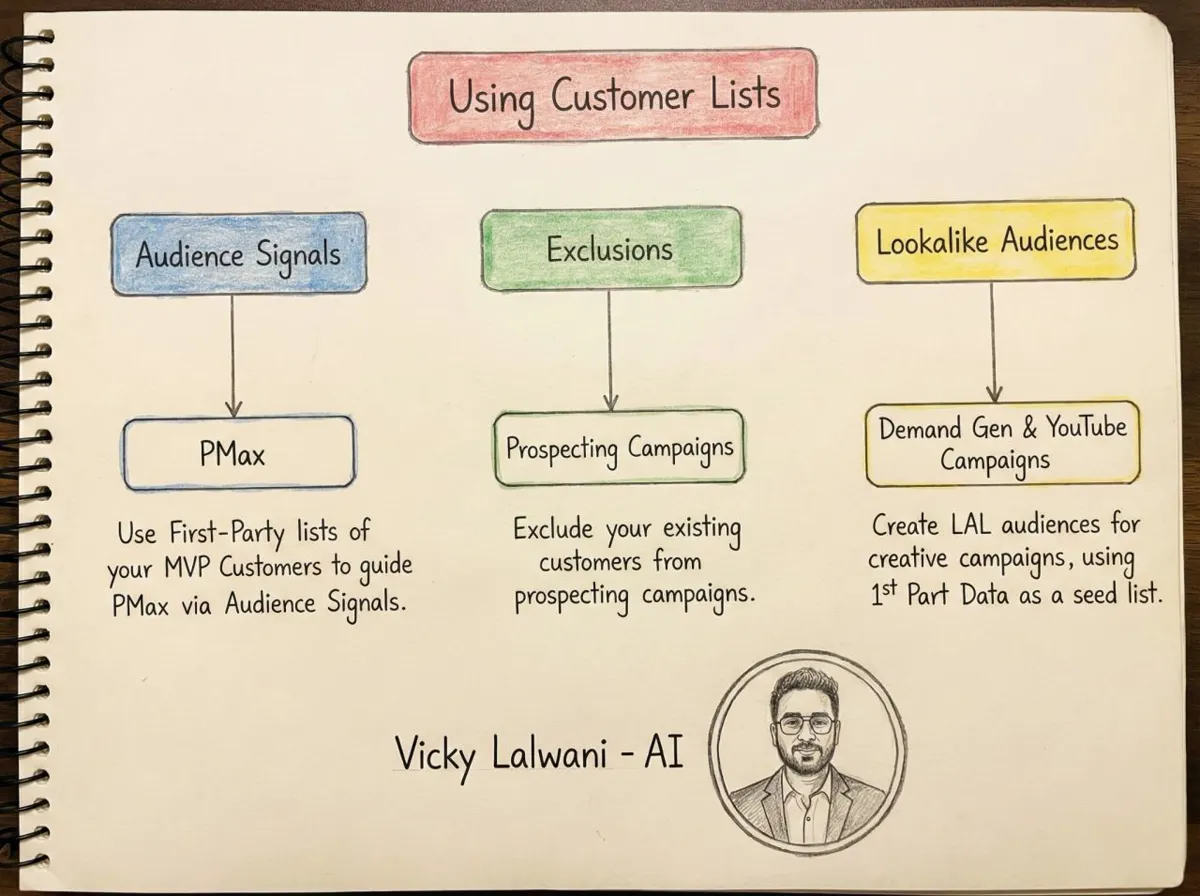
Three uses: a signal that tells Performance Max who your best customers are, an exclusion that stops prospecting campaigns paying for people who already bought, and a seed for lookalike segments in Demand Gen.
What changed by November 2026: lists need 100 active users to serve, memberships expire after 540 days, Performance Max can now exclude customer lists outright, and new integrations go through Data Manager, not the Google Ads API.
The catch: smaller accounts can use lists for observation and exclusions only. Targeting and manual bid adjustments need 90 days of history and more than USD 50,000 lifetime spend.
Jump to: What it is · Eligibility · List size · Signals · Exclusions · Lookalikes · Setup · Refresh · X and Reddit
A note on evidence. Platform rules come from Google Ads Help, Google's policy pages and Google's developer blog, read on 17 November 2026 and linked where I use them. Practitioner views come from X and Reddit and are labelled as opinion. Where I write "I", it describes how I work on accounts in general. I do not share client names or client results, so every number with no source link is a worked example.
What is Google Ads customer match in 2027?
Short answer: customer match is a Google Ads feature that matches contact details you collected yourself, such as emails, phone numbers or name and postcode, to people signed in to Google. You can then reach them, leave them out, or let bidding learn from them. Only first-party data is allowed: details customers gave you directly.
Think of it as telling Google, privately, "these people already know us." What Google does with that depends on the campaign. In a Search campaign it can raise or lower bids for them. In Performance Max it is a starting hint. In Demand Gen it can seed a lookalike segment, which is an audience of people who resemble your list.
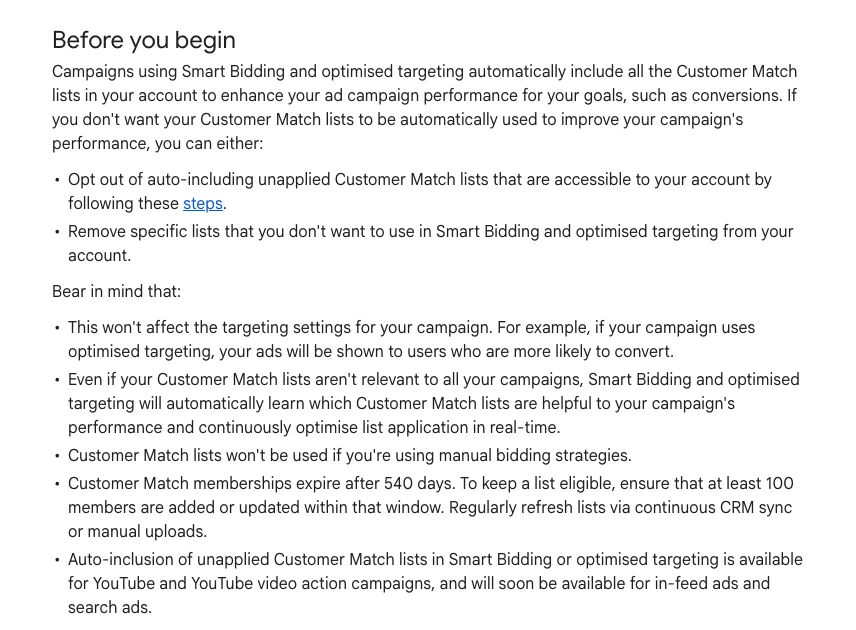
One change matters more than any other since this article first went up. Campaigns using Smart Bidding and optimised targeting now include all the Customer Match lists in your account automatically. Smart Bidding is Google's automated bidding that sets a bid for each auction. So once a list is uploaded, bidding can use it even in campaigns where you never added it. You can opt out, or remove lists you do not want used.
What changed between 2025 and November 2026.
| When | Change | What to do |
|---|---|---|
| Apr 2025 | 540-day maximum membership | Schedule refreshes |
| May 2025 | Search lists drop to 100 users | Test smaller lists |
| Dec 2025 | 100 users on YouTube too | Same, for video |
| Mar 2026 | Lookalikes move to suggestion mode | Opt out if you need a hard limit |
| Mar 2026 | Performance Max list exclusions | Use for suppression |
| Apr 2026 | No new Customer Match adopters on the Google Ads API | Build on Data Manager |
| Jun 2026 | Conversion-based lists switched on | Check account settings |
Can your account use customer match?
Short answer: almost any account with a good policy and payment history can use customer match for observation and exclusions. Using it for targeting, or with manual bid adjustments, needs 90 days of Google Ads history and more than USD 50,000 of lifetime spend. Google converts other currencies to US dollars to check the threshold.
That split decides which of the three uses below are open to you. Observation means the list is attached to a campaign for reporting and bidding, but ads still show to everyone. Targeting means ads show only to people on the list. Exclusion means people on the list do not see the ads.
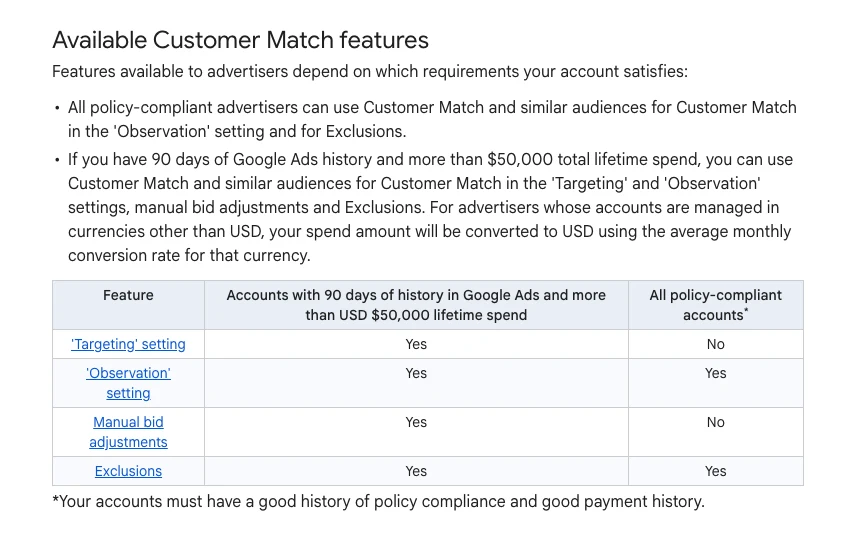
| Feature | Most accounts | USD 50,000+ and 90 days |
|---|---|---|
| Observation | Yes | Yes |
| Exclusions | Yes | Yes |
| Targeting only the list | No | Yes |
| Manual bid adjustments | No | Yes |
| Smart Bidding learning | Yes, automatic | Yes, automatic |
The last row is the one most small advertisers miss. Because lists are now auto-included in Smart Bidding, a smaller account still gets value from an upload, even without targeting rights. Manual bidding strategies do not use the lists at all.
The policy also rules some uses out. You cannot upload data on children under 13, write ads that imply you know personal details about the viewer, or use customer match for sensitive categories such as pharmaceutical products. You also need a privacy notice that says you share data with service providers, and consent where the law requires it. That is a policy summary, not legal advice. Ask a privacy professional about your own case.
One access detail trips people up. Only account owners and people with administrator access can add or remove customer data. If a freelancer or agency was given Standard access, they will not be able to upload the list.
How big does a customer list need to be?
Short answer: a customer list needs at least 100 active users to serve on Search, Display or YouTube, and each uploaded file needs at least 100 records. Google says most match rates fall between 29% and 62%, so plan on uploading several hundred customers at the very least.
Two numbers decide whether your list works. The first is the match rate, which Google puts at 29% to 62% for most advertisers. A match rate is the share of your uploaded rows Google can link to a Google account. The second is the minimum list size. Search, Display and YouTube each need 100 active visitors or users within the last 30 days, and customer lists have the same rule.
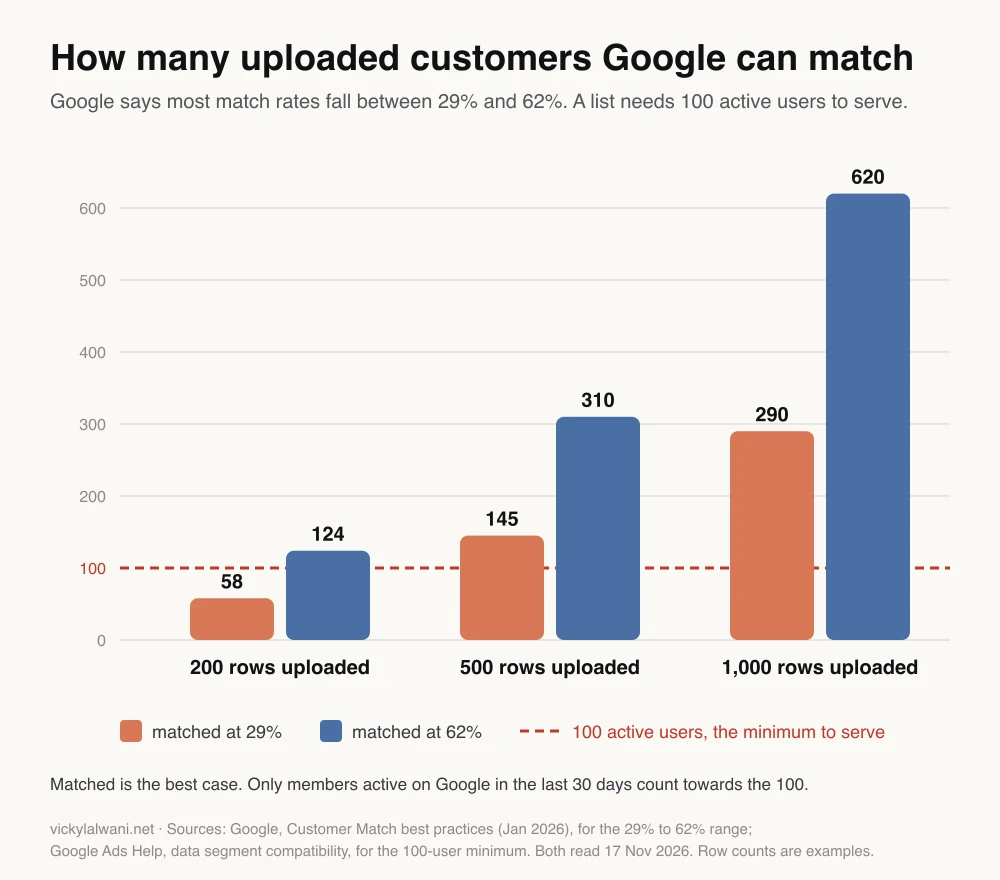
A worked example. A business with 200 past customers uploads them. At a 29% match rate that is 58 matched people, under the 100 needed to serve. At 62% it is 124, just over. Then only those active on Google in the last 30 days count, so the real figure is lower again.
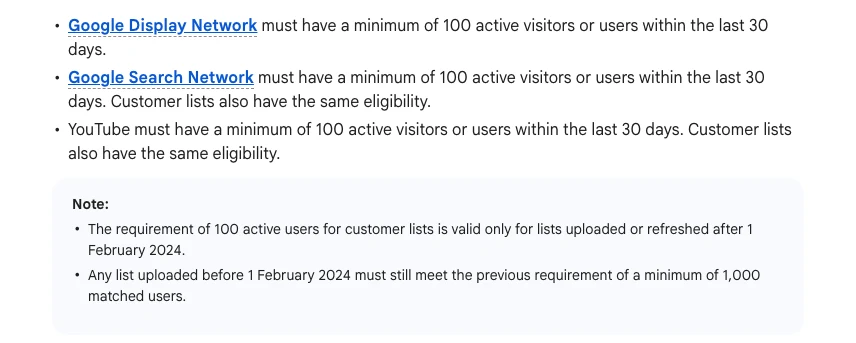
Look at the note under the rule. A list last uploaded before 1 February 2024 still needs 1,000 matched users. If you inherited an account with old lists that show as too small, re-uploading them may be the whole fix.
To lift the match rate, Google suggests uploading every identifier you hold for each customer in the same row: email, phone and name with postcode. Business-to-business lists tend to match worse, because work emails are often not Google accounts. Enhanced Matching, a newer account setting, aims to match emails that are not tied to Google accounts through publisher data, with memberships of up to 60 days.
What are the three best ways to use customer match?
Short answer: use one list three ways: as a Performance Max audience signal built from your best customers, as an exclusion that keeps existing customers out of prospecting campaigns, and as a seed for lookalike segments in Demand Gen. Each job works best with its own segment of the list, not one big upload.
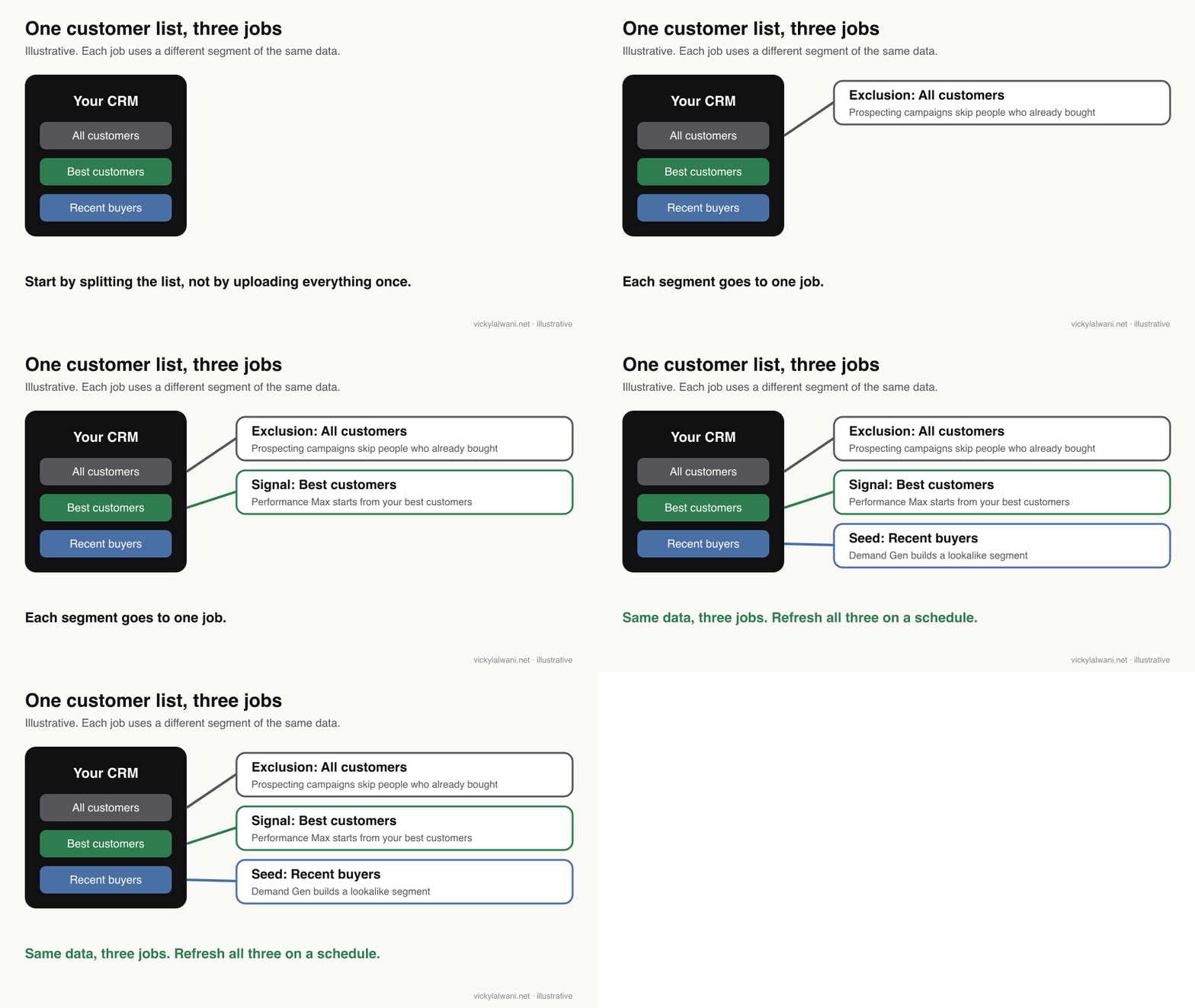
| Segment | Job | Where |
|---|---|---|
| All customers | Exclusion or new customer goal | Prospecting Search, Performance Max |
| Best customers | Audience signal | Performance Max |
| Recent buyers | Lookalike seed | Demand Gen, video brand |
| Lapsed customers | Win-back message | Separate campaign |
Use 1: a signal for Performance Max
Short answer: add a list of your most valuable customers to the asset group as an audience signal. A signal is a hint about where to start looking, not a fence. Performance Max can still show ads to anyone it thinks will convert, so the signal shapes the early weeks more than the long run.
Performance Max is Google's campaign type that runs across Search, YouTube, Display, Gmail, Discover and Maps from one budget. With little data, it guesses. A list of your best customers gives it a better first guess.
"Best" is the word that matters. A list of everyone who ever bought includes one-off bargain hunters. A list of repeat buyers, high order values or long-term clients tells the system what a good customer looks like. If you sell a few services, a list per service is more useful than one combined list.
Do not expect a signal to transform results on its own. Google's own figure is a 5.3% conversion uplift when advertisers applied Customer Match signals, from Google data for 2021 to 2022. That is a platform claim about its own product, and an average. Your result can be higher, lower or nothing.
Use 2: How do you exclude existing customers in Google Ads?
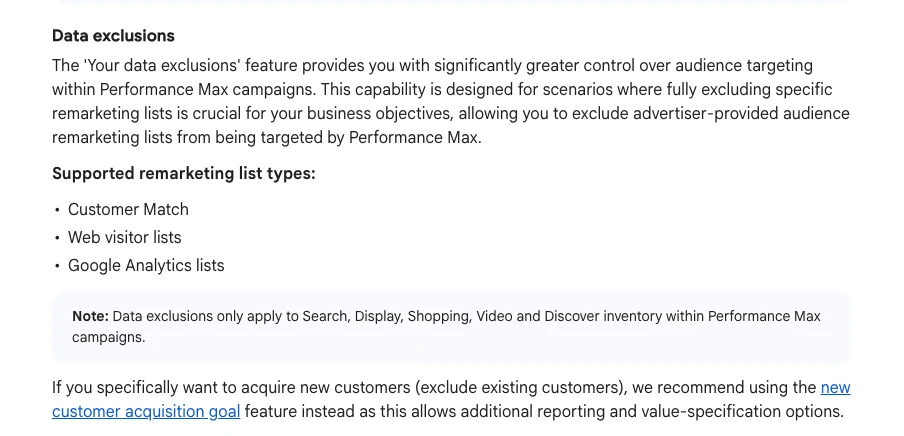
Short answer: there are now three ways. Add the list as an exclusion on a Search campaign. Use Your data exclusions in Performance Max, which went general in 2026. Or switch on the new customer acquisition goal and pick "only bid for new customers", which Google recommends when the aim is acquisition.
Excluding existing customers sounds simple, and it is the use that causes the most arguments. Paying for a click from someone who would have bought anyway wastes money. But returning customers often search for you by name, convert cheaply and are not reached by email every time.
| Option | What it does | Best for |
|---|---|---|
| List exclusion, Search | No ads to people on the list | Prospecting campaigns |
| Your data exclusions, Performance Max | Removes list members from most inventory | Hard suppression |
| Only bid for new customers | Bids only on new customers | Pure acquisition |
| Bid higher for new customers | Values new customers more | Growth with some repeat sales |
Google's help page is clear on which to pick for acquisition: use the new customer acquisition goal instead of a data exclusion, because it adds reporting and lets you put a value on a new customer. The new customer only mode works in Search, Performance Max, Shopping and Demand Gen. Google also says to run a separate campaign for existing customers when you use it.
Keep exclusions for suppression: current clients on a contract, staff, people who asked not to be marketed to, or closed lost leads you do not want to chase. Do not exclude customers from campaigns built to retain, upsell or cross-sell. Those need their own campaign and their own message.
Two practical warnings. Uploads can take up to 48 hours to process, so a new buyer is not excluded the moment they pay. And a list nobody refreshes slowly stops matching your real customers, so the exclusion leaks.
Use 3: Can customer match still find people like your customers?
Short answer: yes, but only in Demand Gen and video brand campaigns, through lookalike segments built from up to 10 seed lists. Narrow reaches about 2.5% of people in your target location, balanced 5% and broad 10%. From March 2026 Google is moving Demand Gen lookalikes to a suggestion mode by default.
Similar audiences, the older way to find people like your customers, have been retired. Lookalike segments took their place in Demand Gen. The seed lists together must have over 100 active matched people, and segments refresh every one to two days. Google suggests creating the segment two to three days before the campaign needs to serve.
| Reach option | Share of location | Use when |
|---|---|---|
| Narrow | About 2.5% | You want people closest to the seed |
| Balanced (default) | About 5% | Most tests |
| Broad | About 10% | You need volume |
The 2026 change matters. Under suggestion mode, the seed list acts as a signal for Google's models, so the narrow, balanced and broad slider no longer limits who sees the ads in the same way. If you need the old behaviour, Google offers an opt-out form. Recent buyers make the best seed, because they reflect who buys from you today.
How do you set it up step by step?
Short answer: segment the list, clean it, connect it through Data Manager or upload a CSV file, then attach each segment to the right campaign. In Google Ads, go to Tools, then Shared library, then Audience manager, and add a customer list. New API integrations should use the Data Manager API.
- Check you are allowed to use the data. Customers gave it to you directly, your privacy notice covers sharing with service providers, and you have consent where it is required.
- Segment it. All customers, best customers, recent buyers, lapsed customers. One file or one sync per segment.
- Clean it. Remove duplicates, test addresses and anyone who opted out. Follow Google's formatting rules: a CSV in UTF-8, English column headers such as Email, Phone, First name, Surname, Country and Postcode.
- Connect or upload. Google now recommends Data Manager for customer match. It connects sources such as BigQuery, Salesforce, Snowflake, cloud storage and SFTP. Google hashes the data with SHA256 if you have not.
- Attach each segment to one job. Best customers as a signal, all customers as an exclusion or new customer goal, recent buyers as a lookalike seed.
- Write it down. Which list feeds which campaign, how it refreshes, and who owns it.
| Column header | Format | Note |
|---|---|---|
| Lower case, no spaces | Strongest identifier | |
| Phone | E.164, such as +44... | Include the country code |
| First name, Surname, Country, Postcode | All four together | Address match needs all four |
| User IP address, timestamp | Unhashed | Not supported in the EEA, UK or Switzerland |
On handovers I treat the customer match upload as its own job on the checklist. It needs administrator access, the person who built the CRM export, and a decision on how it refreshes. When nobody owns it, it quietly stops.
A prompt to plan your segments with an AI assistant. Paste only your column names and counts, never customer data.
I run Google Ads for a business that sells [what you sell] to [who buys].
I want to build Google Ads customer match segments from my CRM export.
Do not ask me for any customer names, emails or phone numbers. Work only from the column names and counts below.

Columns in my export: [paste the header row only]
Rough counts: [total customers, repeat buyers, customers in the last 90 days, lapsed customers]
Campaigns I run: [for example Search prospecting, Performance Max, Demand Gen]

1. Suggest 3 to 5 segments, each with the rule to build it from my columns.
2. For each segment, say which job it does: audience signal, exclusion, new customer goal or lookalike seed, and which campaign it goes in.
3. Flag any segment likely to fall under 100 matched people if the match rate is 29% to 62%.
4. Suggest how often each segment should refresh.
5. List what I must check before uploading: consent, privacy notice and administrator access.
How often should you refresh a customer list?
Short answer: refresh it on a schedule, not when you remember. Google suggests weekly for manual uploads and at least daily for API uploads. Memberships expire after 540 days, and a list stays eligible only if at least 100 members are added or updated within that window.
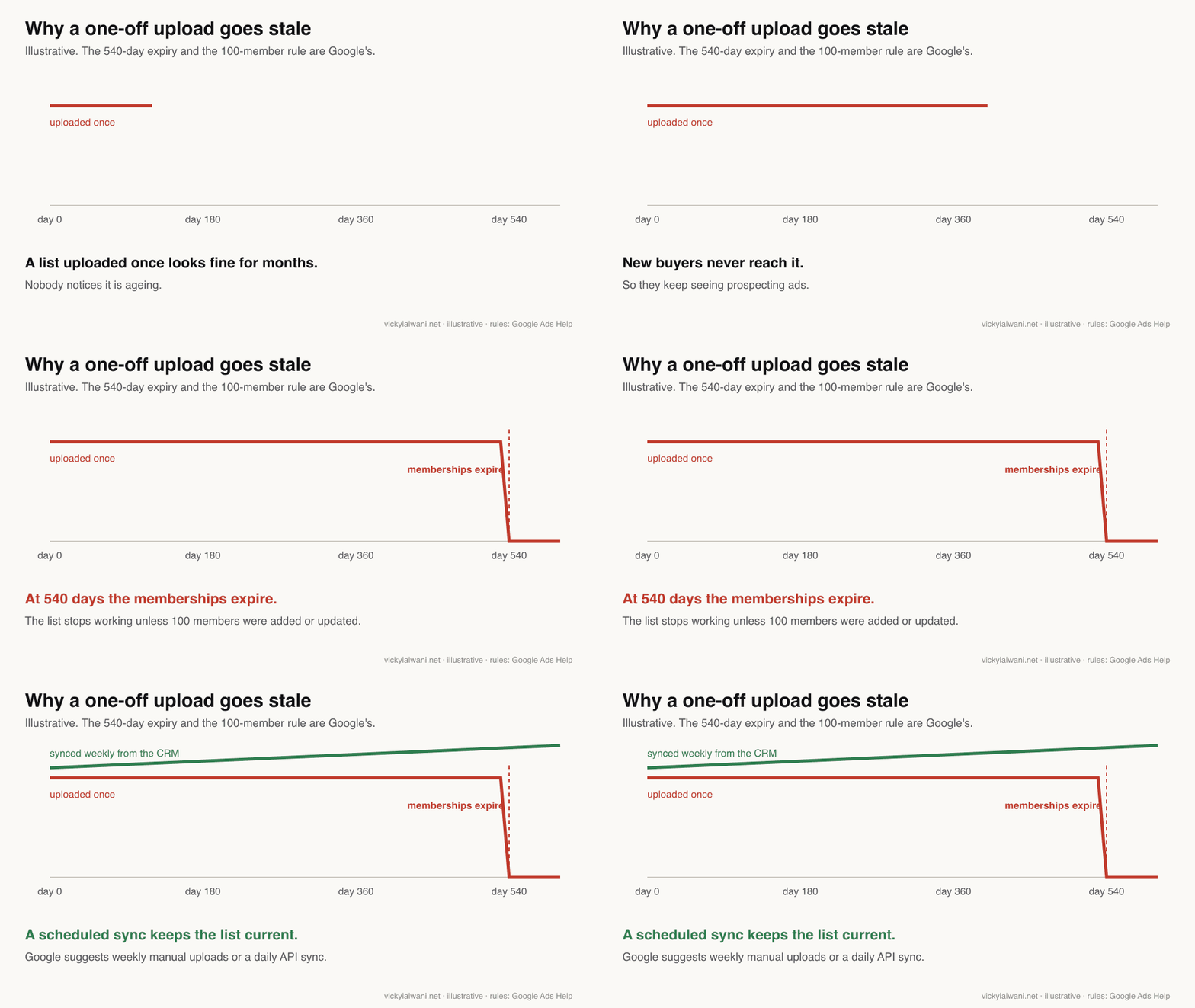
A stale list does damage in two directions. Exclusions miss recent buyers, so you pay to reach them again. Signals and seeds describe customers from a year ago. A scheduled sync from the CRM fixes both. Google lists Zapier as an integration partner for smaller set-ups that have no data warehouse.
Conversion-based customer lists. If you already use enhanced conversions, Google can build customer lists from the hashed data your conversion tag already sends, one list per conversion goal, kept up to date for you. Enhanced conversions is a setting that sends hashed customer details with each conversion to improve measurement. Google began switching this on for eligible accounts from 17 June 2026, with data processing from 18 August 2026, unless the advertiser opted out. Check Admin, then Account settings, then Customer match, to see whether yours is on.
How do you know whether customer match is working?
Short answer: judge it on new customer acquisition cost and lead quality, not total conversions. Total conversions can rise simply because the campaign found more existing customers. Google added a new customer acquisition cost column for campaigns that use the new customer goal, which is the cleanest number to watch.
Customer match changes who sees your ads, so a raw conversion count can mislead. A campaign that quietly shifts towards repeat buyers looks better on paper while bringing in fewer new customers. Split the result into new and returning before you decide.
For lead generation, the CRM is the real test. I reconcile the leads Google Ads reports against the leads in the CRM before I trust any change, and I keep campaigns in draft until every form and call is tracked. If your tracking is shaky, fix that first. My guide to conversion tracking with an event map covers it, and the analytics and tracking service is there if you want it done for you.
| Question | Where to look | Watch for |
|---|---|---|
| Is the list big enough? | Audience manager, list size | Under 100 active users |
| Is it matching well? | Match rate on upload | Well under 29% |
| Is acquisition working? | New customer acquisition cost | Rising cost per new customer |
| Is it current? | Last updated date | Older than your refresh plan |
Videos worth watching
Two to watch first, both checked on 17 November 2026.
A short guide to preparing data for Data Manager from Google Ads' own channel, published in April 2026. It is Google explaining its own tool, so it covers the how, not whether it pays off.
A long-form episode arguing that customer match matters more as bidding gets more automated, from a Google Ads coach's channel, published in June 2026. The channel sells coaching and training.
| Video | Channel | Date |
|---|---|---|
| Data Manager: data prep guide | Google Ads | Apr 2026 |
| Boost your ROI with Data Manager | Google Ads | Oct 2025 |
| You Need Customer Match | Google Ads coach channel | Jun 2026 |
| Customer Match tutorial 2026 | PPC agency channel | Jun 2026 |
| The new way Google wants your first-party data | Analytics training channel | Aug 2026 |
| Exclude audiences in Performance Max | Local marketing agency channel | Jan 2026 |
What people say on X and Reddit
Short answer: practitioners agree customer match helps, but modestly, and they argue about exclusions. The most common view on Reddit is that a clean, recent list of paying customers steadies Smart Bidding over weeks rather than changing results overnight.
Every post below was opened and checked on 17 November 2026. Two X posts are in Japanese and are summarised in English. Reddit replies are single opinions, often from people selling services.
| Where | Date | What it says |
|---|---|---|
| Google Ads liaison, X | 9 Dec 2025 | Data Manager API launches |
| A practitioner in Japan, X | 24 Dec 2025 | Minimum list size now 100 |
| A B2B marketer in Japan, X | 22 Oct 2025 | List exclusions appear in Performance Max |
| An agency owner, X | 17 Jun 2026 | Conversion-based list enrolment notice |
| Google Ads liaison, X | 10 Sep 2026 | A scorecard for first-party data |
| r/PPC | Sep 2026 | Same list as signal and exclusion? |
| r/PPC | May 2026 | Boss wants customers excluded |
| r/googleads | Jul 2026 | Did uploading a list help? |
| r/PPC | Jul 2025 | No uplift in observation tests |
| r/PPC | May 2025 | Who still uses customer lists? |
On X: the official changes and how practitioners read them.
- Data Manager. Google's ads liaison account announced the Data Manager API in December 2025 as one route for first-party data across Google Ads, Google Analytics and Display and Video 360. In September 2026 the same account described a Data Strength Uplift scorecard meant to show the extra conversions a first-party data set-up brings. Both are official, so read them as Google describing its own tools.
- Smaller lists. A practitioner in Japan posted that Google had cut the minimum audience size to 100 across networks and audience types, matching the help page change.
- Exclusion or new customer goal? A B2B marketer in Japan noticed list exclusions in Performance Max in October 2025 and wondered whether they are more precise than "new customers only". Their answer was to use both. Google's help page leans towards the new customer goal.
- Automatic enrolment. An agency owner shared Google's notice about enrolment in conversion-based lists in June 2026. That is how many advertisers first heard of it.
On Reddit: three arguments keep coming back.
- Signal and exclusion at once. In an r/PPC thread on lead generation, one reply said the exclusion side works but the signal barely moves results. Another argued that excluding your best customers stops Performance Max learning from them. Both are opinion. The fix is to use different segments for each job.
- Excluding customers from search. An in-house retail advertiser was told to exclude past customers and leave them to email. The top replies suggested bidding higher for new customers or testing on one campaign first, rather than a blanket exclusion.
- Modest gains. In an r/googleads thread, several people reported steadier cost per acquisition over a few weeks after uploading lists of paying customers, and nobody claimed a big jump. In an older r/PPC thread, a lead generation advertiser saw no uplift from lists in observation, and one reply pointed out that observation alone does not restrict anything.
- Match rates in B2B. In an r/PPC thread, one business-to-business advertiser said their match rate was always under 30% because they only collect work emails. That fits the low end of Google's 29% to 62% range.
Where this advice is weak
- No independent uplift data. The only performance figure here, 5.3%, is Google's own, from 2021 to 2022. I found no independent study with a published sample.
- Match rates vary widely. The 29% to 62% range is Google's statement about most advertisers. Business-to-business lists can fall below it.
- Suggestion mode is new. How much the Demand Gen lookalike change alters reach is not yet clear from public data.
- Rules change often. Four of the seven changes in the table above happened in 2026. Check the linked help pages before you rely on a threshold.
- Privacy law is out of scope. This covers Google's policy, not the law where you trade. Ask a privacy professional about consent.
Want a second pair of eyes on your customer data?
Short answer: if your account has never had a customer list, or the lists are more than a few months old, an audit will show what is missing. I check eligibility, list size, match rates, how each list is used and whether tracking tells new customers from returning ones.
Customer data is not just for reporting. Used well, it helps bidding, keeps prospecting budgets on new people and gives Demand Gen a better place to start. My Google Ads management service includes an audience and data review, and the pricing page shows what an audit costs. Related reading:
- Conversion tracking audit: 15 PPC checks
- Conversion tracking setup with an event map
- How to reduce wasted spend in Google Ads
- Google Ads on a small budget
Sources
| Source | What it supports | Date | Link |
|---|---|---|---|
| Google Ads Help | How it works, auto-inclusion, 540 days | Read 17 Nov 2026 | About Customer Match |
| Google policy | Eligibility, USD 50,000, sensitive uses | Read 17 Nov 2026 | Customer Match policy |
| Google Ads Help | 100 active users, 1,000 for old lists | Read 17 Nov 2026 | Segment compatibility |
| Google Ads Help | 100 records, 48 hours | Read 17 Nov 2026 | Fix list issues |
| Google Ads Help | Setup, admin access, Zapier | Read 17 Nov 2026 | Create a list, formatting |
| Google Ads Help | Conversion-based lists, Enhanced Matching | Read 17 Nov 2026 | Conversion lists, Enhanced Matching |
| Google Ads Help | New customer goals, Performance Max exclusions | Read 17 Nov 2026 | Acquisition goals, Performance Max |
| Google Ads Help | Lookalike segments, suggestion mode | Read 17 Nov 2026 | Lookalikes, Demand Gen change |
| Match rates, 5.3%, refresh cadence | Jan 2026 | Best practices | |
| Performance Max list exclusions | 2026 | Steering updates | |
| New customer acquisition cost column | 2025 recap | 2025 recap | |
| Google Ads Developer Blog | API change from 1 April 2026 | 4 Mar 2026 | Developer blog |
| Search Engine Roundtable | Dates of 2025 and 2026 changes | Feb 2025 to Jun 2026 | 540 days, Search, YouTube, enrolment |
| X | Google Ads liaison, practitioners | Oct 2025 to Sep 2026 | Linked in the text |
| r/PPC, r/googleads | May 2025 to Sep 2026 | Linked in the text | |
| YouTube | Six videos, checked by oEmbed | Oct 2025 to Aug 2026 | Linked in the videos table |
This article expands on my post on LinkedIn ↗.
FAQ
What is customer match in Google Ads?
Customer match is a Google Ads feature that matches contact details your customers gave you, such as emails and phone numbers, to people signed in to Google. You can then show them ads, exclude them, or let Smart Bidding learn from them. It works on Search, the Shopping tab, YouTube, Gmail and Display.
Who can use Google Ads customer match?
Any Google Ads account with a good policy and payment history can use customer match for observation and exclusions. Targeting only the list, and manual bid adjustments, need 90 days of account history and more than USD 50,000 of lifetime spend.
What is the minimum list size for Google Ads customer match?
A customer list needs at least 100 active users in the last 30 days to serve on Search, Display or YouTube, and each uploaded file needs at least 100 records. Lists last uploaded before 1 February 2024 still need 1,000 matched users until they are refreshed.
What is a good customer match rate in Google Ads?
Google says most advertisers see match rates between 29% and 62%. Uploading email, phone and name with postcode in the same row usually helps, and business lists built on work emails tend to match less often.
Does adding an audience signal limit Performance Max reach?
No. An audience signal in Performance Max is a hint about where to start, not a restriction, so the campaign can still show ads to people outside the list. To keep people out, use Your data exclusions or the new customer acquisition goal instead.
How do I exclude existing customers from Performance Max?
You can add a customer list under Your data exclusions in the Performance Max campaign settings, or switch on the new customer acquisition goal and choose to bid only for new customers. Google recommends the acquisition goal when the aim is new customers, because it adds reporting and value settings.
How often should I refresh my customer match lists?
Google suggests weekly refreshes for manual uploads and at least daily for API uploads. Memberships expire after 540 days, and a list stays eligible only if at least 100 members are added or updated within that window.
Can I still upload customer match lists through the Google Ads API?
Since 1 April 2026 the Google Ads API no longer accepts new adopters of customer match. Existing integrations can keep running while they move, but Google recommends Data Manager or the Data Manager API for all new customer match work.
Do Google Ads lookalike segments still exist?
Yes. Lookalike segments built from customer match and other lists are available in Demand Gen and video brand campaigns, with narrow, balanced and broad reach of about 2.5%, 5% and 10% of people in your target location. Since March 2026 Google is moving Demand Gen lookalikes to a suggestion mode by default.