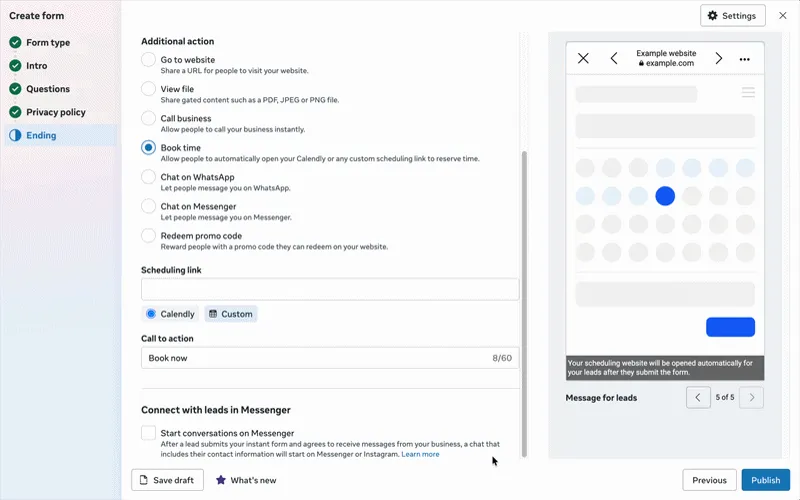
Meta lead ads appointment booking lets someone who submits an Instant Form pick a time straight away: a Calendly or HighLevel calendar loads on the thank you screen with their details prefilled. It works on the Facebook mobile app, bookings are not reported in Ads Manager, and speed of follow-up still decides whether a lead becomes an appointment.
TL;DR
Since Meta announced it on 23 June 2026, a lead ad Instant Form can end with a real calendar: after someone submits, a Calendly or HighLevel booking widget loads on the thank you screen with their name, email and phone already filled in.
It is set up in the form's Ending section with the Book time action and a direct scheduling link. No code. It only embeds on the Facebook mobile app; Instagram and other placements open the booking page in an in-app browser instead.
Bookings are not reported in Ads Manager. Count them in your calendar tool, join them to the lead in your CRM, and send the stages back to Meta, because since April 2026 the qualified leads goal needs a Conversions API integration for new campaigns.
Booking inside the ad removes one step. It does not replace a fast call or text for everyone who skips the calendar. If you want this built and measured end to end, that is the work in my Meta Ads consulting.
You run lead ads for a clinic, a builder or a consultancy. The form fills arrive at 9pm. Someone calls them back at 11am the next day, and half of them say they do not remember filling in a form. That gap between a form and a booked appointment is where much of the money in lead ads quietly goes.
Meta's embedded appointment booking is built for that gap. This guide explains what it does as of November 2026, where it is limited, and how to set it up so you can judge it on appointments, not form fills. If you would rather have someone build it with you, my Meta Ads consulting covers lead funnels from the form to the booked slot.
What is Meta lead ads appointment booking?
Short answer: It is a feature of lead ads with Instant Forms (Meta's in-app forms) that loads a scheduling partner's calendar on the form's thank you screen. Meta calls it embedded appointment booking. The lead picks a slot without leaving Facebook, and their contact details carry over from the form.
An Instant Form is the form that opens inside Facebook or Instagram when someone taps a lead ad. Before this feature, the best you could do was a appointment request question, where people suggest a date and time and you still have to confirm it, or a button that sent them to your booking page.
With embedded booking, the announcement says the calendar widget "loads right on the Thank You page with no redirects and no extra steps". Your calendar provider then handles confirmations and emails both you and the lead.
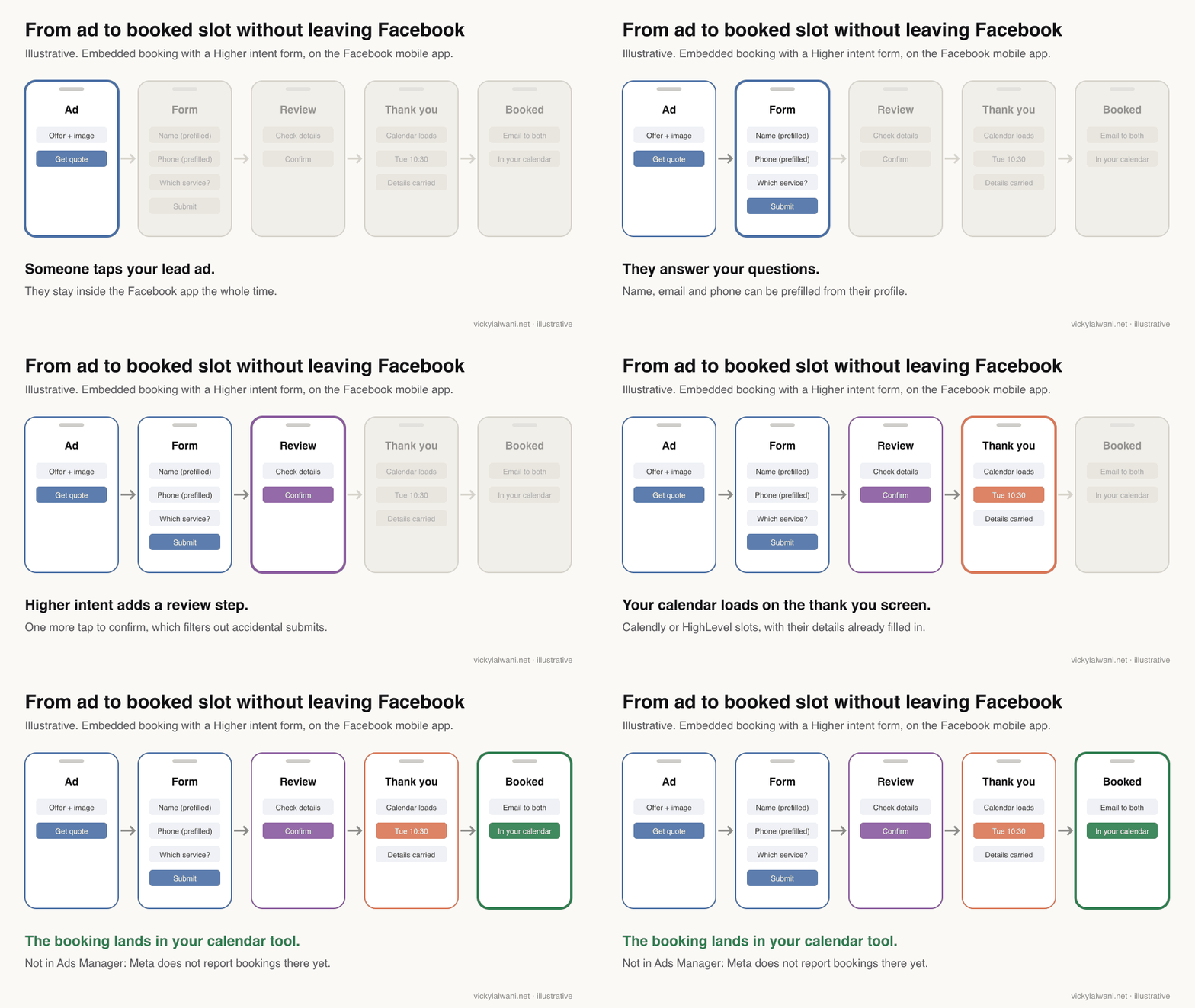
Which booking options do Meta lead ads have in 2026?
Short answer: Three. An appointment request question collects a preferred date and time; the Book time action opens your booking page in an in-app browser; and embedded booking shows a supported partner's live calendar on the thank you screen. Only the last one books a confirmed slot inside the form.
| Option | What the lead does | Where it works | Confirmed slot? |
|---|---|---|---|
| Appointment request question | Suggests a date and time | Facebook app on mobile | No, you confirm later |
| Book time button | Opens your booking page | All placements | Yes, on your page |
| Embedded booking | Picks a slot in the form | Facebook mobile app | Yes, in the form |
The appointment request question has a fixed window: Meta's help page says availability defaults to Monday to Sunday, 07:00 to 22:00, and cannot be customised. That is fine for a callback preference and poor for a real diary.
Embedded booking is the only option that turns the form into a booked appointment in one sitting. The other two still leave someone on your side to close the loop.
How do you set up embedded booking in an Instant Form?
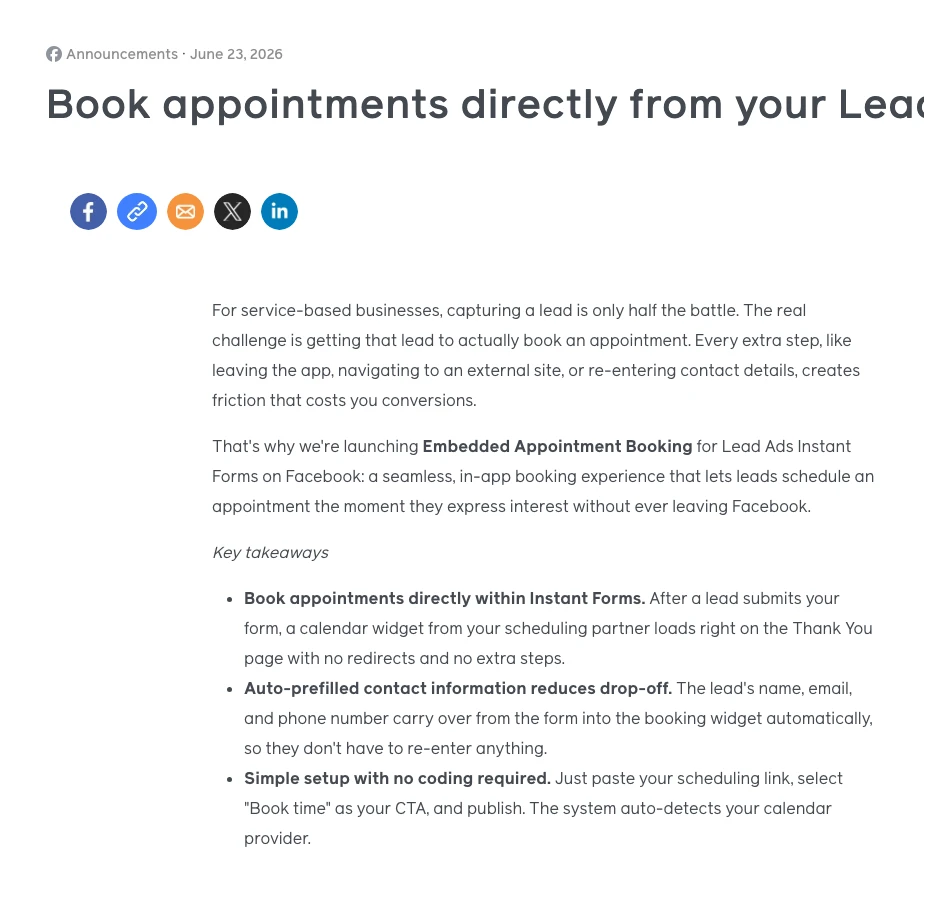
Short answer: In Ads Manager, create a campaign with the Leads objective, choose Instant forms as the conversion location, build the form, then in the Ending section pick Book time under Additional actions and paste a direct scheduling link. Meta detects the provider and shows a live preview.
- Ads Manager, + Create, objective Leads.
- At the ad set level, set the conversion location to Instant forms.
- At the ad level, create the Instant Form: form type, intro, questions, privacy policy.
- In Ending, under Additional actions, select Book time.
- Paste the direct booking link from Calendly or HighLevel under Scheduling link and check the preview.
- Publish, then submit a test lead on a phone in the Facebook app and book a test slot.
Two details catch people out. Meta says custom URLs and self-embedded calendar pages "will not load within the instant form", so use the partner's own link. And HighLevel's help article says to use the LeadConnector domain link, because a branded-domain link may not show the embedded preview and may open a browser in live ads.
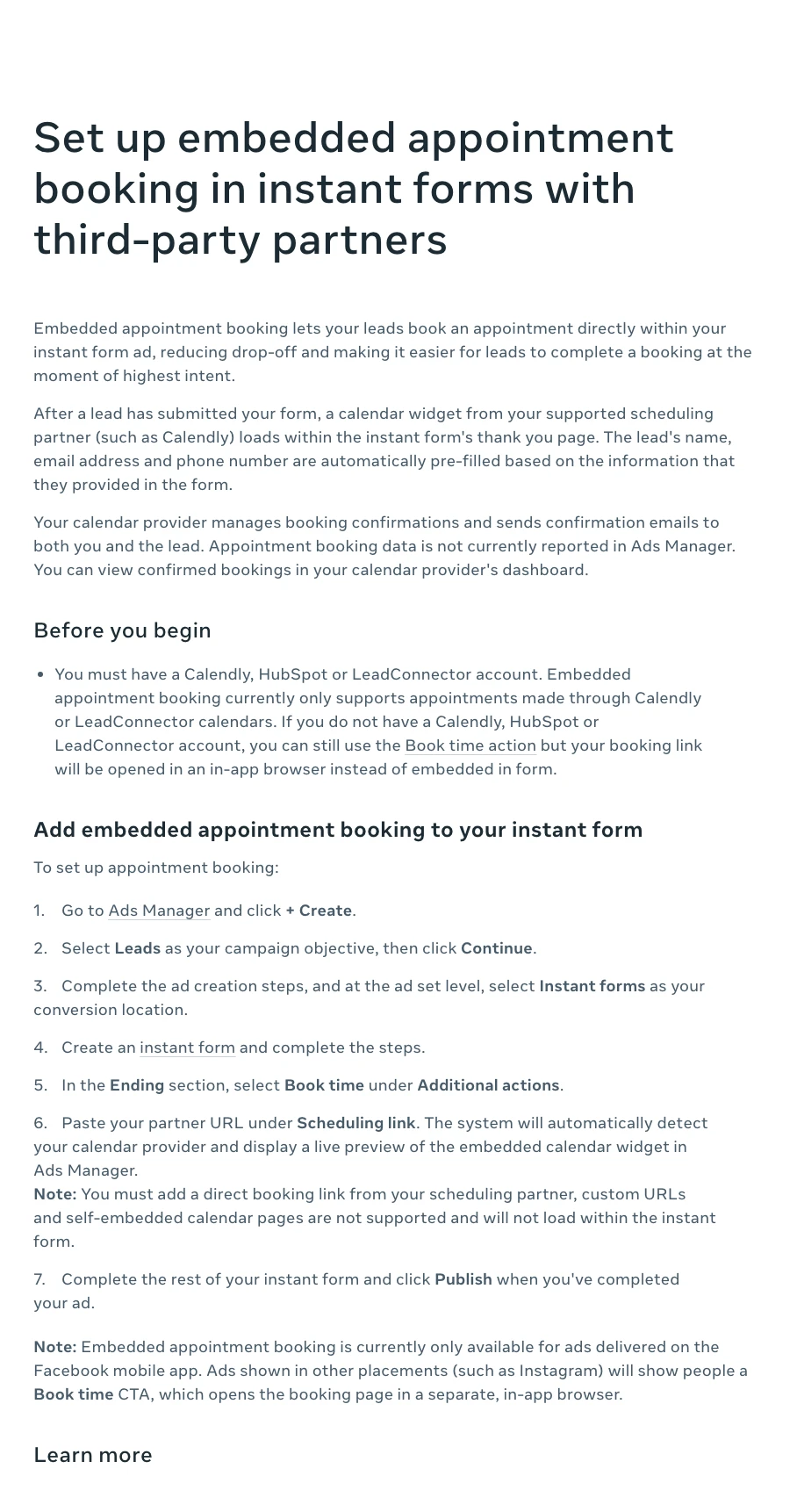
You can change the button label. The announcement says the call to action can be customised up to 40 characters, for example "Book a consultation", and the thank you screen headline takes up to 60 characters.
Which calendars and placements does it support?
Short answer: At launch Meta named Calendly and HighLevel, with HubSpot planned for early August 2026. Meta's own help page now lists Calendly, HubSpot and LeadConnector accounts but says embedding currently supports Calendly and LeadConnector calendars, so test HubSpot in your account before you rely on it.
| Question | What Meta says | Source |
|---|---|---|
| Calendars | Calendly, LeadConnector (HighLevel); HubSpot listed | Help page |
| Placement | Facebook mobile app only | Help page |
| Book time button, in-app browser | Announcement | |
| Prefill | Name, email, phone | Announcement |
| Reporting | Not in Ads Manager | Help page |
| Rollout | Global availability expected October 2026 | Announcement |
Calendly lists the integration on its Meta Ads integration page as available on its free and paid plans. Meta's help page still carries the line "This product or feature may not be available to you yet" on the Book time action, so if you do not see it, it may not have reached your account.
The placement limit matters more than it looks. If your ad set runs on Facebook and Instagram, only the Facebook app share of your leads gets the embedded calendar. Everyone else gets a button and a web page, which is the old friction.
Which Instant Form type should you pair with booking?
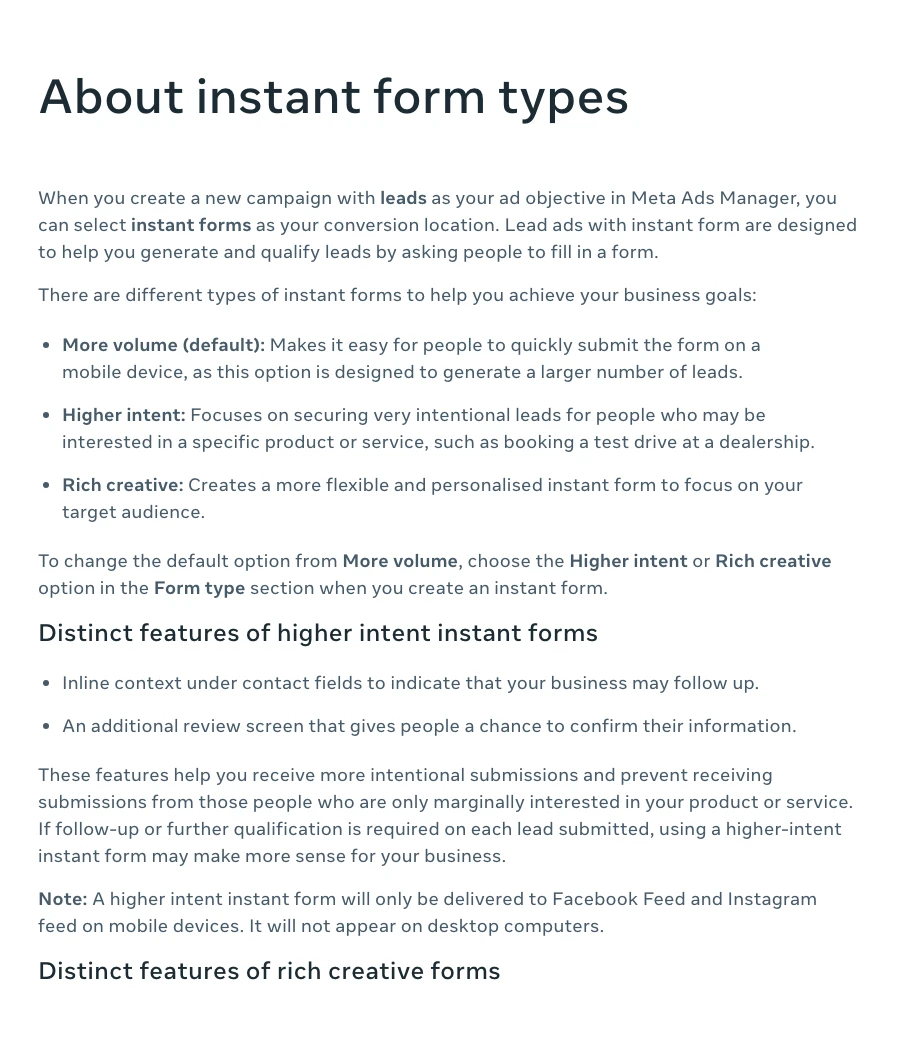
Short answer: For appointments, start with Higher intent. Meta describes it as the form for "very intentional leads" and it adds a review screen before submit. The default, More volume, is built for quantity and makes accidental submissions easier. Higher intent only delivers to Facebook and Instagram feeds on mobile, per Meta.
| Form type | What it adds | Use it when |
|---|---|---|
| More volume (default) | Fastest submit on mobile | You can call every lead fast |
| Higher intent | Review screen, follow-up notice | Appointments cost you time |
| Rich creative | Images, colours, more text | The offer needs explaining |
Questions do more filtering than form type. Meta's guide to form questions suggests custom questions by goal, and conditional answers let the options change with the previous answer. Add one or two multiple choice questions that sort good fits from poor fits, and consider one short open-text question: practitioners on Reddit report that autofilled accidental taps rarely write a real sentence.
Meta also offers phone number verification by one-time password and work email validation. Both add friction on purpose. One r/FacebookAds thread credits SMS verification and conditional logic for its contact rate, while a reply in the same thread warns that paid OTP services can now get past SMS checks.
Here is a prompt I would give an AI assistant to draft the questions. Edit the output yourself; it does not know who your good customers are.
You are helping me write the questions for a Meta lead ad Instant Form that ends with embedded appointment booking.

Business: [what you sell, in one line]
Who books: [the customer who is worth an appointment]
Who should not book: [people you cannot help, wrong area, wrong budget]
Appointment: [length, in person or video, what happens in it]

Write:
1. Two multiple choice qualifying questions that sort good fits from poor fits without sounding like a test.
2. One short open-text question that a real prospect can answer in one sentence and an accidental tap will not.
3. The intro text (under 60 words) that says what happens after they submit, including that they can pick a time straight away.
4. A thank you screen headline (up to 60 characters) and a "Book time" button label (up to 40 characters).
Use plain words. Do not promise results. Flag any question that could touch a sensitive category such as health, finance or personal circumstances.
Why does speed to lead still matter if people book in the form?
Short answer: Because not everyone books. Some close the calendar, some are on Instagram where it does not embed, and some want to talk first. Meta's own best practice page says minimising the time to follow up "can improve your lead quality", and recommends running lead ads when you can respond quickly.
On the lead ad accounts I work on, the first question I ask is who calls a new lead, and how fast. I have seen a lead campaign paused until a fast call was in place, because leads that were only emailed later simply did not reply. Scaling spend before that is fixed buys more leads that go cold.
Reddit says the same in plainer words. In a November 2026 thread, a marketer running Higher intent forms with SMS verification for a dental practice reported 69 submissions and about 5 genuine leads, with many people saying they did not remember submitting. One reply asked how fast the practice was calling: within 5 or 10 minutes, while the person is still on their phone, changes a lot.
Keep both paths open. Use lead nurturing in Ads Manager to start a follow-up chat on Messenger, Instagram or WhatsApp, push every lead to your CRM the moment it arrives, and have a person or an automated text reach the people who did not book. My article on after hours lead response covers the evening and weekend gap.
How do you measure booked appointments from lead ads?
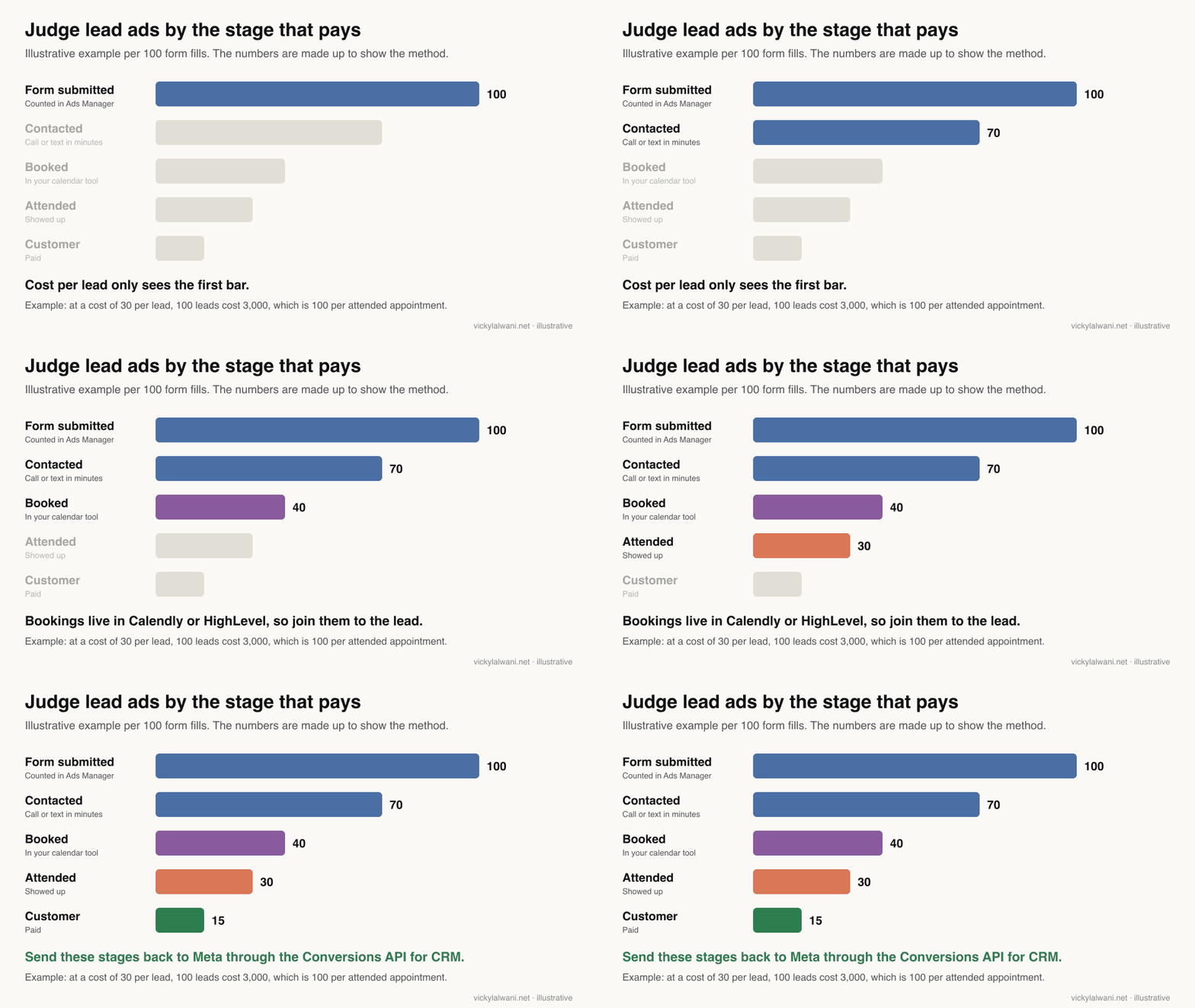
Short answer: Count bookings in Calendly or HighLevel, attended appointments in your CRM, and join both to the Meta lead ID. Then report cost per booked and cost per attended appointment. Ads Manager only counts form submissions, and Meta says embedded bookings are not reported there.
| Metric | Where it lives | Why it matters |
|---|---|---|
| Leads | Ads Manager | Volume only |
| Contact rate | CRM or dialler | Shows follow-up speed |
| Bookings | Calendly, HighLevel | Not in Ads Manager |
| Attended | CRM or practice system | The real appointment |
| Cost per attended | Your report | The number to judge on |
Instant Form leads never load your website, so analytics tools like GA4 will not see them. When a business tells me analytics shows no leads while the CRM shows dozens, the first thing I check is where the leads were captured. My guide to a conversion tracking event map shows how to plan those events before launch.
Download or sync leads quickly. Meta keeps leads available for download for 90 days from submission, so a CRM connection is safer than a spreadsheet someone exports when they remember.
Should you optimise for qualified leads instead of all leads?
Short answer: Usually yes, once your CRM can send lead stages back to Meta. The qualified leads goal shows ads to people more likely to convert after submitting. Since April 2026 it is not available for new campaigns without a Conversions API for CRM integration, and existing campaigns were affected from August 2026.
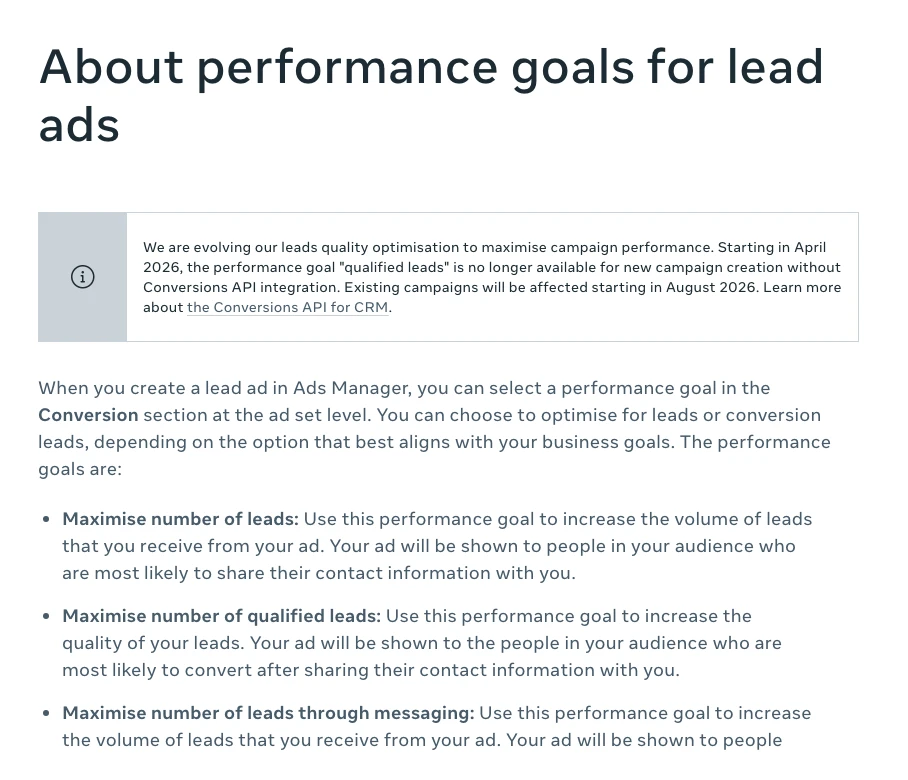
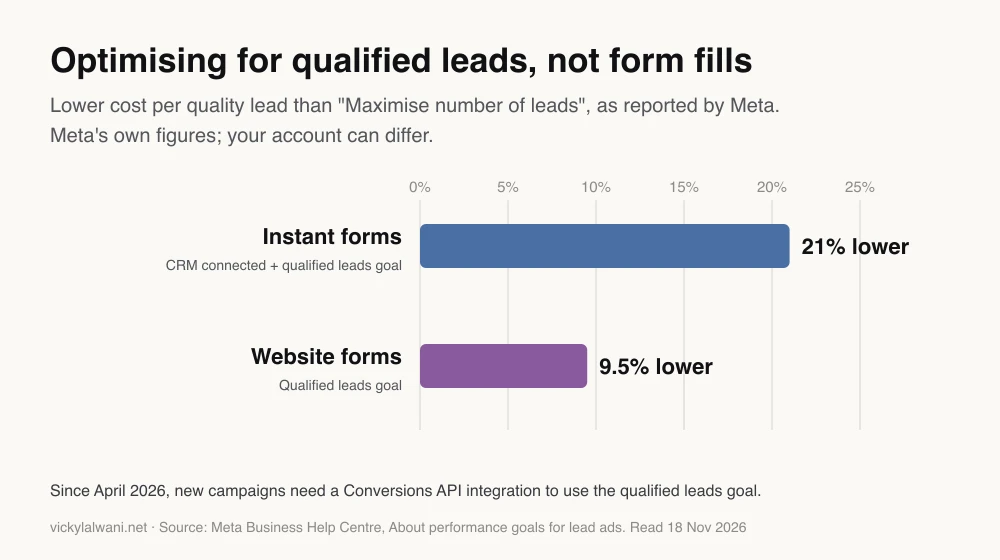
Meta's performance goals page reports that lead ads using the Conversions API for CRM with the qualified leads goal on Instant Forms saw 21% lower cost per quality lead than ads using maximise number of leads. For website forms the figure was 9.5%. These are Meta's own figures with no published method, so treat them as a reason to test, not a forecast.
The Conversions API for CRM is Meta's way for your CRM to tell it what happened to each lead, such as contacted, booked or attended. You connect it in Events Manager directly, through a partner such as HubSpot, LeadConnector or Salesforce, or with a developer following the integration guide. Meta's setup page asks you to send an event for each lead status update during the learning phase.
A booking is a good stage to send, because it happens fast and close to the money. My article on Meta Ads attribution changes explains how Meta counts these conversions now.
What do people say about lead ads and booking on X and Reddit?
Short answer: Practitioners agree on three points: cheap leads mean little without fast follow-up, Higher intent forms and qualifying questions cut accidental submissions, and sending CRM stages back to Meta improves who the ads find. Some argue landing pages still beat Instant Forms for considered purchases.
| Source | What they say | Date | Type |
|---|---|---|---|
| r/FacebookAds | 69 forms, about 5 genuine leads | 12 Nov 2026 | First-hand |
| r/FacebookAds | CPL fell, lead quality fell with it | 4 Nov 2026 | First-hand |
| r/FacebookAds | Judge cost per booked meeting | 30 Oct 2026 | Opinion |
| r/FacebookAds | Form to call fails if nobody answers | 21 Oct 2026 | Opinion |
| r/FacebookAds | Call within 60 seconds, 91% contact | 4 Aug 2026 | First-hand |
| A small business marketer on X | 200 form fills, none legitimate | 28 Jun 2026 | First-hand |
| A funnel agency account on X | Send only qualified leads back | 4 Feb 2026 | Opinion |
| An automation builder on X | Missed follow-up is the real leak | 9 Jul 2026 | Opinion |
| HighLevel on X | Confirm by link an hour before | 26 May 2026 | Vendor |
| A paid ads specialist on X | Pick form or call funnel by maths | 22 Aug 2026 | Opinion |
The most useful threads are the arguments. In one, a B2C advertiser saw cost per lead drop from about 4 to 5 euros to about 1.50 while quality fell; replies pointed to placements such as Audience Network, the More volume form type, and the need to judge cost per qualified lead instead. In another, a SaaS founder was warned that a form-to-call flow "falls apart fast" without someone to pick up the phone.
Read these as reports from individual accounts, not as benchmarks. They do agree with Meta's own advice on speed and qualification.
Videos worth watching
Short answer: No official Meta video on embedded booking was available when this was written, so the picks below are practitioner walkthroughs. Check each one against Meta's help page, because the interface changed during the rollout.
A short walkthrough of the Book time option from an online marketing tutorial channel, published 30 June 2026, a week after Meta's announcement.
A digital marketing channel's explainer from 10 August 2026. The description promotes the channel's own paid course.
A funnel and automation consultant's channel on why Instant Form leads do not answer the phone, 14 May 2026. The description offers paid services.
| Video | Channel | Date | What it covers |
|---|---|---|---|
| Book appointments from Instant Forms | Marketing tutorial channel | 30 Jun 2026 | Book time setup |
| Meta lead ads changed again | Digital marketing channel | 10 Aug 2026 | Booking in the form |
| Meta Instant Forms: fix your leads | Funnel consultant | 14 May 2026 | Lead quality basics |
| Train Facebook to bring qualified leads | Ads coach | 19 May 2026 | Sending quality back |
| Stop using Meta Instant Forms | Agency owner | 16 Oct 2025 | The case against forms |
| How speed to lead works in 2026 | Kixie (vendor) | 26 Jan 2026 | Fast call and text |
What should you check before switching booking on?
Short answer: Check that your calendar shows real availability, that the form filters poor fits, that reminders go out, that someone follows up everyone who does not book, and that bookings and attendance reach your CRM. Then test it against your current setup on cost per attended appointment.
| Setting | Default | What to choose |
|---|---|---|
| Form type | More volume | Higher intent |
| Ending action | Website | Book time + direct link |
| Placements | Advantage+ | Check where leads come from |
| Performance goal | Leads | Qualified leads, with CRM |
| Lead delivery | Download | CRM sync |
| Reminders | Provider emails | Add text reminders |
- Calendar capacity. The widget shows live availability. Block out time you cannot serve, or you will book appointments you cannot keep.
- Qualifying questions. Easier booking brings more bookings, including poor fits. Keep the questions that protect your diary.
- Reminders. The calendar provider sends confirmations; add reminders by text or email before the appointment.
- Follow-up for non-bookers. A call or text within minutes for everyone who submits but does not book.
- Tracking. Bookings and attendance into the CRM, joined to the lead, and stages sent back to Meta.
- Privacy. A privacy policy is required on Instant Forms; check your wording and data handling for each country you advertise in.
Run a fair test: same audience, budget and creative, one ad set with embedded booking and one with your current ending. Give it enough time to reach booked and attended appointments, not just leads. My Meta Ads settings checklist covers the account settings to check first.
Where this advice is weak
Short answer: The feature is new, its partner list and placements were still changing in late 2026, and Meta has published no data on how embedded booking changes booking or show rates. Treat it as worth testing, not as proven.
- Meta's help page lists HubSpot accounts but says embedding currently supports Calendly and LeadConnector calendars. I could not confirm HubSpot embedding from an official source.
- The announcement claims more bookings and fewer no-shows. Meta gives no numbers for that, so I have not repeated it as fact.
- The 21% and 9.5% cost per quality lead figures are Meta's, without a published method or date range.
- Reddit and X reports are single accounts. Lead quality varies a lot by industry, offer and country.
- Health, finance and other sensitive categories have extra rules on what you can ask in a form. Check Meta's policies and get professional advice for your market.
Want a second pair of eyes on your lead ads?
Short answer: If your lead ads fill the form but not the diary, I can review the form, the follow-up and the tracking together and set up booking and CRM feedback properly. See Meta Ads consulting or pricing.
Most lead ad problems sit after the click: a slow call, a form that lets anyone through, or bookings nobody counts. Fixing those usually matters more than a new creative. Get in touch about your Meta lead ads.
Sources
| Source | What it supports | Date | Link |
|---|---|---|---|
| Meta for Business | Launch, partners, rollout, CTA length | 23 Jun 2026 | Announcement |
| Meta Help Centre | Setup, placements, reporting | Read 18 Nov 2026 | Embedded booking |
| Meta Help Centre | Appointment request question | Read 18 Nov 2026 | Appointment request |
| Meta Help Centre | Form types | Read 18 Nov 2026 | Instant form types |
| Meta Help Centre | Qualified leads goal, 21% and 9.5% | Read 18 Nov 2026 | Performance goals |
| Meta Help Centre | CRM partners, setup | Read 18 Nov 2026 | Conversions API for CRM |
| Meta Help Centre | Follow-up speed | Read 18 Nov 2026 | Respond to leads |
| Meta Help Centre | 90-day lead download window | Read 18 Nov 2026 | Expired leads |
| Meta Help Centre | Verification, form sections | Read 18 Nov 2026 | About Instant Forms |
| HighLevel Help | LeadConnector link, no Ads Manager count | 24 Jun 2026 | HighLevel article |
| Calendly | Plans that include the integration | Read 18 Nov 2026 | Calendly page |
| X and Reddit | Practitioner views | Feb to Nov 2026 | Linked in the table above |
This article expands on my post on LinkedIn ↗.
FAQ
How does appointment booking work in Meta lead ads?
After someone submits a lead ad Instant Form, a Calendly or HighLevel calendar loads on the thank you screen with their name, email and phone prefilled. They pick a slot and confirm without leaving the Facebook app, and the calendar provider sends the confirmation emails.
How do I add a booking calendar to a Facebook Instant Form?
In Ads Manager, build an Instant Form for a Leads campaign, go to the Ending section, choose Book time under Additional actions and paste a direct scheduling link from your calendar provider. Meta detects the provider and shows a preview before you publish.
Which calendars work with Meta embedded appointment booking?
Meta launched it with Calendly and HighLevel (LeadConnector) in June 2026 and planned HubSpot for August. Meta's help page still says embedding currently supports Calendly and LeadConnector calendars, so test any other provider in your own account.
Does Meta embedded booking work on Instagram?
Not as an embedded calendar. It currently embeds only for ads on the Facebook mobile app; on Instagram and other placements people see a Book time button that opens your booking page in an in-app browser.
Are bookings from Meta lead ads shown in Ads Manager?
No. Meta says appointment booking data is not currently reported in Ads Manager. You see confirmed bookings in Calendly or HighLevel and should join them to the lead in your CRM.
Which Instant Form type is best for appointments?
Higher intent is usually the better start for appointments, because it adds a review screen before submit and tells people the business may follow up. It only delivers to Facebook and Instagram feeds on mobile.
Do I still need to call leads if they can book inside the ad?
Yes. Many leads will not book in the form, and Meta itself says faster follow-up can improve lead quality. Call or text everyone who submits but does not book, ideally within minutes.
What is the qualified leads goal in Meta lead ads?
It is a performance goal that shows your ads to people more likely to convert after submitting, using lead stages your CRM sends back. Since April 2026, new campaigns need a Conversions API integration to use it.
How long can I download leads from Meta?
Meta keeps leads available to download for 90 days from submission. After that they cannot be downloaded, so connect a CRM or sync tool instead of relying on manual exports.